


- 1 Use React-i18next Instead of Outdated Options: i18n-js has been deprecated and thus the currently recommended stack in 2026 is i18next + react-i18next combination. It allows for pluralisation of 200+ locales and gives access to useTranslation hook for language change re-renders.
- 2 Create Translations File Per Feature and Namespace: Create one JSON translation file per language and structure it semantically according to feature.actions (for example, profile.editButton), allowing large projects to maintain order and avoid misunderstandings between translators.
- 3 Configure i18next for Device Language Detection and Persistence: In order to create a professional setup, you will need i18next to identify the language of the device, store user selection manually through AsyncStorage and fallback on key if there's no translation. Never forget to configure 'compatibilityJSON': 'v3', otherwise plurals won't work on Androids.
- 4 Create a Persistent Language Switcher: A language switcher needs to call changeLanguage() during the execution and then save its result to the AsyncStorage. Otherwise your application will always use language set on the device, reverting user choice.
- 5 Use I18nManager.forceRTL() for Arabic/Hebrew: Call I18nManager.forceRTL() during language change for right-to-left languages and reload the whole app immediately afterwards as React-Native does layout direction detection only once on initial load.
In the ever-shifting landscape of React build, handling asynchronous data can often feel like too much for a project.
From data fetching to caching and state management, it’s easy to find yourself confused in a web of complexity. But fear not, my fellow coders, React Query is here for you.
You’ll see this library referred to as both “React Query” and “TanStack Query” — that’s not two different tools, just two names for the same thing at different points in its history. The project was renamed TanStack Query in 2022 when the maintainers expanded it beyond React to support Solid, Svelte, and Vue as well, with @tanstack/react-query being the specific package for React projects.
Most coders still say “React Query” out of habit, and that’s the term we’ll use throughout this guide, but if you’re searching guide or GitHub issues, TanStack Query is the name you’ll find things under today.
So, what exactly is React Query?
React Query is a strong library, offering a breath of fresh air for data fetching, caching, and state management within React apps. Serving as a central hub, it automates these processes, enabling you to craft delightful user experiences.
What are the reasons that you to take the role as React Query?
1. Streamlined Data Fetching:
The tedious and error-prone manual data scrape is now out to let the automatic functions start to work for you with ease.
With this library, you are provided a boatload of higher order hooks which are both powerful and convenient, making things very easy for you.
2. Intelligent Caching:
Fitz farewell any calls that API causes on your community visitors or amount. Another great feature offered by React Query is its caching feature, which means your utility consumes lesser data, hence, making your app run faster.
3. Simplified State Management:
React Query plays the game of assisting you as the records manager and shielding you from the records country control concerns, allowing you to focus on task of distributing the records to the showing agent.
4. Error Handling:
Decide included, React Query is like a true friend that helps to deal with issues of your web apps. If something goes wrong, it solves the problem with ease that makes you present your own messages for your customers.
It gives provision to help you go over again a case that felt problematic if it happens. Therefore, you can make a brand on building good quality by cutting down things that make you technical and not able to engage your skill.
5. Optimistic Updates:
When a person reacts to the messages in a positive way cheer up him with the same message. Our team can help you with any grammar or sentence structures problem that you might be getting yourself into as well.
It adjusts data values in such a way that they fit your working sheets. The files hence on are synchronized alone with your co-workers’ other devices.
Explore Data Navigation with React Query
Here’s a quick roadmap to kickstart your adventure with React Query :This is a brief description about what to expect in the React Query`s exploratory session.
In your school astronomy subject, the course covers practical exercises, including scientific tools, which then makes it very full.
1. Installation:
Begin your odyssey by installing React Query via npm or yarn :To begin, it’s a need to install React-Query either via npm or yarn package manager.

2. Basic Usage:
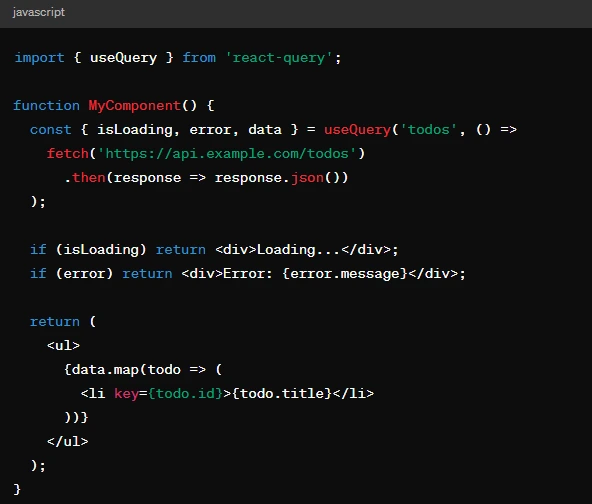
Dive into the fray by importing the useQuery hook from React Query and integrating it into your functional components to fetch data.
Handling Mutations: Writing Data, Not Just Reading It
All the topics that have been discussed so far are related to reading data, but most often, the app needs to write it somewhere as well, like, for instance, when sending a form, editing a record, or deleting it.
React Query has a special hook for this called useMutation .
Like a query, which is executed when the component that owns it is rendered, a mutation is performed manually by calling a special function that is returned by the hook.
This feature is often used in combination with events such as clicking on a button or sending a form. Thus, the useMutation hook is a fully independent entity that has nothing to do with queries.
In contrast to the query, which is alone executed when the component that owns it is rendered, the second must be called explicitly. Any arguments can be passed to a mutation since it is just a function, while the query always receives the key as an argument. However, the main benefit of the useMutation hook is that it allows you to declare functions that will be executed at various stages of the mutation.
For instance, right before sending the request, after it has been successfully completed, or in case of an error. One of the most common use cases of this hook is sending a request to the server and updating the client’s copy of the data using the queryClient.invalidateQueries method. As a result, you will not have to change each piece of data that could be related to the mutation on the client side since React Query will alone trigger a query refresh if it is specified in the onSuccess array.
Why Query Invalidation Matters More Than It Seems
Caching is what makes React Query fast, but caching is what introduces a problem (that every data fetching library will eventually have to solve) of knowing when to consider the cached data as expired. This is what invalidation handles. Invalidating React Query data happens by calling the queryClient.invalidateQueries with the specific key. When done so, it does not remove the data immediately, but marks it as stale and will refetch it on the next render of the query with said key. It is more important than it seems on a practical level.
If the user updates their profile name, and the name is shown on another part of the app (a header component), without the invalidation, the header will continue to display the old value until any event causing a refetch occurs. On the other hand, an invalidated query key allows the components to update themselves without having to share state or having any knowledge of each other. It only needs to be invalidated once, on a good mutation, and both will update. Getting the invalidation right mostly revolves around getting the keys right, as it is primarily used to target individual entries.
Common Mistakes When Getting Started with React Query
A few mistakes come up often enough with new React Query implementations that they’re worth calling out directly. The first is treating every piece of state in an app as something React Query should manage — it’s built specifically for server state, meaning data that lives on a backend and can go stale, not for local UI state like whether a modal is open, which is better handled with regular useState or a dedicated state library. The second is not setting a sensible staleTime, which controls how long fetched data is considered fresh before React Query will refetch it in the background.
Leaving this at the default of zero means every component mount can trigger a fresh network request, even for data that barely changes, which adds unnecessary load without much benefit. The third is forgetting to structure query keys consistently — a query key isn’t just an identifier, it’s what React Query uses to know when to refetch, cache, or invalidate specific data, so inconsistent or overly generic keys across a codebase tend to cause subtle caching bugs that are annoying to track down later.
Perks and Considerations:

Pros:
– Reduced Boilerplate: Bye bye for good to all that repeated data accessing routine, which also secures simple and clear components in the long run.
– Enhanced Speed: To avoid long periods of waiting time and unnecessary API requests, automatic caching persistent data ensures to shorten the retrieval period and optimizes the app accordingly.
– Simplified State Management: “Leave React Query the steering wheel of data state management, then you are able to escape from the noose around the complicated state management fixes”.
– Enhanced Coder Skill: Enjoy a variety of features such as upbeat updates, error handling, and refetching, which are basically easy to use and you will find them helpful when you are in the work.
Cons:
– Learning Curve: Although React Query assists with fetching data, it takes out time to grasp its principles and hooks as these concepts may call for some level of grasp.
– Potential Dependency: Here, an external library is added to your project, which, aside from adding a new level of dependency to your project, also calls for its upkeep and a reconsideration of modifications.
– Abstraction: React Query simplifies data fetching to the extent of hiding some of the minor implementations that might be perceived as a drawback by the detail-oriented coders.
Conclusion:
React Query has garnered its rightful place as a faithful partner to anyone into React who desires to develop a precise data fetching, caching, and state management tool.
It may have its extremely individual downfalls, but the layers of its perks make it a must-have tool that perfect React apps are made of. Farewell the unimaginable data fetching issues and let React Query open a myriad of opportunities for you!.
“Thank React Query for making the future of quality apps without delay and cost-efficiency simple for you by supplying you with the necessary data management tools.”
To learn more about React Query and its tools, check out algolia’s official website .
For more insightful articles and info on custom code build services, please reach out to us.