Workflow automation services that eliminate manual processes for good
Innostax builds AI-powered workflow automation that replaces the manual, repetitive processes your team shouldn't be doing — document processing, data extraction, decision routing, scheduled outreach — with reliable, auditable systems that scale without headcount. A dedicated Tech Lead owns what gets built.
The manual process problem that compounds as you scale
Manual Processes Cost Time, Consistency, Accuracy, and Scale
Every organisation has them — the workflows that run on human effort because nobody has had time to automate them. The data that gets copied from one system to another. The documents that get reviewed by the same checklist every time. The reports that get assembled from five different sources every Monday morning. The customer communications that get sent on a schedule that requires someone to remember to send them.
When the team is small, manual processes are manageable. When the organisation grows, they become a constraint. The same process that took two people two hours at Series A takes six people six hours at Series B — because manual processes scale with headcount, not with product growth.
And the errors that were acceptable at low volume become expensive at high volume: the missed step, the inconsistent classification, the data entry mistake that propagates downstream.
The second problem is that manual processes are invisible to management until they fail. Nobody knows how long a process actually takes, how consistently it’s executed, or where the errors are occurring — because there’s no system recording any of it.
Innostax builds workflow automation that replaces manual processes with systems that are faster, more consistent, auditable, and scalable — without the fragility of automation built quickly and maintained by nobody.
What we automate with AI workflow systems
Document processing and data extraction
Automated ingestion, classification, and structured data extraction from documents — contracts, invoices, appraisals, applications, reports. AI models extract the specific fields your workflow requires, validate the extraction against defined rules, and route the structured output to the next step in the process. The manual review that currently takes hours per document reduced to seconds per document, with the same or better accuracy.
Compliance and checklist automation
Rule-governed workflows where a human currently works through the same checklist against the same document type every time — compliance reviews, quality checks, approval workflows. AI pipelines that apply your rules to your documents, fill the checklist, provide evidence for every answer, and flag the items that require human judgment rather than passing everything through unchecked.
Data pipeline automation
Scheduled and event-driven data pipelines that move, transform, and load data between your systems without manual intervention — ETL pipelines, reporting automation, data synchronisation across platforms. Built with the error handling, retry logic, and monitoring that makes a data pipeline reliable in production rather than requiring constant intervention when something goes wrong.
Scheduled outreach and communication automation
AI-powered communication workflows — patient reminders, customer follow-ups, scheduled notifications — that run automatically on defined triggers and schedules, with natural language generation that personalises each communication and escalation logic that routes exceptions to humans. For teams where manual outreach is a significant operational overhead.
Integration and system automation
Automated workflows that connect your existing systems — CRM, ERP, databases, APIs — without requiring manual data transfer between them. Event-driven automation that triggers the right action in the right system when the right condition is met. Microsoft Power Automate, custom API integrations, and webhook-based automation that works with your existing infrastructure.
Decision routing and classification
Automated classification of incoming data — support tickets, applications, documents, leads — and routing to the appropriate team, queue, or next step based on AI-powered classification. Consistent routing decisions at scale, without the inconsistency that comes from humans applying the same rules differently on different days.
Reliable automation is designed for failure, not just for the happy path.
Process audit before automation design.
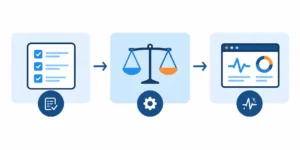
Before we automate anything, we understand the process in full — every step, every decision point, every exception, every system involved. The manual process that looks simple from the outside almost always has edge cases that the people running it handle automatically and that an automation system needs to handle explicitly. Missing those edge cases is how automation that works in testing fails in production.
Exception handling designed in, not bolted on.
Every automated workflow has exceptions — inputs that don’t match the expected format, decisions that require human judgment, downstream systems that return errors. We design exception handling into the automation from the start: what happens when the document is illegible, when the classification confidence is below the threshold, when the downstream API is unavailable. Automation that fails silently is worse than no automation.
Auditability as a requirement.
Every automated action is logged — what was processed, what decision was made, what evidence supported it, what was routed where. For regulated industries, this audit trail is a compliance requirement. For all industries, it’s what makes the automation trustworthy and debuggable when something behaves unexpectedly.
Human-in-the-loop for the decisions that require it.
Full automation isn’t always the right answer. We design workflows with clear escalation points — the conditions under which the automation surfaces a decision to a human rather than making it autonomously. The goal is to automate the parts of the workflow that don’t require human judgment and surface the parts that do, with the context the human needs to decide quickly.
Monitoring and alerting from day one.
Automated workflows need to be monitored — processing volumes, error rates, latency, and the anomalies that indicate something has changed in the upstream data or downstream systems. We configure monitoring before the automation goes live, not after the first production failure.
Automation that breaks in production is worse than the manual process it replaced. You'll know within two weeks whether ours holds up.
2-week free trial on a real process.
Your workflow, your data, your actual edge cases. You’ll see within two weeks whether the automation handles real-world inputs reliably or whether the exceptions are already breaking it. If the latter, walk away. No invoice.
1-day termination notice.
If the automation isn’t delivering the reliability and consistency it should, you’re out tomorrow. No lock-in, no notice periods.
Engineers who own what they build.
Great Place to Work certified — the engineer who maps your process and builds your automation in month one is still accountable for it in month six. Workflow automation requires continuity. Edge cases surface over time. An engineer who knows the process’s history handles them. One who doesn’t rediscovers them.
Workflow Automation That Delivers Measurable Outcomes
Project management automation — 85–90% manual work eliminated
A full project management automation platform built on Azure with Microsoft Power Automate — replacing manual workflows that consumed significant team time with automated processes that run without intervention. The result: 85–90% reduction in manual work, a 100% successful data migration with zero data loss, and a platform that continues to run cleanly. Automation that moved a business metric, not just a process metric.
Patient communication automation at scale
An automated patient outreach system that handles medication reminders, test scheduling, and care follow-ups across a healthcare provider’s patient base — running on defined schedules and triggers, generating call summaries for care owners, and escalating to humans when additional assistance is needed. Workflow automation in a HIPAA-compliant environment where the reliability and auditability requirements are non-negotiable.
Compliance checklist automation for banking
An automated compliance pipeline that processes property appraisal documents, applies bank-specific compliance rules, fills checklists, and provides evidence for every answer — replacing a manual review process that was time-consuming and inconsistent. Multi-step AI validation catches low-confidence outputs before they reach reviewers. Every decision is traceable. Every step is logged. Automation in a regulated environment where the audit trail is as important as the output.
Who workflow automation is for
Operations leaders
whose teams are spending significant time on manual processes that should be automated — data entry, document review, report assembly, scheduled communications. The workflows where the cost of manual execution is a line item that grows with the business.
CTOs and engineering leads
who need automation built to a production standard — with exception handling, monitoring, and the audit trail that makes it trustworthy rather than fragile. Not automation scripts that work until the input format changes.
FinTech, HealthTech, and regulated industries
where automation needs to be auditable and compliant — with the logging, encryption, and human escalation design that regulated workflows require.
Growth-stage companies
whose manual processes were manageable at their previous scale and are becoming a constraint at their current one. Automation is the path from processes that scale with headcount to processes that scale with product growth.
Tech stack
Tools and Technologies We Use to Build Workflow Automation
We provide AWS Textract integration for intelligent document processing, OCR extraction, and scalable cloud-based data automation solutions.
- PyPDF
- PDFPlumber
- Azure Document Intelligence
FAQ about Workflow Automation Services
Workflow automation uses defined rules and logic to execute processes without manual intervention — if this happens, do that. AI automation adds reasoning to the workflow — classifying documents, extracting unstructured data, making judgment calls that rule-based systems can't. Most production automation systems use both: rule-based logic for the deterministic steps and AI for the steps that require interpretation. We design the right combination for your specific workflow.
Exception handling is designed into the automation before implementation begins — not discovered when the first edge case breaks the production workflow. During the process audit, we map every exception the manual process currently handles and design explicit handling for each one: escalation to human review, fallback logic, error logging, and alerting. Automation that fails silently is worse than no automation.
Every automated action is logged — what was processed, what decision was made, what evidence supported it, what was routed where, and when. The audit trail is designed as a first-class output of the automation, not a secondary concern. For regulated industries, we design the logging architecture to meet the specific requirements of your compliance framework — HIPAA, SOC 2, financial regulations.
Yes — and it's the most common scenario. Workflow automation is additive: we connect your existing systems via APIs, webhooks, and database connectors, and build the automation layer on top of what you already have. We don't require a system replacement to automate the processes running on top of it.
A focused workflow automation — a single process with well-defined inputs, outputs, and rules — can be production-ready in three to six weeks. A complex multi-step automation with AI components, multiple system integrations, and compliance requirements typically takes eight to twelve weeks. The timeline depends heavily on the complexity of the exception handling and the state of the systems being integrated. We'll give you a realistic estimate after the process audit.
We configure monitoring that detects when the automation is behaving differently from expected — processing failures, error rate increases, latency anomalies — and alerts before the issue compounds. For planned changes to upstream systems, we treat the automation as code: changes go through review, testing, and staged rollout. Automation that breaks silently when something upstream changes isn't automation you can trust.