Amplitude gives React Native apps a practical way to track user actions, understand app usage, and spot where users drop off. By setting up the SDK, tracking relevant events, adding user properties, and recording revenue, teams can get a clearer picture of how people use the app. The key is to track useful data without collecting more than the product actually needs.
- 1 Importance of Analytics: Through the use of analytics tools such as Amplitude, it becomes easier to comprehend the user behaviour which is definitive to the app.
- 2 Amplitude Integration: Here are the guidelines to effectively incorporating Amplitude in a React Native app through installation of the SDK, a unique API key for initializing, and event tracking.
- 3 Data-Driven Decisions: It is advised to use Amplitude as a tool to analyze the situation and make decisions to improve the user experience and the performance of the application among others.
- 4 Amplitude helps React Native teams understand how users move through the app and where they interact.
- 5 A focused event structure makes analytics easier to maintain and more useful for product decisions.
Introduction to Integrate Amplitude in React Native
In today’s digital age, understanding user behavior and interactions within your mobile app is crucial for its success. This is where analytics tools like Amplitude come into play. Amplitude allows you to gather valuable insights into how users engage with your app, enabling you to make data-driven decisions to enhance the user experience. In this guide, we will walk you through the process of integrating Amplitude into your React Native app, from the basics to the implementation steps.
Introduction to Amplitude
Amplitude is a powerful analytics platform that helps app developers and product teams track user interactions, analyze user behavior, and gain insights into how users engage with their applications. With Amplitude, you can collect data on events like user actions, button clicks, page views, and more. This data is then processed and presented in an easy-to-understand format, empowering you to make informed decisions about feature improvements, user flows, and overall app performance.
Pre-requisites
Before you begin integrating Amplitude into your React Native app, make sure you have the following pre-requisites in place:
- React Native App: You should have a functional React Native app that you want to integrate with Amplitude.
- Amplitude Account: Sign up for an Amplitude account if you don’t have one already. You can register at https://amplitude.com.
- API Key: Once you have an Amplitude account, you’ll need an API key to authenticate your app’s data. You can find your API key in your Amplitude project settings.
Integration Steps
Step 1: Install the Amplitude SDK
Open your React Native project directory in your terminal and run the following command to install the Amplitude SDK:
npm install @amplitude/react-native
Step 2: Initialize Amplitude
In your app’s entry point (usually App.js), import and initialize Amplitude with your API key. This initializes the Amplitude tracker and prepares it to start collecting events. Here’s how you can do it:
import { Amplitude } from ‘@amplitude/react-native’;

// Initialize Amplitude with your API key

Amplitude.initialize(‘YOUR_API_KEY’);
Step 3: Track Events
Tracking events is at the heart of Amplitude’s functionality. You can track events to monitor user interactions, behavior, and app usage. For example, you might want to track when a user signs up or completes a purchase. To track an event, use the following code:
Amplitude.logEvent(‘Event Name’);You can also include additional properties with your events:
Amplitude.logEvent(‘Item Added’, {

    itemName: ‘Product ABC’,

  category: ‘Electronics’

});
Step 4: Identify Users
Identifying users allows you to tie events and data to specific users. This is particularly useful for understanding user flows and behavior on an individual level. To identify a user, use the setUserId method:
Amplitude.setUserId(‘user123’);Step 5: Sending User Properties
User properties are attributes that describe users. You can send user properties to Amplitude using the setUserProperties method:
Amplitude.setUserProperties({ subscriptionStatus: ‘active’, age: 28 });Tracking Revenue with Amplitude’s logRevenue Event
In addition to tracking user interactions and behaviors, Amplitude also allows you to track revenue-related events using the logRevenue event. This feature is especially beneficial for e-commerce apps or any application that involves monetary transactions. Let’s explore how you can integrate and utilize the logRevenue event in your React Native app.
Understanding the logRevenue Event
The logRevenue event in Amplitude enables you to track revenue-related data such as purchases, transactions, and other financial activities. This data can be essential for assessing the financial performance of your app and understanding user spending patterns.
Track Revenue
To track revenue using the logRevenue event, you’ll need to create a revenue instance, set the necessary properties, and then pass it to the logRevenue method. Here’s an example of how to do it:
import { Amplitude } from '@amplitude/react-native';
const revenueData = {
  price: 0.99,
  eventProperties: {
    bookingIds: [1, 2, 3],
    orderAmount: 10,
    commision: 3,
  },
};
Amplitude.logRevenue(revenueData);
Planning Your Amplitude Event Structure
Before getting to instrument all React Native events, one should decide which product events to track. There are a sufficient amount of events that no one will ever look at.
It may be a good idea to make a list of what one’s product is about. For instance, if it is an e-commerce application, one may want to track viewing a product, adding it to the cart, proceeding to checkout, and completing the purchase. In case it is a subscription-based application, one may want to track signing up, starting a free trial, upgrading the subscription, and cancellation.
In addition, one should bring uniformity to the names of the tracked events. If one uses different names in the same codebase, that would make one’s analysis and report generation significantly more difficult. It is a good idea to come up with a naming convention that makes it immediately obvious what an individual event stands for. One may even spend some extra time figuring out the good naming structure because, in the future, there may be exponentially more events, and one will not want to rename them all.
Lastly, before proceeding to instrument any events, one should figure out what business questions they want to answer. Otherwise, there is a good chance that one ends up with a disorganized list of irrelevant events. One should be able to relate a tracked action to a specific question that one wants to answer through it.
Tracking Screens and User Journeys
It becomes much more useful when combined with other events in the context of a particular user’s actions. When one event represents a single action, such as clicking a button, multiple events can show what happened before and after that action.
For instance, such events can include a sequence of an application’s events during one session. A user views a page with products, changes the product variant, adds the item to the cart, and makes the purchase. Such events can illustrate the place where the user could have gotten confused and provide insight into what they are likely to do after completing one action, such as clicking a button.
An onboarding process can help the user explore the app’s main features and encourage them to start using the product. By analyzing such events, the business can determine the number of users who got to a particular step in the onboarding process and abandoned the app onboarding or purchased the product after completing the tutorial.
Thus, it becomes one of the main benefits of using Amplitude in React Native to observe the product from the user’s perspective. The SDK will collect the events, and the company can spend time studying user actions to improve the product.
Using Event Properties Carefully
Event properties give more context to an event. Instead of having just a default event message, you can add more data like the item category, item value, or another attribute.
The main thing is not to send all the information you have about a case. It will only bloat your dataset and make your reports less readable.
Rather, pick which properties best complement your product questions and help get you the answers you need. For example, you could track the category of items purchased in a cart to see if users interact with various product types differently. Another example is adding the source of a user who signed up for a newsletter and comparing different channels.
Above all, make sure to use the same property names each time and use consistent value formats. Otherwise, you will have to do extra work to get comparable values for different events. This rule is even more important when you work with multiple teammates and companies. A little preparation on your end will save you and your colleagues hours of confusion and headache.
Handling Analytics in Development and Production
Analytics code should be treated as part of the application rather than something added once and forgotten. During development, incorrect event names, duplicate events, or missing properties can easily slip into the code.
Testing important events before releasing the app helps catch these problems. Developers can check whether events are being triggered at the correct point and whether the expected properties are being sent.
Production behavior should also be reviewed after a release. A small change in a screen or user flow can affect when an event is triggered. If analytics is used to make product decisions, inaccurate tracking can lead to incorrect conclusions.
Keeping analytics logic in predictable places within the React Native codebase can make these checks easier. It also gives developers a clearer idea of where to update tracking when a user flow changes.
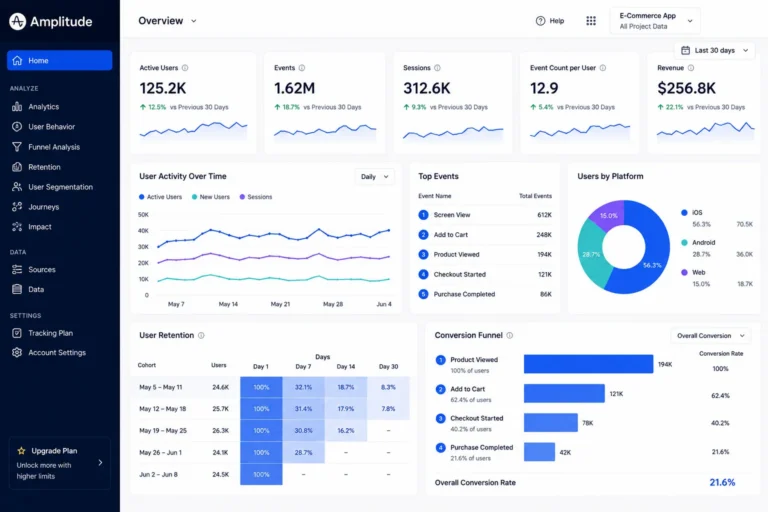
Using Amplitude Data for Product Decisions
Collecting analytics is only as useful as the information itself, so it is important to actually use the data gathered by Amplitudes in the process. The mere intention to include the product in theReact Native application suggests that the company wishes to get value out of the information.
For example, a high number of users accessing a certain feature and then leaving the application will highlight the necessity to improve it. Furthermore, it would be useful to know which actions kept users engaged as the company could then focus on those specific points. The collected data could also be used to measure the effect of certain changes and, subsequently, the performance of the application, thus enabling Amplitude to constantly evolve. Instead of only hypothesizing about the changes that improved the application, the company would be able to back up its statements with objective data.
That being said, analytics should not be considered an all-encompassing truth that guides the company towards the right direction. Although it is an essential tool in any application, it is far from being perfect, and there are other important factors to consider. With that in mind, Amplitude would be helpful in adding another degree of objectivity to the company’s operations, but it would not be the sole deciding factor in what changes to implement.
Keeping User Data and Privacy in Mind
Analytics implementation also needs to consider what user information is being collected and why. Not every piece of user data belongs in an analytics platform.
Before tracking personal or sensitive information, teams should review their application’s privacy requirements and the consent users may need to provide. Data collection should be limited to what is necessary for the intended analytics purpose.
It is also important to understand how user identification is handled. Assigning a user ID can make it easier to connect events across sessions, but the way that identifier is generated and stored should be considered carefully.
A clean analytics setup is not only about collecting useful information. It is also about being clear on what is collected, keeping unnecessary data out of the system, and making privacy part of the implementation from the beginning.
Common Mistakes to Avoid When Using Amplitude in React Native
Amplitude integration itself is a relatively simple process, but it is vital to understand what analytics to track and how they would be used later. First of all, avoid the temptation to track everything in your application. While it may seem useful, it will generate too much information, most of which will hardly ever be needed. It is better to focus on events that are somehow tied to user experience, important product features, and business metrics.
Next, make sure to use the same naming conventions for all track events and analytics. Even if it seems a trivial issue, having button_clicked and Button Click as separate events in your dashboard will complicate data analysis needlessly. It is better to dedicate some time to planning the naming strategy instead of trying to rename dozens of events later.
Additionally, consider reviewing your analytics before your application is ready for release. A single typo in the track event can lead to missing information in your dashboard or even incorrect user properties. It will undoubtedly take more effort to fix such issues in production than before launching the application.
Finally, you should regularly revisit and update your analytics to reflect recent changes in your React Native app. Some track events may stop being relevant, while new ones should be added to your dashboard. Such updates will make your analytics more accurate and easier to use by removing unnecessary information.
Conclusion:
Integrating Amplitude into your React Native app can provide you with invaluable insights into user behavior and interactions. By tracking events, identifying users, and sending user properties, you’ll be able to make data-driven decisions with amplitude node sdk that can lead to improved user experiences and increased app engagement.
Remember that while Amplitude offers a wealth of features, it’s essential to respect user privacy and obtain necessary consents before collecting and using their data. With the right implementation and a focus on user-centric analytics, you’ll be well-equipped to create a successful and user-friendly app with amplitude node sdk.