

Manual cloud setups have a way of feeling productive right up until they aren’t. Click through a console enough times and things start to drift — one environment quietly diverges from another, the reasoning behind a config choice lives in one person’s head, and there’s no real trail showing who changed what. Infrastructure as Code fixes this by putting your setup into config files that get reviewed and versioned like real code, instead of scattered console clicks nobody wrote down — and which tool you reach for depends on what you’re running: Terraform for multi-cloud, Pulumi if your team would rather write in a language they already know, CloudFormation or Bicep if you’re all-in on AWS or Azure, Ansible for configuration management. If you’re already running manual setups, don’t try to rebuild everything in code overnight — import what’s there, wire up a CI pipeline, lock down console access, and only then layer in drift detection. Slow and boring beats fast and broken.
- 1 While manual provisioning seems faster, the cost is incurred later when it comes to rebuilding or recovering the environment since it is challenging to recall the exact sequence of actions taken previously.
- 2 Infrastructure as code replaces the manual process of infrastructure deployment in a console with maintaining configuration files that can be reviewed or version controlled.
- 3 The five main problems associated with manual infrastructure management are infrastructure drift, single point of failure, poor audit control, complex disaster recovery, and compliance lag.
- 4 There is no best Infrastructure as code (IaC) tool as each has its shortcomings; Terraform is better for multi-cloud, Pulumi aligns better with developers who utilize generic programming languages, CloudFormation and Bicep better for single-cloud organizations while Ansible is good for configuration management.
- 5 The migration process should be done step by step starting with import, then CI/CD, followed by restricted console access and finally drift detection instead of reimaging existing infrastructure.
Manual cloud setups feel fast at first. Someone clicks through the console, spins up a server, opens the right ports and the service is live by lunch. Six months later, nobody remembers exactly what was clicked, the setup does not survive a region outage and every change carries fresh risk.
Infrastructure as code fixes that problem by turning infrastructure setup into something teams can define, review and repeat. Instead of relying on console clicks, engineers write configuration files that describe the environment they want. Cloud automation tools then apply those files consistently. The result is a cloud setup that is easier to reproduce, audit and recover when something goes wrong. The key areas are infrastructure as code, the risks of manual cloud management and the steps needed for a safe transition.
Understanding IaC Infrastructure as Code
IaC replaces manual console work with configuration files that define the infrastructure an application needs.
A file might define a VPC, a Kubernetes cluster, a database, and their settings. An IaC tool reads that definition and creates or updates the cloud environment to match. The same configuration can drive development, staging, and production, so every environment is built from the same source.
Manual setup (“click-ops”) works differently. Environments that started out identical slowly drift apart. One engineer updates a firewall rule in production. Another changes a setting in staging. Weeks later, no one remembers why the two environments behave differently.
The more a team depends on manual changes, the more time it spends untangling what actually happened.
5 Reasons Why Manual Cloud Setups Put Your Business at Risk
Manual cloud setups create risks that infrastructure as code is designed to reduce. Some of them are:
- Environment drift: Development and production environments can gradually diverge, making bugs harder to reproduce and fix.
- Single-person dependency: Critical setup knowledge may sit with one engineer, creating risk if that person leaves.
- No audit trail: Manual changes make it difficult to track who changed what, when it changed and why.
- Slow disaster recovery: Rebuilding infrastructure can take much longer when the setup process is not documented or automated.
- Compliance gaps: Without version-controlled infrastructure, proving the exact state of an environment at a given time becomes difficult.
Any one of these issues can turn into a serious operational problem during an outage, migration or audit.
Infrastructure as Code Benefits Modern Engineering Teams See
The benefits of IaC show up in several practical ways:
- Consistent environments. Teams create new environments from the same definitions, instead of building them by hand each time.
- Reviewed changes. Infrastructure changes go through pull requests, so another engineer can review them before they reach production.
- Clear history. If a change causes a problem, the team has a version history showing exactly what changed.
- Faster disaster recovery. Instead of rebuilding a production environment from memory and old notes, the team already has a defined infrastructure state in the repository.
- Easier compliance. Every infrastructure change leaves a record, making it easier to answer who changed a resource, when, and what configuration was expected.
Comparing Modern Infrastructure as Code Tools: Which One Should You Choose?
There is no single best choice among modern infrastructure as code tools. The right option depends on the cloud environment, the team’s existing skills and how much portability matters.
| Tool | Best suited for | Main strength | Trade-off |
| Terraform | Multi-cloud and large cloud environments | Broad provider ecosystem and mature workflow | HCL adds another language for teams to learn |
| Pulumi | Engineering teams that prefer general-purpose languages | Infrastructure can be written in TypeScript, Python, Go and other familiar languages | Smaller ecosystem than Terraform |
| AWS CloudFormation | Teams operating primarily on AWS | Native AWS integration and broad service support | Closely tied to AWS |
| Azure Bicep | Azure-focused organisations | Cleaner authoring experience for Azure resources | Limited value outside Azure |
| Ansible | Server configuration and application setup | Strong configuration management and procedural automation | Less suited to managing all cloud infrastructure as declarative state |
Terraform for Multi-Cloud Infrastructure
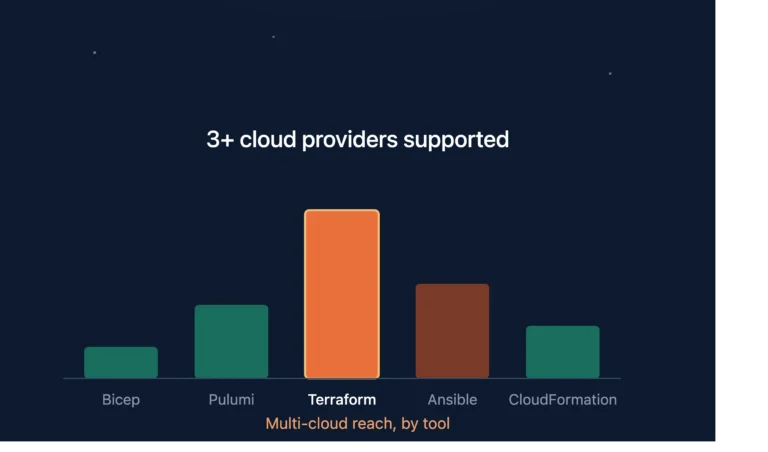
Terraform IaC remains a common choice when infrastructure spans more than one cloud or relies on a broad mix of third-party services. Its provider ecosystem covers AWS, Azure, Google Cloud, Kubernetes and many SaaS platforms.
Its state model also gives teams a structured way to compare the configuration in code with the resources that already exist. The trade-off is that engineers need to become comfortable with HCL and manage Terraform state carefully, particularly as environments grow.
Pulumi for Teams That Prefer Programming Languages
Pulumi approaches the same problem differently. Instead of introducing a dedicated configuration language, it lets engineers define infrastructure using languages such as TypeScript, Python, Go and C#.
That can be attractive for application engineering teams that already work heavily in those languages. It also makes abstractions and reusable components feel familiar. The trade-off is ecosystem size. Terraform still has a broader community and a longer operational track record in many organisations.
AWS CloudFormation for AWS-Native Environments
For teams committed to AWS, CloudFormation offers a direct path to infrastructure automation. It is maintained by AWS and supports a wide range of AWS resources without requiring an additional third-party infrastructure platform.
That close integration is its main advantage. It is also its limitation. If the organisation later expands beyond AWS, CloudFormation definitions do not transfer to Azure or Google Cloud.
Azure Bicep for Azure-First Teams
Azure Bicep plays a similar role for Microsoft Azure. It provides a cleaner syntax over Azure Resource Manager templates and works well for organisations that already standardise on Azure.
Teams gain deep integration with the Azure platform without adding another infrastructure tool. The drawback is the same as with CloudFormation: portability is limited if the infrastructure strategy becomes multi-cloud.
Ansible for Configuration Management
Ansible fits a slightly different part of the infrastructure problem. It is especially useful for configuration management, server provisioning, software installation and operating system configuration.
Teams often use it alongside Terraform rather than instead of Terraform. Terraform can create the infrastructure, while Ansible configures what runs on top of it.
That distinction matters when choosing a tool. A company provisioning VPCs, clusters and managed databases may lean towards Terraform, CloudFormation or Bicep. A company that needs to configure hundreds of existing servers may find Ansible more useful.
The choice therefore comes down to what the team is actually trying to automate, not which tool happens to have the largest community.
Use Automation to Prevent Configuration Drift
Configuration drift happens when the live cloud environment no longer matches the infrastructure defined in code. Someone changes a security group through the console, updates a database setting manually, or creates a resource that never makes it into the repository.
It’s one of the harder problems to catch once multiple environments are involved. A practical approach has three parts:
- Limit direct console write access, keeping a defined break-glass route for real emergencies.
- Run drift checks that compare the live environment against the expected state in code.
- Route normal changes through pull requests, rather than direct console edits.
The goal isn’t to make the console completely inaccessible. It’s to stop undocumented manual changes from becoming the normal way of working.
Moving From Manual Setups to Full Cloud Automation
Shifting from manual infrastructure management to full cloud automation is not a weekend project. A phased rollout is usually safer, particularly when production infrastructure already exists.
- Import existing infrastructure: Bring the current setup under code without immediately changing how the environment behaves.
- Add a CI pipeline: Route infrastructure changes through pull requests so plans can be reviewed before they are applied.
- Restrict console access: Reduce routine direct writes while keeping a controlled break-glass path for real incidents.
- Introduce drift detection: Compare the live environment with the code regularly and investigate unexpected differences.
Trying to rebuild everything from scratch introduces unnecessary risk. Start by representing the existing setup accurately. Once that baseline is under code, the team can improve it in smaller, controlled steps.
Why Innostax Recommends a Code-First Cloud Strategy
Innostax uses a code-first cloud approach because manual infrastructure becomes harder to manage as teams, environments and services grow.
Our DevOps engineers can help bring existing AWS IaC infrastructure under code, connect changes to a CI pipeline and introduce drift detection so the intended configuration remains visible.
The value is not simply faster provisioning. Teams gain a repeatable way to review infrastructure changes, rebuild environments and understand exactly what is running in the cloud. If critical infrastructure is still being managed primarily through console changes, bringing it under code is usually the right place to start.
Future-Proofing Your Business With Cloud Automation
Cloud automation gives teams a more reliable way to deploy, recover and maintain infrastructure without depending on a sequence of manual steps.
Infrastructure as code turns cloud configuration into a version-controlled asset. New services can be built from established patterns. Recovery becomes easier because the environment can be recreated from code. Audits become less disruptive because the change history already exists in the repository.
As the infrastructure grows, that consistency matters more. The real advantage of IaC is not that engineers type fewer commands. It is that the organisation no longer has to depend on memory to know how its cloud environment was built.