- 1 GraphQL and Prisma Integration: GraphQL integration with Prisma in a Node. js application offers a very efficient, dynamic and scalable API concept.
- 2 Step-by-Step Setup: Starting procedure of a Node. When it comes to API creation, this structure, setting up Prisma, and defining data models for a js project lay a strong base.
- 3 Type-Safe GraphQL: The advantages of using a language like Nexus to build schemas and resolvers for GraphQL is that it helps to increase the developer productivity while at the same time increasing the reliability of the software built.
In the world of web development, GraphQL has emerged as a powerful tool for building APIs that provide flexibility and efficiency. When combined with Prisma, a modern database toolkit for Node.js and TypeScript, you can create robust and scalable GraphQL APIs with ease. In this blog post, we’ll walk you through the process of integrating Prisma Nexus into a Node.js application to create GraphQL APIs. By the end of this tutorial, you’ll have a solid foundation for building GraphQL APIs using Prisma Nexus for node js ecommerce.
Before You Get Started
Before we dive into the integration, make sure you have the following prerequisites:
- Node.js: Ensure you have Node.js installed on your system. You can download it from the official website.
- Prisma: You’ll need to have Prisma installed globally. If you haven’t already, install it using npm:
npm install -g prisma- A Database: You should have a database (e.g., PostgreSQL, MySQL, SQLite) set up and running. This tutorial will use PostgreSQL for simplicity, but you can easily switch to a different database later.
Step 1: Initialize Your Node.js Project
Let’s start by creating a new Node.js project and setting up the necessary dependencies.
mkdir prisma-nexus-graphql
cd prisma-nexus-graphql
# Initialize your project

npm init -y

# Install required dependencies
npm install graphql nexus prisma express apollo-server-express path
Step 2: Configure Prisma
Next, you need to configure Prisma to connect to your database. Create a Prisma configuration file by running:
npx prisma initThis command will guide you through the setup process. Choose PostgreSQL as the database and follow the prompts.
Step 3: Define Your Data Model
With Prisma, you define your data model using Prisma Schema. Create a file named schema.prisma in your project directory and define your data model. Here’s a simple example:
// schema.prisma
generator client {
  provider = "prisma-client-js"
}

datasource db {
  provider = "postgresql"
  url      = env("DATABASE_URL")
}

model User {
  id    Int     @id @default(autoincrement())
  name  String
  email String  @unique
}
After defining your schema, apply the migrations to create the database tables:
npx prisma migrate devStep 4: Create GraphQL Types with Nexus
Nexus is a powerful library for building GraphQL schemas in a type-safe manner. Create a new file, schema.ts, to define your GraphQL types and resolvers using Nexus.
// schema.ts

import { makeSchema } from 'nexus';
import path from 'path';
import * as resolvers from './resolvers';

const schema = makeSchema({
  types: [resolvers],
  outputs: {
    schema: path.join(__dirname, './generated/schema.graphql'),
    typegen: path.join(__dirname, './generated/nexus.ts'),
  },
});

export default schema;
Step 5: Implement GraphQL Resolvers
Now, let’s create resolvers for your GraphQL API for node js ecommerce. You can add resolvers for your data models (e.g., User) in a separate file, such as resolvers.ts
// resolvers.ts

import { extendType, stringArg, nonNull, objectType } from 'nexus';
import { PrismaClient } from '@prisma/client';

const prisma = new PrismaClient();

export const User = objectType({
  name: 'User',
  definition(t) {
    t.nonNull.id('id')
    t.string('name')
    t.string('email')
  },
})

export const Query = extendType({
  type: 'Query',
  definition(t) {
    t.list.field('users', {
      type: 'User',
      resolve: async () => {
        return await prisma.user.findMany();
      },
    });
  },
});

export const Mutation = extendType({
  type: 'Mutation',
  definition(t) {
    t.field('createUser', {
      type: 'User',
      args: {
        name: nonNull(stringArg()),
        email: nonNull(stringArg()),
      },
      resolve: async (_, args) => {
        return await prisma.user.create({
          data: {
            name: args.name,
            email: args.email,
          },
        });
      },
    });
  },
});
Step 6: Set Up the GraphQL Server
To set up your GraphQL server, create a new file, server.ts
// server.ts

import express from 'express';
import { ApolloServer } from 'apollo-server-express';
import schema from './schema';

const app = express();
const server = new ApolloServer({ schema });

const startServer = async () => {
  await server.start(); // Start Apollo Server

  server.applyMiddleware({ app }); // Apply Apollo Server middleware to Express

  const PORT = process.env.PORT || 4000;

  app.listen(PORT, () => {
    console.log(`Server is running at http://localhost:${PORT}/graphql`);
  });
}

startServer().catch((err) => {
  console.error('Error starting the server:', err);
});
Step 7: Start Your GraphQL Server
You’re almost there! Start your GraphQL server by running the following command:
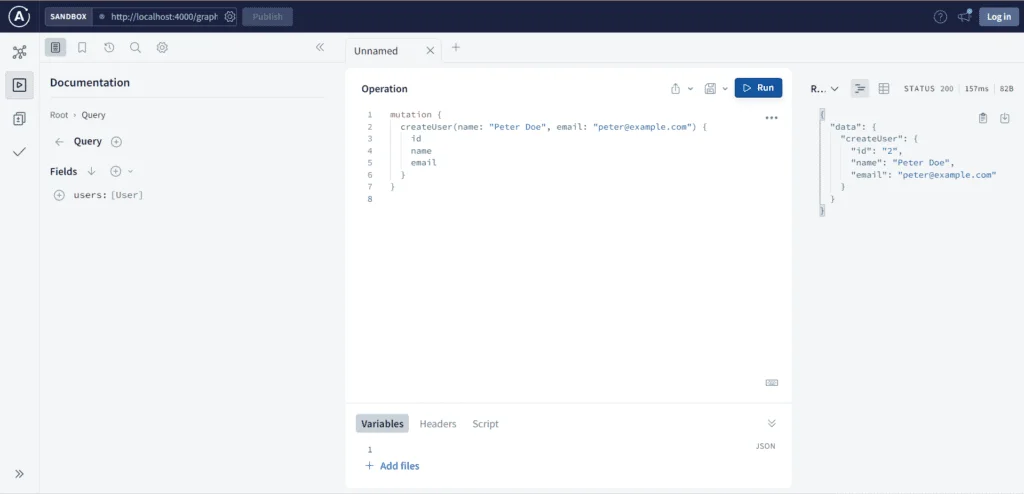
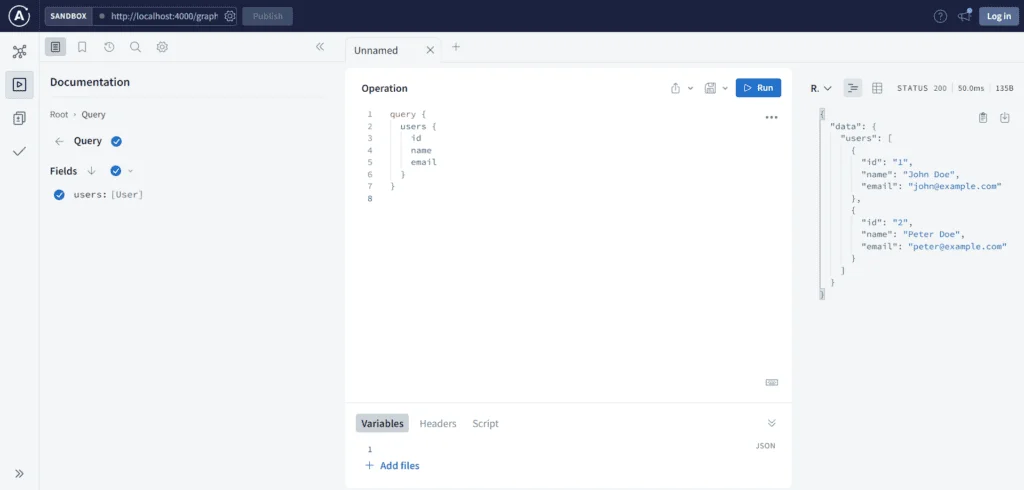
node server.tsYou can use these queries and mutations in your GraphQL Playground by visiting http://localhost:4000/graphql in your browser or client application to interact with your API with node technologies. Here’s how you can use them:
// Fetch Users
query {
  users {
    id
    name
    email
  }
}

// Create Users
mutation {
  createUser(name: "John Doe", email: "john@example.com") {
    id
    name
    email
  }
}
These examples demonstrate how to perform queries to retrieve a list of users and mutations to create new users in your Prisma Nexus GraphQL API. You can further customize and expand these queries and mutations based on your project’s requirements.
Conclusion
Congratulations! You’ve successfully integrated Prisma Nexus into your Node.js application with node technologies to create GraphQL APIs. You can now extend your schema, add more models, and implement additional resolvers to build a feature-rich API. The basic questions comes up for is nodejs safe. With the following blog you can get an idea for is nodejs safe idea.
This integration provides a robust foundation for building GraphQL APIs, offering type safety, database integration, and flexibility. Explore the Prisma documentation and Nexus documentation to further enhance your GraphQL project.
Common Mistakes When Setting Up Prisma Nexus
Getting a Prisma Nexus API running is one thing. Getting it running well is another. There are a mistakes that come up often enough in real projects that they’re worth pointing out before you run into them yourself.
The first mistake is creating than one instance of PrismaClient. It’s easy to do. You’re writing a resolver file you need database access so you just create a PrismaClient at the top like a tutorial shows.. If you do this in multiple files you end up with many client instances each opening its own connection pool. In development this usually doesn’t cause problems. In production with serverless functions that start and stop frequently it can use up your database’s maximum connections very quickly. The solution is simple: create the PrismaClient once in one file and import that instance everywhere else in your application.
The second issue is skipping validation on mutation inputs just because Nexus enforces types. Type safety and actual validation are not the thing. Nexus will accept an email argument that’s technically a string but isn’t a real email address. It will also allow a name field that’s just an empty string. Type checking catches issues but not business logic problems. You should add a validation layer. A light one. Before your resolver logic runs. Otherwise bad data can slip into your database without any checks.
Third and this one surprises people: N+1 queries happen here as they do in any other GraphQL setup including ones using Prisma. Fetching a list of users takes one query.. Then fetching each users posts inside a nested resolver? That causes a query for every user. This adds up under load. Prisma has a built-in way to fix this. Nested include statements let you fetch data all at once instead of making repeated calls. Learning this pattern early helps avoid performance problems when your API starts getting real traffic.
Fourth many tutorials. Including the ones you might be following. Skip authentication just to keep things simple. That’s fine while learning. It’s easy to forget about adding it before you ship. Every mutation that creates updates or deletes data must check who is making the request. This check shouldn’t rely on the API gateway. It must happen inside the resolver itself because Nexus resolvers can be called in ways that bypass assumptions you may have made elsewhere, in your system.
Finally pay attention to your generated schema file as your project grows. Nexus regenerates it automatically which is helpful. That means the file can become out of sync with what you expect. If a migration or type definition doesn’t apply the way you thought the schema.graphql file might reflect something than you planned. Checking the generated schema after changes. Of assuming it matches your mental model. Avoids confusion later.
None of these are hard to avoid once you know about them. They just don’t show up in setup guides. By the time they matter they’re already built into how your project works.
Scaling Your Prisma Nexus API Beyond the Basics
Once your API moves past the prototype stage a things that did not matter much at first start to matter a lot. Connection pooling is usually the one that teams run into. Prisma manages its pool but the defaults are tuned for general use not for your specific traffic pattern. If you are running in a serverless environment this gets trickier still. Every cold start can spin up connections and without something like Prisma Accelerate or an external pooler such as PgBouncer sitting in front of your database you can hit connection limits during traffic spikes that would not have shown up in local testing at all.
Query performance is the thing that is worth watching closely. Prisma makes it easy to write queries with deeply nested includes, but easy to write does not always mean efficient to run. A query that looks clean in your resolver can translate into an expensive join or a large payload once it hits real data volumes. It is worth checking the actual SQL that Prisma generates especially for your most frequently called resolvers rather than assuming that the abstraction is always doing the efficient thing behind the scenes.
Pagination is another area that gets skipped early and then causes problems later. Returning every row in a table works fine when you have a hundred users, in a dev database. It does not work all once you have a hundred thousand records. Prisma supports both offset‑based and cursor‑based pagination out of the box and cursor‑based pagination is generally the choice once your tables grow because it holds up better under concurrent writes and does not slow down as the offset gets larger.
Finally think about how your schema will evolve. Nexus makes it simple to add fields and types but removing or renaming something once clients are relying on it is a different story entirely. Deprecating fields explicitly than just deleting them gives consumers of your API time to migrate instead of breaking their integrations without warning.
Deploying a Prisma Nexus API to Production
I have found that getting from a working setup to something you would trust in production involves a handful of decisions that are easy to overlook when you are focused on just getting the API running.
I have seen that environment variables are the starting point but worth mentioning anyway because a surprising number of production issues trace back to a database URL or API key that was fine locally but never got set correctly in the deployment environment. Keeping a.env.example file in your repo with every required variable listed but no real values filled in saves a lot of back and forth when onboarding environments or new developers.
I have experienced that migrations deserve their careful process once you are not the only person touching the schema. Running prisma migrate dev locally is fine for development. Production deployments should use prisma migrate deploy, which applies existing migrations without generating new ones or prompting for input. Baking this into your deployment pipeline than running migrations manually removes a common source of human error.
I have noticed that logging and error tracking matter than they seem to at first. Prisma can log queries. In production you generally want structured logs going somewhere you can actually search and alert on, rather than raw console output. Pairing this with an error tracking tool means you find out about a resolver from a dashboard not from a user reporting it.
I have realized that you should not overlook the GraphQL Playground or introspection being open by default. It is genuinely useful during development. Leaving your schema fully introspectable, in production can hand attackers a complete map of your API surface. Disabling introspection or at gating it behind authentication is a small change that closes off a real avenue of reconnaissance.
Securing Your Prisma Nexus API
Getting the API working and making the API secure tend to happen on timelines. It is worth closing that gap rather than later especially when real user data is involved.
Rate limiting is one of the things worth adding. It is easy to underestimate why it matters more in GraphQL than in REST. A single GraphQL query can request nested data across multiple resolvers, which means one bad query can do the work of many REST calls in a single request. Without some form of query cost analysis or depth limiting in front of the GraphQL resolvers a single bad actor—or even a meaning developer with an inefficient frontend query—can put real strain on the database. Libraries like graphql-query-complexity exist specifically for this assigning a cost to each field and rejecting queries that exceed a threshold before they ever touch the GraphQL resolvers.
Authorization deserves thought than a single check at the top of a resolver. It is common to verify that a user is logged in assume the rest is fine. GraphQL’s flexibility means a client can request data that the client should not have access to. Authorization checks generally need to live at the field level for anything not just at the query’s entry point because a single request can touch data belonging to more than one context.
Input sanitization matters here as much as it does anywhere else even though Prisma’s query builder already protects from raw SQL injection in most cases. The risk shifts than disappears. Things such as string lengths malformed JSON in a field or unexpected characters in a search argument can still cause problems whether that is a bloated database record or a resolver that behaves unpredictably. Treat every argument coming through a resolver as untrusted the way you would in a REST controller is a habit worth keeping even though Nexus and Prisma abstract away a lot of the danger.
It is also worth thinking about what the error messages reveal. A raw Prisma error passed through to the client can leak details about the schema the database structure or even parts of a query that were never meant to be visible. Wrapping errors in a formatting function before they reach the response so only a generic and safe message goes out while the real detail is logged internally closes off a common source of information leakage.
Finally keep dependencies. Prisma, Nexus and the GraphQL ecosystem around them move quickly and security patches do get released for real vulnerabilities from time to time. Running an automated dependency check as part of the CI pipeline than upgrading reactively after something breaks catches most of this before it becomes a problem worth worrying about.
None of these steps are especially difficult on their own. The trouble is they rarely all get done in the build and, by the time an API is handling real traffic retrofitting security tends to take longer than building it in from the start.
One more thing worth mentioning: security reviews shouldn’t be a one-time checklist you run through before the first deploy and then forget about. Schemas grow, new resolvers get added by different people over time, and a field that was properly locked down at launch can end up exposed months later simply because nobody thought to apply the same authorization pattern to the new addition. It helps to treat any new mutation or sensitive field as a small checklist item on its own — who can call this, what data does it touch, does the error handling leak anything — rather than assuming the protections you built early automatically carry forward to everything added afterward.
Keeping a Prisma Nexus API Secure Over Time
Security work does not truly finish once an API is released. Security work changes from a build-time worry into a duty. Treating security that way saves problems later.
Building a habit of monitoring dependencies and CVEs for the GraphQL layer is worth it not for the general npm audit. GraphQL-specific problems are often subtler than package problems. For example a resolver-level denial of service caused by fragment queries or wrong introspection settings can slip past a general security scan unnoticed. Subscribing to advisories for the libraries you use such as Nexus, Apollo Server or Prisma catches issues that a generic dependency scanner may not mark as urgent.
Testing security assumptions from time, to time helps, too. Security testing does not have to be complicated. A simple idea is to write a few test queries that purposely try to do the thing. For example request another user’s data through a field send a query nested ten levels deep or submit a mutation without an authentication token. Running those tests against staging regularly finds regressions before they reach production. Security testing is an investment compared to discovering a gap the hard way and it reveals problems that are easy to miss when only reading the code because the problem usually appears only when someone actually tries to exploit it.
Revisiting access regularly is also worth it of only when something feels wrong. Teams change, roles change and permissions given for a task can quietly stay in place long after the task ends. A quarterly review of authorization rules confirms that they still match the people who should truly have access, catching drift that’s easy to miss each day.
None of this has to be a process. Even a simple version works. A recurring calendar reminder to check advisories a set of test queries and an occasional access review cover most of the important ground. This approach does not turn security into a full-time job for a small team.