


WebSockets provide a persistent, two-way connection, making them ideal for chat, gaming, and live dashboards. Use wss:// in production, authenticate connections, add reconnection logic, and use Redis/pub/sub with load balancing when scaling across servers.
- 1 Real-Time Communication: WebSockets support long-during two-way communication between the client and the server; it supports real-time data transfer unlike the conventional use of HTTP.
- 2 Versatile Uses: WebSockets are the most effective in the contexts of using real-time data, for instance, stream data, games, collaborating platforms, and financial services since they use minimal resources and the time latency is minimal.
- 3 Implementation Steps: WebSockets uses a few layers which are created with the help of a server in Node. for example, js, installation of requirements, setting up of the WebSocket server and enabling real time communication, as well as creating a basic HTML page for use in communicating with the WebSocket to send and receive messages.

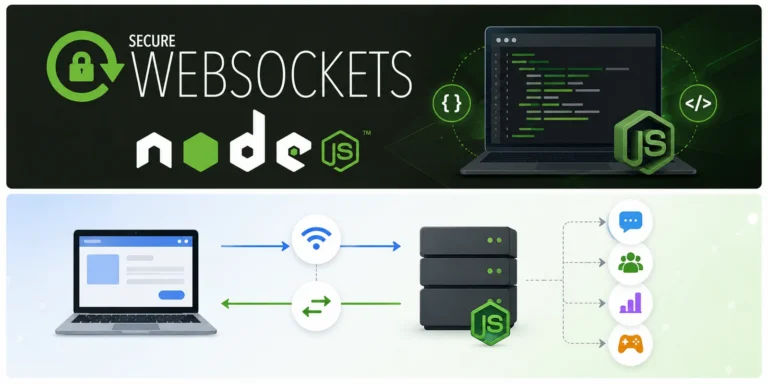
Overview of WebSockets
WebSockets offer a persistent connection between client and server that enables real-time communication. They provide a standardized way of sending data from the server to the client and vice versa. Unlike HTTP , they do not require the client to repeatedly request data from the server.
What are WebSockets?
It is a communication protocol with full-duplex communication channels on a single TCP connection between a server and a client. This protocol utilizes a ‘handshake process’ to establish a client-server connection wherein both parties can communicate and receive data. The protocol is implemented as a JavaScript API in web browsers. It can be used with server-side programming languages like Node.js.
It allows real-time, two-way communication between a web browser and a server, enabling the server to send data to the browser without requesting it explicitly.
What are the uses?
WebSockets are a communication protocol that provides full-duplex, bidirectional communication channels over a single, long-lived connection between a client (usually a web browser) and a server. Unlike traditional HTTP requests that are request-response based and stateless, Web Sockets allow ongoing, real-time communication between the client and server. Here are some common use cases for Web Sockets:
- Real-Time Web Applications
- Gaming
- Live Data Streaming
- Collaborative Applications
- IoT (Internet of Things)
- Online Auctions and Bidding
- Customer Support and Help Desks
- Live Dashboards and Monitoring
- Financial Applications
- Voice and Video Calls:
How do they work?
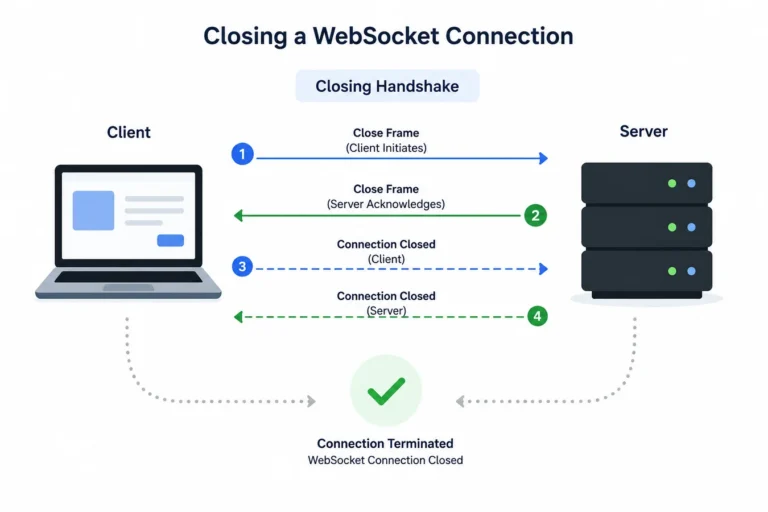
In a nutshell, working with WebSockets involves three main steps:
- Opening a WebSocket connection. The process of establishing a WebSocket connection is known as the opening handshake, and consists of an HTTP request/response exchange between the client and the server.
- Data transmission over WebSockets. After a successful WebSocket handshake, the client and server can exchange messages (frames) over a persistent WebSocket connection. WebSocket messages may contain string (plain text) or binary data.
Closing a Web Socket connection. Once the persistent WebSocket connection has served its purpose, it can be terminated; both the client and the server can initiate the closing handshake by sending a close message.
Advantages of WebSockets
- Bi-directional communication
- Real-time data transfer
- Low latency
- Scalability
- Efficient use of resources
Set up your project environment
- Setup the project
Create a new directory for your project and navigate to it:
mkdir websocket-project

cd websocket-project- Initialize the Node.js Project
Initialize a `package.json` file for your project:
npm init -y
- Install Dependencies
Install the required dependencies for the server using:
npm install express ws
- Create Server Code
Create a `server.js` file and open it in your preferred text editor:
touch server.js
Add the following code to set up an Express server and WebSocket integration:
const express = require('express');
const http = require('http');
const WebSocket = require('ws');

const app = express();
const server = http.createServer(app);
const wss = new WebSocket.Server({ server });

wss.on('connection', (ws) => {
  console.log('Client connected');

  ws.on('message', (message) => {
    console.log(`Received: ${message}`);
    ws.send(`Server received: ${message}`);
  });
});

app.get('/', (req, res) => {
  res.sendFile(__dirname + '/index.html');
});

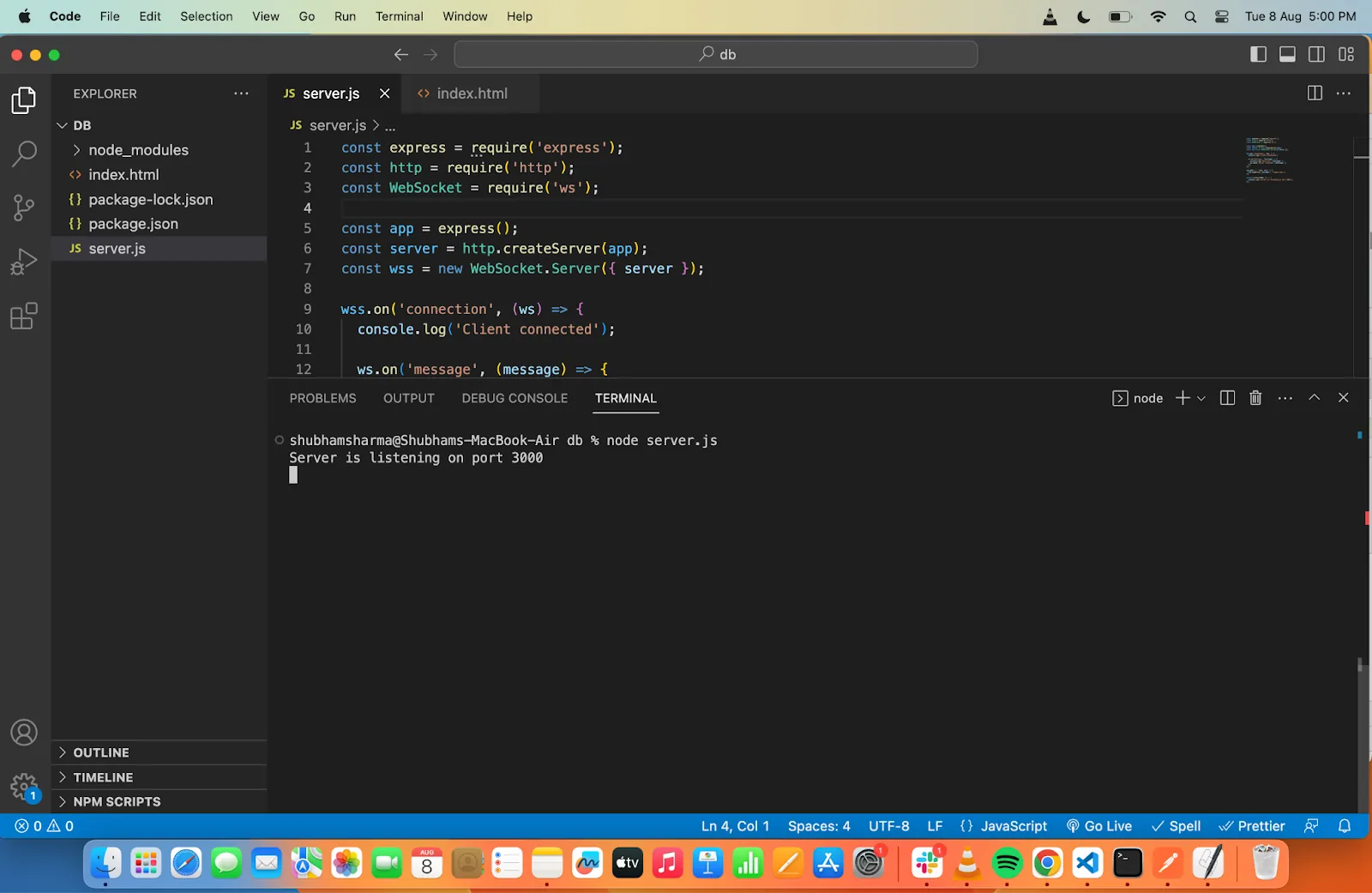
server.listen(3000, () => {
  console.log('Server is listening on port 3000');
});
5. Create HTML User Interface:
Create an `index.html` file and open it in your preferred text editor:
touch index.html
Add the following HTML code:
<!DOCTYPE html>

<html lang="en">

<head>

  <meta charset="UTF-8">
  <meta name="viewport" content="width=device-width, initial-scale=1.0">
  <title>WebSocket Test</title>

</head>

<body>

  <input type="text" id="messageInput" placeholder="Type a message">

  <button id="sendButton">Send</button>

  <div id="output"></div>
  <script>
    const socket = new WebSocket('ws://localhost:3000');

    socket.onopen = (event) => {
      console.log('WebSocket connection opened');
    };

    socket.onmessage = (event) => {
      const output = document.getElementById('output');
      output.innerHTML = `Received: ${event.data}`;
    };
    socket.onclose = (event) => {
      console.log('WebSocket connection closed');
    };

    const sendButton = document.getElementById('sendButton');
    sendButton.addEventListener('click', () => {
      const messageInput = document.getElementById('messageInput');
      const message = messageInput.value;
      socket.send(message);
    });

  </script>
</body>
</html>
Here is the file structure for the app
websocket-project/
├─node_modules/
├─ server.js
├─ index.html
└── package.json
6. Run the Server
Start the server by running
node server.js
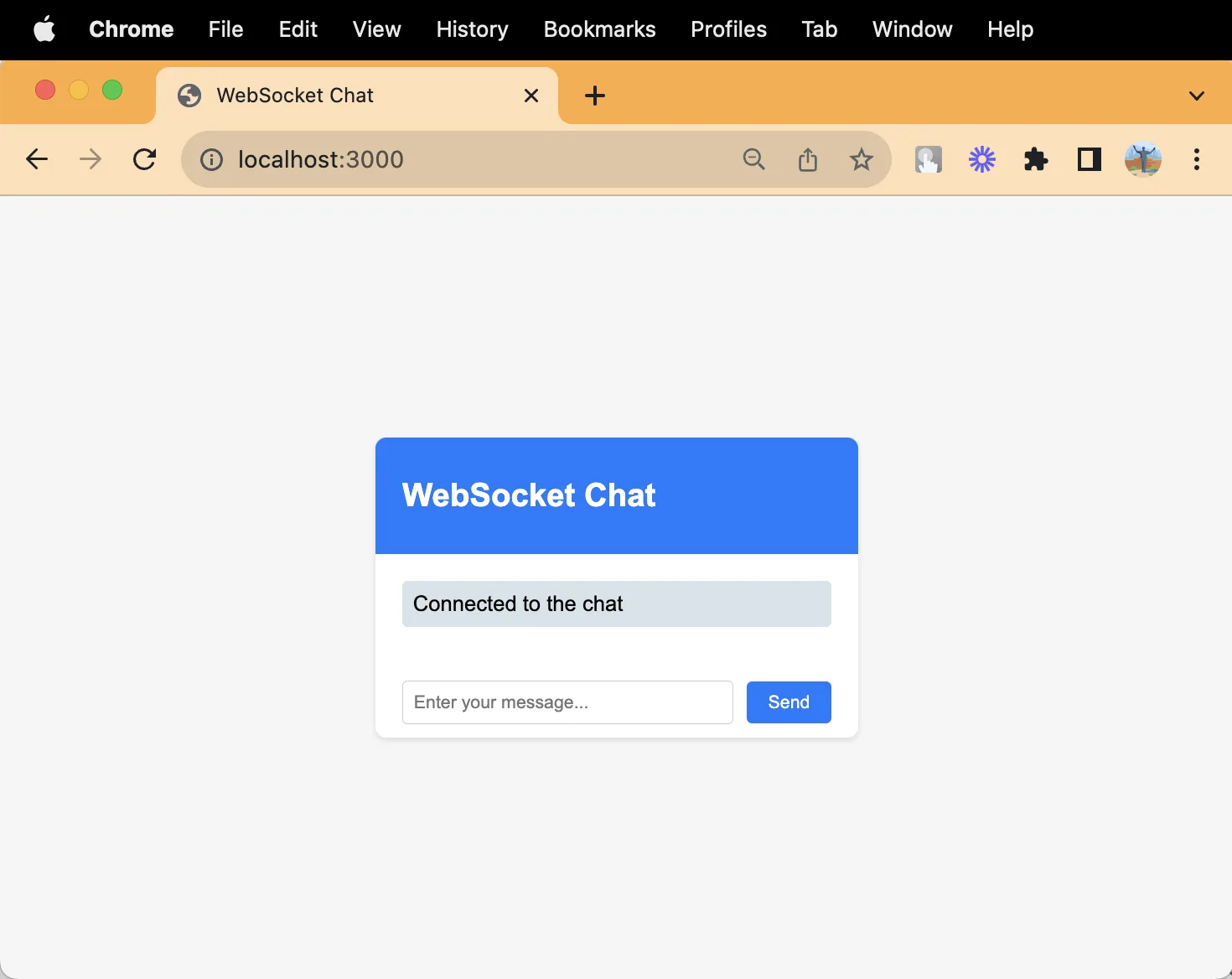
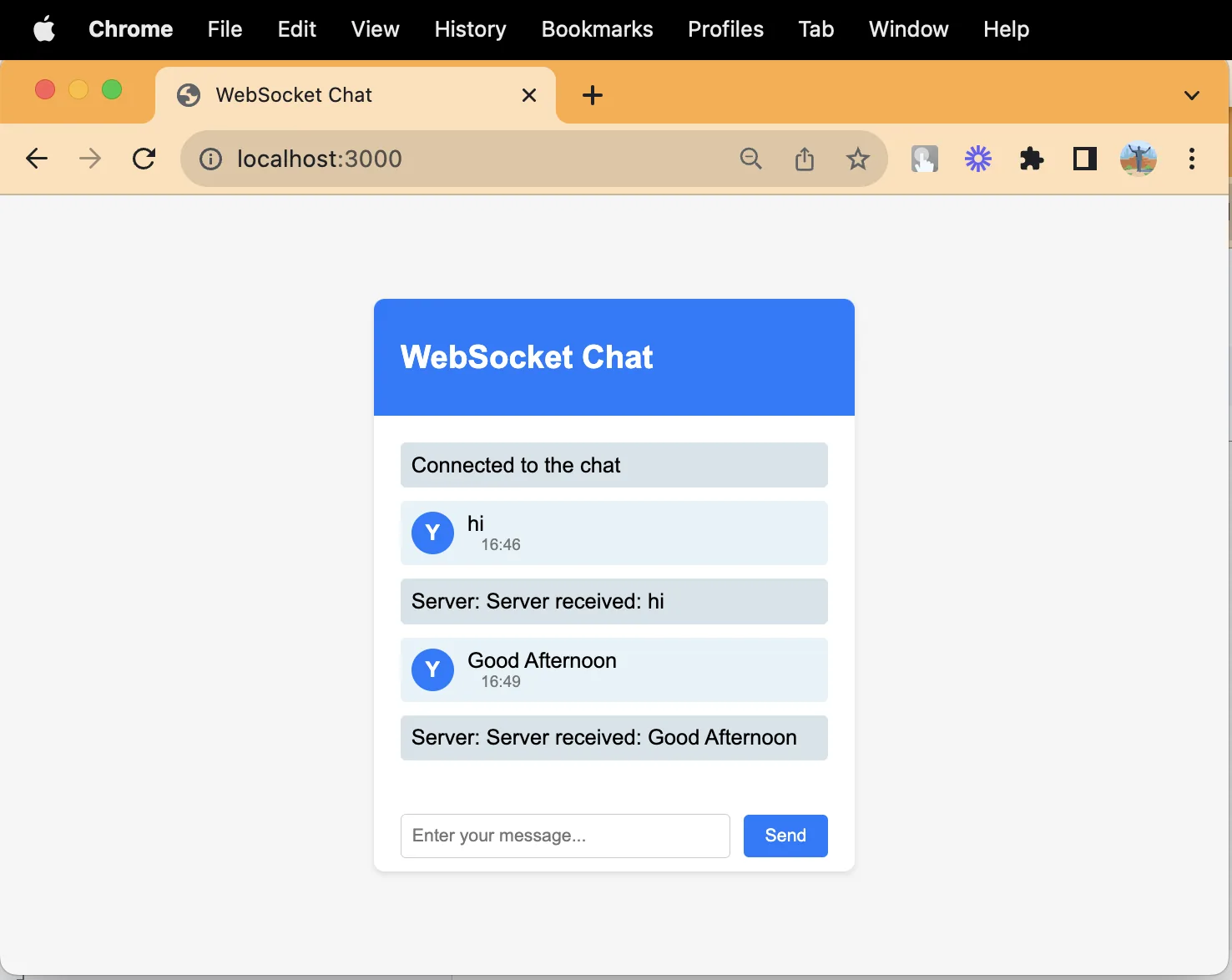
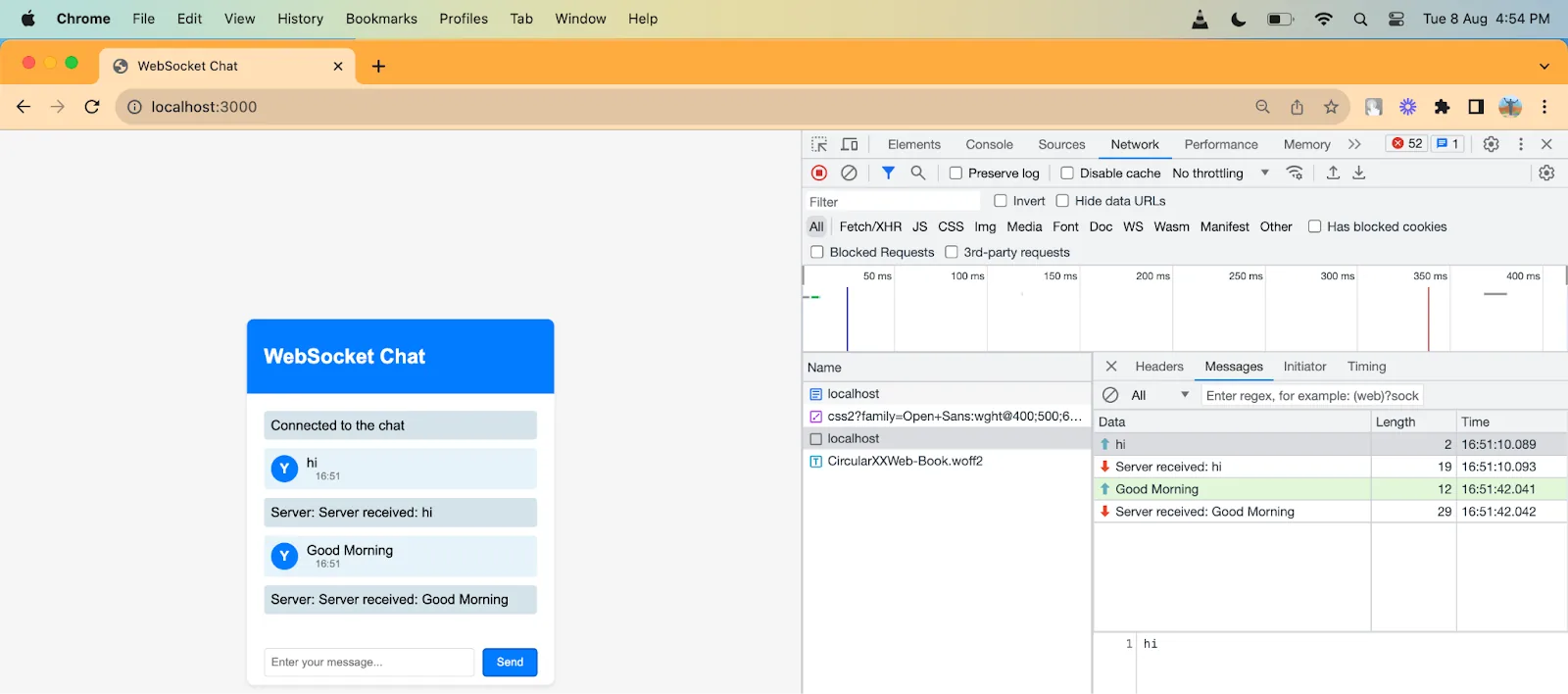
7. Access the User InterfaceOpen a web browser and navigate to http://localhost:3000. You should see the simple UI with an input box and a “Send” button. Messages sent from the UI will be echoed back by the server and displayed on the page.
WebSockets vs. Other Real-Time Options
Before you commit to WebSockets for a project, it’s worth knowing what else is out there, because WebSockets aren’t always the right tool.
HTTP polling is the oldest trick in the book. The client just asks the server “anything new?” every few seconds. It’s dead simple to build and debug, but it wastes bandwidth and adds delay — if something happens right after you poll, the user won’t see it until the next request goes out.
Long polling is a step up. The server holds the request open until it actually has something to send, then the client immediately reopens the connection. It feels closer to real-time, but you’re still paying the overhead of new HTTP requests and headers on every round trip.
Server-Sent Events (SSE) are a good middle ground when you only need one-way updates from server to client — think stock tickers or a live news feed. SSE runs over plain HTTP, reconnects automatically, and is far easier to set up behind proxies and load balancers than WebSockets. Here’s roughly what an SSE endpoint looks like on the server side, just to show how much lighter it is than setting up a full WebSocket server:
javascript
app.get('/updates', (req, res) => {
  res.setHeader('Content-Type', 'text/event-stream');
  res.setHeader('Cache-Control', 'no-cache');
  res.setHeader('Connection', 'keep-alive');

  const interval = setInterval(() => {
    res.write(`data: ${JSON.stringify({ time: Date.now() })}\n\n`);
  }, 2000);

  req.on('close', () => clearInterval(interval));
});
And on the client, there’s no manual reconnect logic to write — the browser does it for you:
javascript
const source = new EventSource('/updates');
source.onmessage = (event) => {
  console.log('Got update:', JSON.parse(event.data));
};
The catch is it’s one-directional; if the client needs to talk back, you’re stuck bolting on separate HTTP calls.
WebSockets win when you genuinely need both sides talking constantly — chat apps, multiplayer games, collaborative editors. If your app is mostly server-to-client with the occasional client message, SSE or even polling might save you a lot of infrastructure headaches.
Securing Your WebSocket Connection
A raw ws:// connection is not encrypted, which means anyone sniffing the network can read every message. In production, you should always use wss://, the encrypted version, the same way you’d use HTTPS instead of HTTP:
javascript
// Instead of this in production:
const socket = new WebSocket('ws://yourapp.com');

// Do this:
const socket = new WebSocket('wss://yourapp.com');
Most hosting providers handle the TLS certificate part automatically once it’s sitting behind something like Nginx or a managed load balancer.
Authentication is another thing people trip over. WebSockets don’t have built-in login screens, so you need to pass some kind of token during the handshake — often a JWT tacked onto the connection URL as a query parameter:
javascript
// Client
const socket = new WebSocket(`wss://yourapp.com?token=${authToken}`);

// Server
wss.on('connection', (ws, req) => {
  const params = new URLSearchParams(req.url.split('?')[1]);
  const token = params.get('token');

  try {
    const user = jwt.verify(token, process.env.JWT_SECRET);
    ws.userId = user.id;
  } catch (err) {
    ws.close(4001, 'Invalid token');
  }
});
Whatever you do, don’t just trust that a connection is legitimate because it made it past your firewall. Validate the token server-side before you let that client send or receive anything meaningful.
It’s also smart to rate-limit incoming messages per connection. Since WebSockets stay open, a misbehaving client (or a malicious one) can hammer your server with messages far faster than a typical HTTP client ever could. A simple token-bucket check on the message handler goes a long way:
javascript
ws.on('message', (data) => {
  if (!ws.rateLimiter.tryConsume()) {
    return ws.close(4008, 'Rate limit exceeded');
  }
  handleMessage(ws, data);
});
Handling Reconnections Gracefully
Networks drop. Phones go into airplane mode. Wi-Fi hiccups on a train. Your WebSocket client needs a plan for when the connection dies unexpectedly, because it will happen more often than you’d like.
The usual approach is exponential backoff: try reconnecting almost immediately, and if that fails, wait a bit longer before the next attempt, then longer again, up to some reasonable ceiling like 30 seconds. Here’s a bare-bones version of what that looks like on the client:
javascript
let reconnectDelay = 1000;
const maxDelay = 30000;

function connect() {
  const socket = new WebSocket('wss://yourapp.com');

  socket.onopen = () => {
    reconnectDelay = 1000; // reset once we're back
  };

  socket.onclose = () => {
    setTimeout(connect, reconnectDelay);
    reconnectDelay = Math.min(reconnectDelay * 2, maxDelay);
  };
}

connect();
This stops a client from hammering your server with reconnect attempts the moment it goes down, which can turn a small outage into a much bigger one.
You’ll also want to think about what happens to messages that were “in flight” when the connection dropped. Some apps queue messages locally and resend them once reconnected; others simply ask the server for anything they missed, using a timestamp or sequence number. Either way, don’t assume the reconnected client’s state matches the server’s — sync it explicitly.
Scaling WebSockets Across Multiple Servers
A single Node.js process handling WebSocket connections works fine for a demo, but real applications usually run behind a load balancer with several server instances. This creates a problem: if client A is connected to Server 1 and client B is connected to Server 2, how does a message from A reach B?
The common fix is a pub/sub layer like Redis. Each server subscribes to relevant channels, and when a message needs to go out, it’s published to Redis rather than sent directly:
javascript
const { createClient } = require('redis');
const publisher = createClient();
const subscriber = createClient();

await subscriber.subscribe('chat-room', (message) => {
  // forward to any locally connected clients in this room
  wss.clients.forEach((client) => {
    if (client.room === 'chat-room' && client.readyState === 1) {
      client.send(message);
    }
  });
});

// whenever a client on this server sends a message:
ws.on('message', (data) => {
  publisher.publish('chat-room', data);
});
Every server picks the message up and forwards it to whichever of its own clients need it. Tools like socket.io with the Redis adapter handle a lot of this plumbing for you, though plain ws can be wired up the same way with a bit more manual work.
You also need “sticky sessions” on your load balancer, so a client’s HTTP handshake and subsequent connection land on the same server instance rather than bouncing around.
Common Pitfalls to Watch For
A few mistakes come up again and again in WebSocket projects. Forgetting to handle the close and error events is a big one — connections that silently die leave your server thinking a client is still there, quietly leaking memory over time. Another is sending huge, unthrottled payloads over a single message instead of breaking data into smaller chunks. And plenty of developers forget that browsers enforce their own limits on concurrent WebSocket connections per domain, which can bite you if you’re opening several sockets from the same page.
Keeping Connections Alive with Heartbeats
Idle WebSocket connections have a habit of dying quietly. A proxy or load balancer somewhere in the middle decides nothing has happened in a while and just drops the connection — no error, no close event, nothing. The fix is a heartbeat: the server pings each client periodically, and if a client doesn’t respond in time, it gets cut loose.
javascript
function heartbeat() {
  this.isAlive = true;
}

wss.on('connection', (ws) => {
  ws.isAlive = true;
  ws.on('pong', heartbeat);
});

const interval = setInterval(() => {
  wss.clients.forEach((ws) => {
    if (ws.isAlive === false) return ws.terminate();
    ws.isAlive = false;
    ws.ping();
  });
}, 30000);
This one small addition catches a huge chunk of the “my users randomly get disconnected” bug reports you’ll otherwise spend hours chasing.
Sending Binary Data Instead of JSON
Most tutorials stick to plain text messages because they’re easy to read in the console, but WebSockets also support binary frames, and for high-frequency data — think multiplayer game state or audio streams — binary is a lot cheaper than JSON. ArrayBuffer and Blob are both supported on the client:
javascript
// Sending a Float32Array of coordinates instead of {"x": 10, "y": 20}
const coords = new Float32Array([10, 20]);
socket.send(coords.buffer);

socket.onmessage = (event) => {
  if (event.data instanceof ArrayBuffer) {
    const view = new Float32Array(event.data);
    console.log(view[0], view[1]);
  }
};
You lose the readability of JSON, but for high-throughput use cases the smaller payload size and faster parsing are usually worth the trade-off.
Testing WebSocket Servers
It’s tempting to test WebSocket code by opening a browser tab and clicking around, but that gets old fast. wscat is a small command-line tool that lets you connect and send messages without any UI:
bash
npm install -g wscat
wscat -c ws://localhost:3000
Once connected, you just type a message and hit enter to send it, and anything the server sends back shows up in the terminal. For automated tests, libraries like ws itself can spin up a real client in your test suite:
javascript
const WebSocket = require('ws');

test('server echoes messages', (done) => {
  const client = new WebSocket('ws://localhost:3000');
  client.on('open', () => client.send('hello'));
  client.on('message', (data) => {
    expect(data.toString()).toBe('Server received: hello');
    client.close();
    done();
  });
});
Testing WebSocket Servers
It’s tempting to test WebSocket code by opening a browser tab and clicking around, but that gets old fast. wscat is a small command-line tool that lets you connect and send messages without any UI:
bash
npm install -g wscat
wscat -c ws://localhost:3000
Once connected, you just type a message and hit enter to send it, and anything the server sends back shows up in the terminal. For automated tests, libraries like ws itself can spin up a real client in your test suite:
javascript
const WebSocket = require('ws');

test('server echoes messages', (done) => {
  const client = new WebSocket('ws://localhost:3000');
  client.on('open', () => client.send('hello'));
  client.on('message', (data) => {
    expect(data.toString()).toBe('Server received: hello');
    client.close();
    done();
  });
});
Choosing a Library: ws vs. Socket.IO vs. uWebSockets.js
Once you’ve built a toy project with the raw ws library, the next question is usually whether you should be using something else for a real product. There are three names that come up most often, and they solve slightly different problems.
ws is what we’ve been using throughout this post — a lean, unopinionated implementation of the WebSocket protocol with almost no extra features. That’s a feature in itself: it’s easy to reason about, and you build exactly what you need on top of it.
Socket.IO wraps WebSockets (and falls back to long polling if a WebSocket connection can’t be established) and adds conveniences like automatic reconnection, room-based broadcasting, and acknowledgements for messages. The trade-off is that it’s not a plain WebSocket connection anymore — a Socket.IO client can only talk to a Socket.IO server, and the extra abstraction adds some overhead.
javascript
// Socket.IO server
const io = require('socket.io')(server);

io.on('connection', (socket) => {
  socket.join('room-42');
  socket.to('room-42').emit('user-joined', socket.id);
});
uWebSockets.js is the other branch of the spectrum that is written in C++. The idea is to get the maximum amount of concurrent connections per process and to meticulously engineer every millisecond of overhead out. It is less forgiving to work with and there are fewer tools and libraries at your disposal, so it is usually only useful once you have identified a particular performance bottleneck that needs to be addressed.
Unless you have a particular need to handle ten thousand concurrent connections or more, you should use ws or even better – Socket.IO.
Broadcasting to Rooms and Channels
A lot of real apps aren’t just one-to-one connections — they’re group chats, live auction rooms, or collaborative documents where a message from one client needs to reach a specific subset of everyone connected. With plain ws, there’s no built-in concept of “rooms,” so you track membership yourself:
javascript
const rooms = new Map(); // roomId -> Set of ws connections

function joinRoom(ws, roomId) {
  if (!rooms.has(roomId)) rooms.set(roomId, new Set());
  rooms.get(roomId).add(ws);
  ws.roomId = roomId;
}

function broadcast(roomId, message, exclude) {
  const members = rooms.get(roomId);
  if (!members) return;
  members.forEach((client) => {
    if (client !== exclude && client.readyState === 1) {
      client.send(message);
    }
  });
}

wss.on('connection', (ws) => {
  ws.on('close', () => {
    rooms.get(ws.roomId)?.delete(ws);
  });
});
This is the same idea Socket.IO’s .to(room).emit(...) gives you for free, just spelled out manually. If you’re scaling across multiple servers with the Redis approach from earlier, room membership needs to be tracked per-server, but the broadcast message itself still goes out over the shared pub/sub channel.
Reducing Bandwidth with Compression
Text-based messages, especially JSON with repeated key names, compress well. The WebSocket protocol supports this through an extension called permessage-deflate, and most libraries will negotiate it automatically if you let them:
javascript
const wss = new WebSocket.Server({
  server,
  perMessageDeflate: {
    zlibDeflateOptions: { level: 6 },
    threshold: 1024, // only compress messages bigger than 1KB
  },
});
It’s worth being deliberate about the threshold. Compressing every tiny message actually costs more CPU than it saves in bandwidth, so only bothering above a size cutoff — a kilobyte is a reasonable starting point — tends to be the sweet spot. If you’re already sending binary data as described earlier, compression usually won’t help much since binary payloads are typically already dense.
Monitoring Connections in Production
Once a WebSocket server is live, “is it working?” becomes a harder question than it is for a regular REST API, because there’s no request/response cycle to log and measure. A few numbers are worth tracking from day one: how many connections are currently open, how many are opening and closing per minute, and how long the average connection stays alive.
javascript
let activeConnections = 0;

wss.on('connection', (ws) => {
  activeConnections++;
  metrics.gauge('ws.active_connections', activeConnections);

  ws.on('close', () => {
    activeConnections--;
    metrics.gauge('ws.active_connections', activeConnections);
  });
});
A sudden drop in active connections across all your server instances at once is usually a strong signal something upstream broke — a load balancer misconfiguration, an expired certificate, or a bad deploy — well before users start filing tickets about it.
Designing a Message Protocol
It’s easy to start a WebSocket project by just sending raw strings back and forth, but that gets messy fast once you have more than one type of message. Most production apps settle on a small envelope format early on, something like a type field plus a payload:
javascript
// Instead of ambiguous raw strings, wrap every message:
ws.send(JSON.stringify({
  type: 'chat.message',
  version: 1,
  payload: { text: 'hey there', roomId: 'room-42' },
}));

// Then dispatch on the server based on type:
ws.on('message', (raw) => {
  const { type, payload } = JSON.parse(raw);
  switch (type) {
    case 'chat.message': return handleChatMessage(ws, payload);
    case 'chat.typing': return handleTyping(ws, payload);
    default: ws.send(JSON.stringify({ type: 'error', payload: 'unknown type' }));
  }
});
Including a version field from the start costs almost nothing and saves a lot of pain later, since it lets you change the shape of a message type without breaking clients that haven’t updated yet.
Browser Support and Fallbacks
WebSockets are supported by most browsers for more than 10 years. The issue is not in browsers but in the infrastructure between browsers and your web service. Corporate proxies, old enterprise firewalls, and some antivirus software traditionally block establishing WebSocket connections by either refusing to upgrade the connection or silently downgrading it. It is the reason why Socket.IO and others use a long polling transport as a fallback.
It is not a problem for the average consumer app, but if your app is supposed to work in an enterprise environment, you have to test it on such infrastructure, as it is out of your control.
Understanding WebSocket Close Codes
When a WebSocket connection is closed, it is specified with a numeric code to indicate the reason for the closure. Many developers ignore this value completely, and handle all closed connections in the same way. However, this is generally not a good idea, as the codes often describe exactly what happened in a human readable form.
A code 1000 indicates a normal closure, with no further explanation needed. Codes in the 1001-1015 range are reserved for the protocol itself, and indicate various issues ranging from the server going away, to a protocol error occurring, or the message being too big. From 4000 onwards the codes are free for us to specify, which is why we ended up using 4001 and 4008 in our previous example, to indicate authentication failures and rate limiting respectively. Creating a simple lookup table with custom codes and their meanings will save you hours of debugging and sifting through server logs.
Debugging in the Browser
Most developers reach for console.log scattered through their onmessage handler when something isn’t working, but browser DevTools actually have dedicated WebSocket inspection built in. In Chrome, the Network tab has a filter for WS connections, and clicking into an open connection shows you every frame sent and received, with timestamps, in the order they happened. Firefox’s Network Monitor has the same capability under its own WS filter.
This is worth knowing about early, because it saves you from adding and removing logging statements every time you’re chasing down a message that never arrived, or trying to figure out whether a message actually left the client at all versus got lost somewhere on the way to the server.
Conclusion
WebSockets solve a specific problem well: keeping two sides of a connection talking to each other in real time without the overhead of constantly reopening HTTP requests. That’s genuinely powerful for chat apps, multiplayer games, collaborative tools, and live dashboards, but it’s also easy to reach for them out of habit rather than actual need.
The core protocol itself is simple — open a connection, exchange frames, close it when you’re done — but everything around that core is where the real engineering happens. Securing the handshake, handling reconnections gracefully, keeping idle connections alive, scaling across multiple servers, and picking the right library all matter far more in practice than the initial “hello world” example ever suggests. None of it is complicated on its own, but it adds up, and skipping any one piece tends to show up later as a support ticket instead of a code review comment.
If there’s one thing worth taking away from all of this, it’s to match the tool to the problem. Not every feature that updates needs a persistent connection, and not every persistent connection needs the full weight of a library like Socket.IO. Start simple, understand what you actually need before you build it, and layer in complexity — authentication, heartbeats, scaling, compression — only once your app’s real usage patterns tell you it’s necessary.