- 1 Serverless Computing with AWS Lambda: AWS Lambda enables running functions without requiring a server to be managed. This service for everything related to infrastructure making it great for data crunching, API handling, and AWS service integration while only getting billed for actual compute usage.
- 2 Scalability and Cost-Efficiency: Lambda functions are stateless and spawn into separate process containers and they scale as necessary. This helps to significantly minimize operational overhead and expenses since users are charged based on the amount of resource used in the function’s execution.
- 3 Versatile Use Cases and Integration: AWS Lambda supports a number of programming languages and well autops with other AWS products. This makes it suitable for use in a number of tasks, some of which include API backends, real-time data crunching, and integration, among others; making it a good one-size-fits-all solution for the modern scalable and cost efficient cloud computing needs.
Introduction to Serverless Computing:
Amazon Web Services (AWS) provides the serverless computing service named AWS Lambda. By uploading function – executable files written in one of the supported languages and runtimes, the user receives the ability to execute them quickly and efficiently. Hosting any service on AWS Lambda is possible since the Lambda function can perform various tasks: from the simplest, such as displaying a webpage or processing an API request, to complex ones involving interaction with other AWS services. The term “serverless computing” refers to the fact that to perform these tasks, one does not have to maintain servers for their own use. Using the fully managed AWS Lambda service, one does not have to maintain the infrastructure, which does not mean that there is no server at all.
Working of AWS Lambda
Each Lambda function is executed in a separate container. AWS Lambda uses sets of computers to execute new functions, which are divided into isolated containers for each function. The amount of RAM and CPU is allocated to each function before execution begins. The total amount of memory allocated is multiplied by the time of function execution to calculate the cost of execution.
AWS takes care of the entire infrastructure at the backend; thus, the user has minimal control and does not need to worry about the inner workings of the system. At the same time, using the serverless solution, one can save time on infrastructure management. Although the ability to manage the infrastructure is limited, maintaining code becomes more manageable because the environment is controlled. Another advantage of using AWS Lambda is that one can execute multiple instances of the same function or different functions belonging to one account simultaneously. Moreover, these instances will run concurrently regardless of the time of day/week, and the user will only be billed for the actual computation time spent.
Thus, developing highly scalable applications using AWS Lambda is an attractive idea because the number of parallel function instances can be expanded without any limitations on the server side. Since AWS Lambda is fully managed, one can avoid spending time on infrastructure management while enjoying the high scalability of the serverless solution.
Importance of AWS Lambda in Serverless Architecture
AWS Lambda is an integral part of the serverless architecture, as it provides the necessary functions that allow one to write programs running on the serverless platform. Being one of the three pillars of serverless architecture, AWS Lambda allows one to implement the following advantages of the serverless solution:
- Event-driven: AWS Lambda allows one to execute functions in response to events, thereby obtaining a pay-per-use model.
- Scalability: AWS Lambda allows one to scale the application automatically, which makes it possible to achieve high performance levels.
- Security: AWS Lambda provides a highly secure environment for executing functions.
- Cost-saving: Using AWS Lambda, one can benefit from the pay-per-use pricing model, being able to consume only the resources that one actually needs.
- Integration: The AWS Lambda service supports event sources, allowing one to build highly scalable API-driven applications.
The ability to use AWS Lambda in serverless architecture is especially attractive because of the various programming languages and runtimes supported by the service. Thus, writing code for Lambda functions can be done in the language of one’s choice so that subsequent implementation of the serverless solution is convenient and quick. The importance of AWS Lambda in the serverless architecture is difficult to overestimate since it is a versatile and powerful tool that allows one to implement many useful functions.
Common use cases for AWS Lambda
Thanks to its unique architecture,
AWS Lambda can be used in many ways to gain significant advantages over conventional cloud computing. Some of the most common use cases for AWS Lambda include the following:
- API backends: AWS Lambda can be used to build serverless API backends.
- Real-time data processing: Using AWS Lambda, one can process real-time data streams coming from various sources, for example, from social networks or financial markets.
- Batch processing: AWS Lambda can be used to process batches of data of considerable size, for example, log files or customer data.
- File processing: Using AWS Lambda, one can process files stored in Amazon S3.
- Image and video processing: AWS Lambda can be used to process images and video files, for example, by resizing or converting them.
- Chatbots: AWS Lambda can be used to implement chatbots that interact with customers in real-time.
- IoT device management: AWS Lambda can be used to manage IoT devices, for instance, by sending commands to them.
- Machine learning: AWS Lambda can be used to perform machine learning algorithms on data in the cloud.
- Cron jobs: Using AWS Lambda, one can implement cron jobs, that is, schedule the execution of functions at specified times.
Task automation in AWS Lambda
There are many tasks that can be automated with AWS Lambda, for example:
Data processing: AWS Lambda can be used to process streaming and batch data from many sources, including IoT devices, social networks, and financial markets.
Reporting: Using AWS Lambda, one can create reports based on data stored in many sources, for example, in DynamoDB, S3, or RDS.
Notifications: AWS Lambda can be used to send push notifications to users’ mobile devices or SMS messages or emails.
Infrastructure management: AWS Lambda can be used to manage the infrastructure, for example, by managing EC2 instances, Auto Scaling groups, or S3 buckets.
Including other services in an integration: AWS Lambda can be used to integrate external services and other AWS services.
Process For Creating AWS Lambda Function
1: Login into your AWS account and click on “Sign in to the Console.”
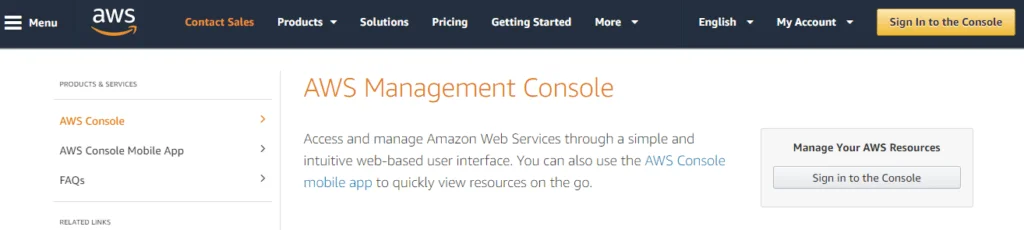
2: Enter your login ID and password.
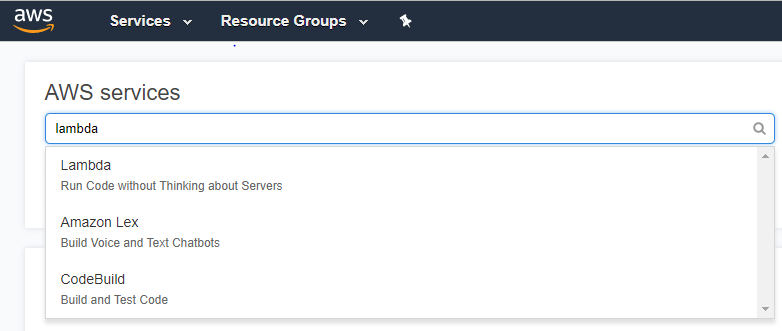
3: Select Lambda under “AWS Services”
4: Click on “Create Function”

5: Select options and click on “Create Function” button
- Function type: Author from scratch
- Name : lambdaBlog
- Runtime: Node.js 10.x
- Role: Choose an existing role / Create any custom rule
- Existing Role: lambda_basic_execution
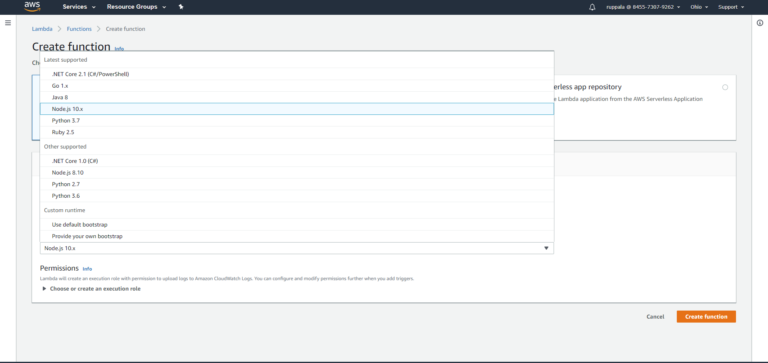
6: Now you will be able to see the following screen. Choose a method of uploading/creating code in the lambda function.
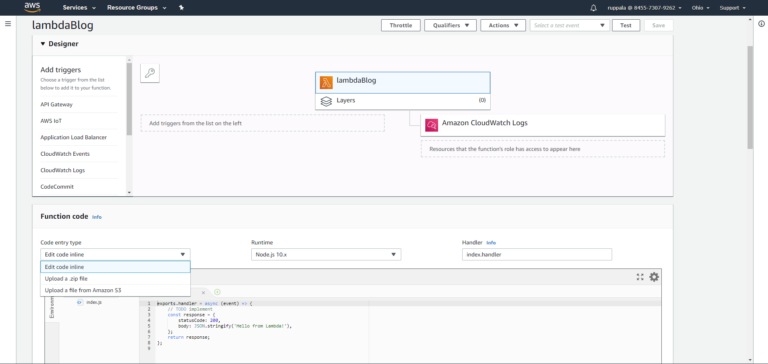
7: Now you can write your code in the given editor as we chose Nodejs as our runtime.

8: Handler name should be the same as our function name so that AWS knows which function to run.
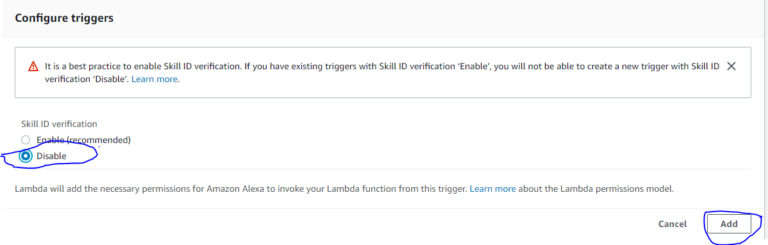
9: We can add more options like execution timeout, environment variables, tags to group out our other functions, memory etc.
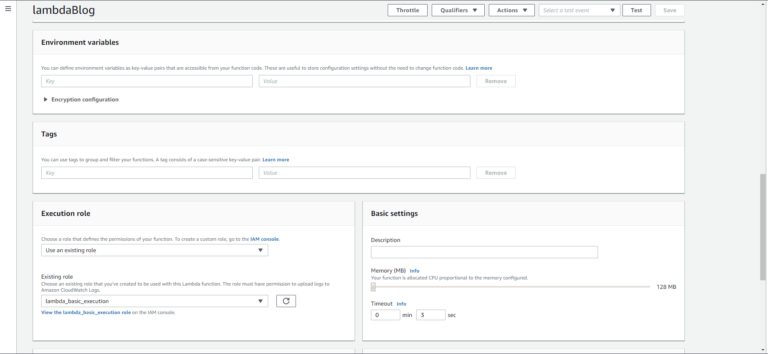
10: Click “Save.”
Things to Keep in Mind before Using AWS Lambda Essay
After creating your first Lambda functions, there are a few things to keep in mind to avoid several headaches on your way to full-scale development.
Firstly, be prepared for cold starts. If your function is resource-heavy, consider provisioned concurrency to avoid unexpected delays on the production environment. Although infrequent, cold starts are normal for Lambda functions as AWS needs to boot a server with a fresh copy of your application to handle the request.
Lambda functions also have a limit to how long they can run. If you have operations that take a lot of time, it is better to offload them to a different service, Step Functions, for example, rather than exceeding the limit. If you are unsure about the required time for a specific task, set up a test environment and measure the time needed. Lastly, consider that the bigger the function’s memory, the higher the price, but the faster it will perform some operations. It is recommended to do some tests with different memory sizes for your Lambda functions and set the acceptable size for the given amount of operations.
Logging and debugging are also very important, especially when functions run on production. Since you do not have servers to check the status of, the best way to do it is to set up CloudWatch monitoring and logging in the beginning. It will make your debugging sessions exponentially easier than trying to guess what went wrong by the end result of your function.
The size of the function body and libraries is something to consider as well. The bigger the file, the longer it takes to upload and process in the runtime environment. It will also prolong the cold start time, which should be minimized for Lambda functions. It is critical to optimize dependencies and only include necessary libraries to reduce the size as much as possible.
And finally, think about future-proofing your codebase by not relying solely on AWS services. While Lambda functions are very convenient and scalable, using them exclusively can make maintenance and operations difficult if you ever decide to migrate to a different cloud provider. It is better to plan ahead and set aside budget and time for such operations in the future. This way, you will have a clearer vision of what to do when the time comes.
Conclusion
The serverless architecture of AWS Lambda frees developers from managing infrastructure, enabling them to concentrate entirely on writing code. This approach is cost-effective and resource-efficient, which is critical for custom financial software development, where optimizing operational expenses is crucial. Similarly, in healthcare software development, the event-driven nature of AWS Lambda ensures that code runs only when absolutely necessary, making it ideal for software development in healthcare applications that need to be responsive and cost-efficient.
Moreover, AWS Lambda’s support for JavaScript (Node.js) is advantageous for a wide range of tasks, including cross-platform mobile app development services, which often require versatile and fast runtime environments. For quality assurance, Lambda can be utilized in QA software testing services, integrating seamlessly with the development pipeline.
As an essential component of the AWS ecosystem, AWS Lambda offers a comprehensive platform for creating and implementing cloud applications, making it valuable for banking software development companies, travel software development companies, and financial software development services. Its compatibility with custom software development and APIs is a major asset, and it seamlessly integrates with custom enterprise software development projects. Additionally, for iOS and Android app development services, Lambda provides the scalability and flexibility needed to handle various workloads.
AWS Lambda is an attractive option for businesses seeking offshore development teams, as it reduces the complexity of software development and allows for the efficient deployment of dedicated offshore developers. Its compatibility with various programming languages, including Java, Ruby on Rails, and Python, makes it an ideal choice for software development companies, whether they’re in need of nearshore software development or offshore software development services.
In conclusion, AWS Lambda is a versatile, cost-effective, and scalable serverless computing service that is highly compatible with various industries and use cases, making it an integral part of modern software development and deployment.