- 1 With the help of CI/CD integrated with Azure DevOps, building, testing and deploying of code changes occur in an automated manner and is suitable for several industries including finance and healthcare for guaranteeing effective integration and release of codes.
- 2 The work of CI and CD pipelines in Azure DevOps consist in creation of a project in Azure DevOps, setup of YAML pipeline for build and deployment and deployment handling into Azure App Service with productivity increasing and reliable deployment for various purposes in applications.
- 3 The Matrix Azure Strategy for Task Management on the other hand works towards enhancing the process of handling tasks within all the development phases along with teams, in a way that helps in increasing the speed of the delivery while also helping to enhance the quality of the software across the business domains.
Introduction:
In today’s software development landscape, the integration of Continuous Integration and Continuous Deployment (CI/CD) has evolved from a good practice to an essential component for ensuring software quality, stability, and rapid delivery. Azure DevOps, a comprehensive suite of tools offered by Microsoft, stands as a cornerstone for automating these crucial processes, enabling seamless deployment to Azure App Service. This guide aims to serve as a detailed walkthrough in streamlining processes to achieve operational excellence, illustrating the setup and implementation of CI/CD pipelines for deploying a web application to Azure App Service utilizing DevOps, Also read about Azure DevOps matrix strategy because it shortens your code and generates jobs in pipeline.
Section 1: Understanding CI/CD and Azure DevOps
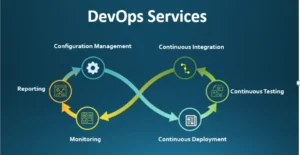
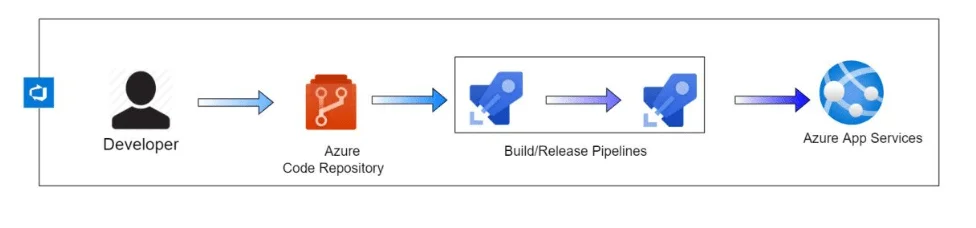
Continuous Integration (CI) emphasizes the automation of building, testing, and validating code changes, ensuring that new modifications integrate smoothly with existing code without introducing errors. Conversely, Continuous Deployment (CD) automates the release of thoroughly validated code into production environments, accelerating the delivery cycle and minimizing manual interventions. Azure DevOps, a comprehensive DevOps platform, offers a suite of integrated tools—Repos for source code management, Pipelines for CI/CD automation, Boards for work tracking, Artifacts for package management, and Test Plans for testing creating a cohesive environment for streamlined software development. This holistic approach caters not only to Android app agencies, Android application development services, and Android apps development companies but also to a diverse array of industries and domains seeking efficient software delivery mechanisms.
Section 2: Setting Up Your Environment
Creating Azure App Service:
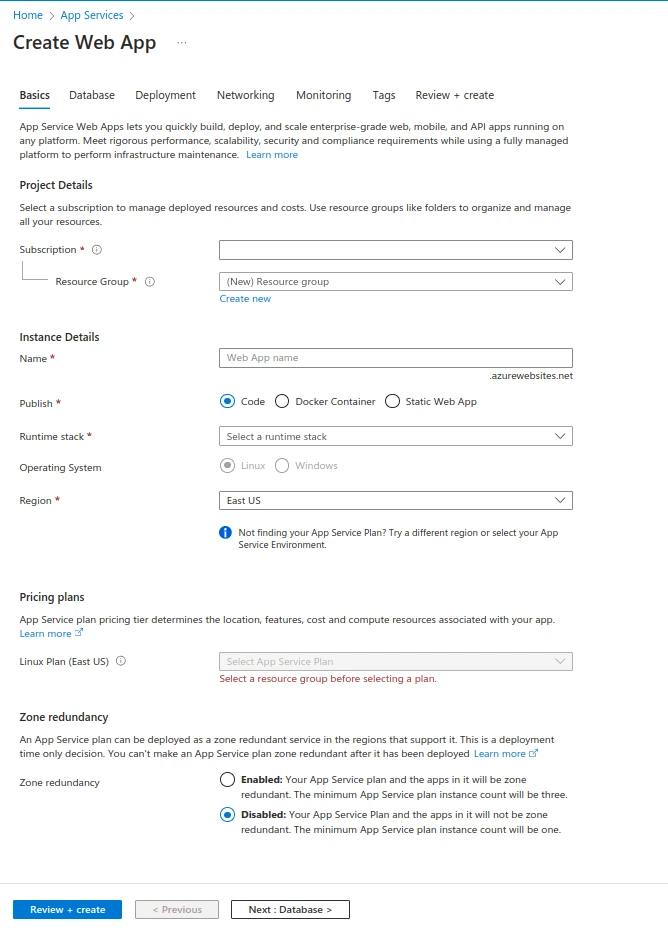
Commence by accessing the Portal using your credentials. Follow these sequential steps to set up the Azure App Service:
- Navigate to “Create a resource.”
- Search for “App Service” and select it.
- Fill in essential details such as the App name, Subscription, Resource Group, OS, Runtime stack, Region, and App Service plan configuration. This adaptable setup accommodates the unique requirements of varied industries, including banking software development companies and business software development entities.
Section 3: Configuring CI Pipeline
Azure DevOps Project Setup:
Prepare Azure DevOps for CI pipelines by following these essential steps:
Sign in to Azure DevOps and select the relevant project.
- Create a new service connection under Project Settings > Service connections. This step is particularly advantageous for banking software development companies and healthcare software development initiatives seeking a secure and robust integration environment.
CI Pipeline Configuration (YAML Example):
Section 4: Implementing CD Pipeline
Azure DevOps Pipeline Setup:
Establishing the CD pipeline for deployment involves these pivotal steps:
- Create a New Pipeline by navigating to Pipelines > New Pipeline and selecting your repository (e.g., GitHub or Azure Repos).
CD Pipeline Configuration (YAML Example):
Managing Secrets and Environment Variables Securely
The YAML examples above actually include a service connection and an application name which is probably fine for demo purposes, but not something you’d want to actually check into your production pipeline. Using Azure DevOps you can actually create variable groups (under Pipelines > Library) where you can define your connections strings or other keys which can then be referenced by name in your YAML, but not actually present in the repo itself. You can even sync’ed those to Azure Key Vault which is a more secure option which stores the information elsewhere than your Azure DevOps instance.
It’s also worth pointing out that most people who actually do this are probably doing it wrong anyway. The reason for putting variables in the pipeline and declaring them secret is because the values aren’t actually visible in the logs or UI. The actual recommended practice for anything that’s even slightly secure is to make use of Key Vault and give your service connection to Azure DevOps access to it (probably scoped down). It’s much easier to justify the security practices if you’re working in an environment which requires compliance with regulatory standards, especially if you have to report on it.
Section 5: Deploying to Azure App Service
Save Changes and Run Pipeline:
- Ensure to save your pipeline configurations within DevOps. Trigger manual runs or commit changes to the configured branch to activate the pipeline a crucial step for software development contractors and dedicated offshore developers.
Monitor Deployment:
- Monitor the Azure DevOps interface for successful pipeline execution, verifying a seamless deployment to cater to the diverse needs of offshore development teams and outsourced development services.
Common Pipeline Failures and How to Diagnose Them
A pipeline that worked yesterday and fails today is one of the more common frustrations teams run into, and most failures fall into a small number of categories. A service connection that’s lost its authorization — often because a certificate or client secret backing it expired — shows up as an authentication failure at the deployment step, even though the YAML itself hasn’t changed. Checking the service connection’s validity under Project Settings is usually the fastest first step when a previously working deployment suddenly fails at that stage.
Artifact path mismatches are another frequent cause, particularly after a build tool or project structure changes and the pathtoPublish or packageForLinux values in the YAML no longer point to where the build actually places its output. The pipeline logs will usually show a file-not-found style error at the deployment task, which is the signal to check the artifact path against the current build output rather than assuming the deployment task itself is broken.
A third category, agent pool exhaustion, shows up as pipelines queuing for an unusually long time rather than failing outright — worth checking under Organization Settings > Parallel jobs if multiple pipelines across a team are competing for the same limited agent capacity.
Rollback Strategies for Azure App Service Deployments
A deployment pipeline is only half the equation if there’s no plan for what happens if that deployment results in a regression. Azure App Service has a great feature called deployment slots. With deployment slots, you can deploy to a staging slot and then “swap” your slot into production, as opposed to deploying directly to production. The same slot feature can be used to swap back if (or rather, when) something goes wrong, which typically takes less time than having to roll back a pipeline.
For teams not yet using slots, Azure DevOps keeps a history of successful deployments, and you’re able to rerun a previous successful pipeline, but that’s typically slower than a slot swap and takes the app down briefly in the process. Whatever your rollback plan is, it’s important to test it, if only so that you’re not figuring out your rollback plan for the first time in the middle of a problem.
Setting Up Approval Gates for Production Deployments
Not every deployment should be fully automated, at least not in production. Azure DevOps environments allow for approval checks (under Pipelines > Environments) that pause a deployment at a given stage until it has been manually approved by a designated individual or group. An approval gate is different from a branch policy in that it specifies what can be deployed (even if the code has been merged and built successfully).
A common setup is to have automatic deployment to a staging or dev environment, but require an approval before the same build can be promoted to production. This provides a team with a final human checkpoint without slowing down the pipeline, and also gives an audit trail of who approved what and when, which can be important for regulated industries. Approval gates can also be combined with branch control checks, so that only builds from particular protected branches are eligible to even pass through the approval gate.
Monitoring Pipeline Health Over Time
A pipeline that works today can degrade gradually in ways that aren’t obvious from a single run. Build times can creep upward as a codebase grows without anyone noticing until a routine build that once took five minutes takes twenty. Azure DevOps provides pipeline analytics under the Pipelines section, showing trends in run duration, pass/fail rates, and failure frequency by stage over time, rather than just the outcome of the most recent run.
Reviewing this data periodically, rather than only when something breaks, tends to surface problems earlier — a test stage whose duration has been slowly climbing over several weeks is often the first sign of a dependency or test suite issue worth investigating before it becomes a larger bottleneck. Teams that only look at pipeline health reactively, after a failure, tend to miss the slower degradation that eventually causes one.
Azure DevOps Matrix Strategy
The Azure DevOps Matrix Strategy maximizes Microsoft’s Azure DevOps platform to streamline software development. It uses a matrix structure to manage tasks across development stages, teams, and features. This method allows efficient progress tracking, resource allocation, and dependency management. It boosts collaboration, increases visibility into the development cycle, and speeds up the delivery of high-quality software.
The Azure DevOps Matrix Strategy maximizes Microsoft’s Azure DevOps platform to streamline software development. It uses a matrix structure to manage tasks across development stages, teams, and features. This method allows efficient progress tracking, resource allocation, and dependency management.
In practical YAML terms, a matrix strategy lets a single job definition run multiple times with different variable values substituted in, rather than duplicating the same job block repeatedly. This is most commonly used for testing a build across multiple configurations — different operating systems, different runtime versions, or different regional settings — without writing a separate job for each combination. A test job that needs to run against three Node.js versions, for instance, can be defined once and run three times in parallel through a matrix, with the pipeline reporting results for each version separately.
This boosts collaboration, increases visibility into the development cycle, and speeds up the delivery of high-quality software, particularly for teams whose applications need to support more than one runtime or platform configuration simultaneously.
Conclusion:
Establishing CI/CD pipelines via Azure DevOps for App Service revolutionizes software development. It enhances deployment efficiency, speeds up software delivery, and ensures reliability across industries like finance, healthcare, and travel. DevOps adapts to diverse industry needs, streamlining processes for operational excellence.