


- 1 Migration Benefits: Moving from FCM Legacy to HTTP v1 also adds reliability, security and offers more features at the same time. HTTP v1 used to support OAuth 2. 0 for secure communication and also has some characteristics such as the ability to batch messages.
- 2 Updated Implementation: When transitioning to HTTP v1, there are some modifications like structure of payloads, shift in endpoints, and changes in the methods of authentication. Some of the known methods for proper handling of responses and errors will be discussed below.
- 3 Secure Credential Storage: Storing FCM credentials in Salesforce Custom Metadata Types is safe and convenient at the same time. This helps in appealing the problem of hard-coding of sensitive information and makes security consistent across environments.
FCM, or Firebase Cloud Messaging, has always been a leading choice for reaching your users with notifications and messages regardless of the platform. Nevertheless, the technology is not limited to communication methods; instead, the methods and protocols are also moving along with the evolution of the technology. Hence, following the development, HTTP v1 is implemented instead of the IPv0 FCM. Replacing the old protocol with a new one will help us to reach higher reliability, better security, and, at the same time, include some extra functions. In this blog, we will discuss migration of legacy FCM to HTTP v1 using apex in salesforce.
Why Migrate to HTTP v1?
Migrating to HTTP v1 offers several compelling advantages:
- Improved Reliability: HTTP v1 uses the channels with greater stable performance for reliability in delivering the messages to the FM servers that are Cloud Messaging.
- Enhanced Security: HTTP v1 is focusing on authentication that is using OAuth 2.0, in order to ensure secure interaction of Salesforce environment and FCM servers.
- Support for New Features: HTTP v1 creates new features: the message batching , by using it, the transmission of multiple messages in a single data package helps expedite such processes.
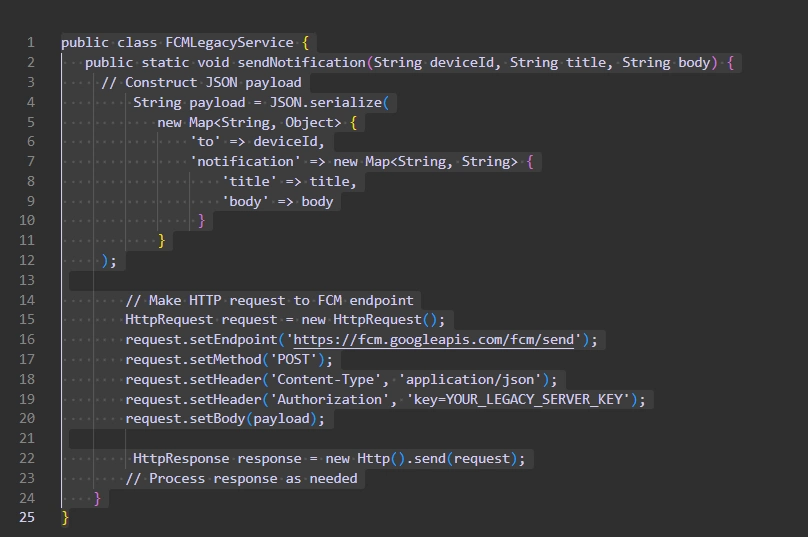
Sending Push Notification using the FCM Legacy
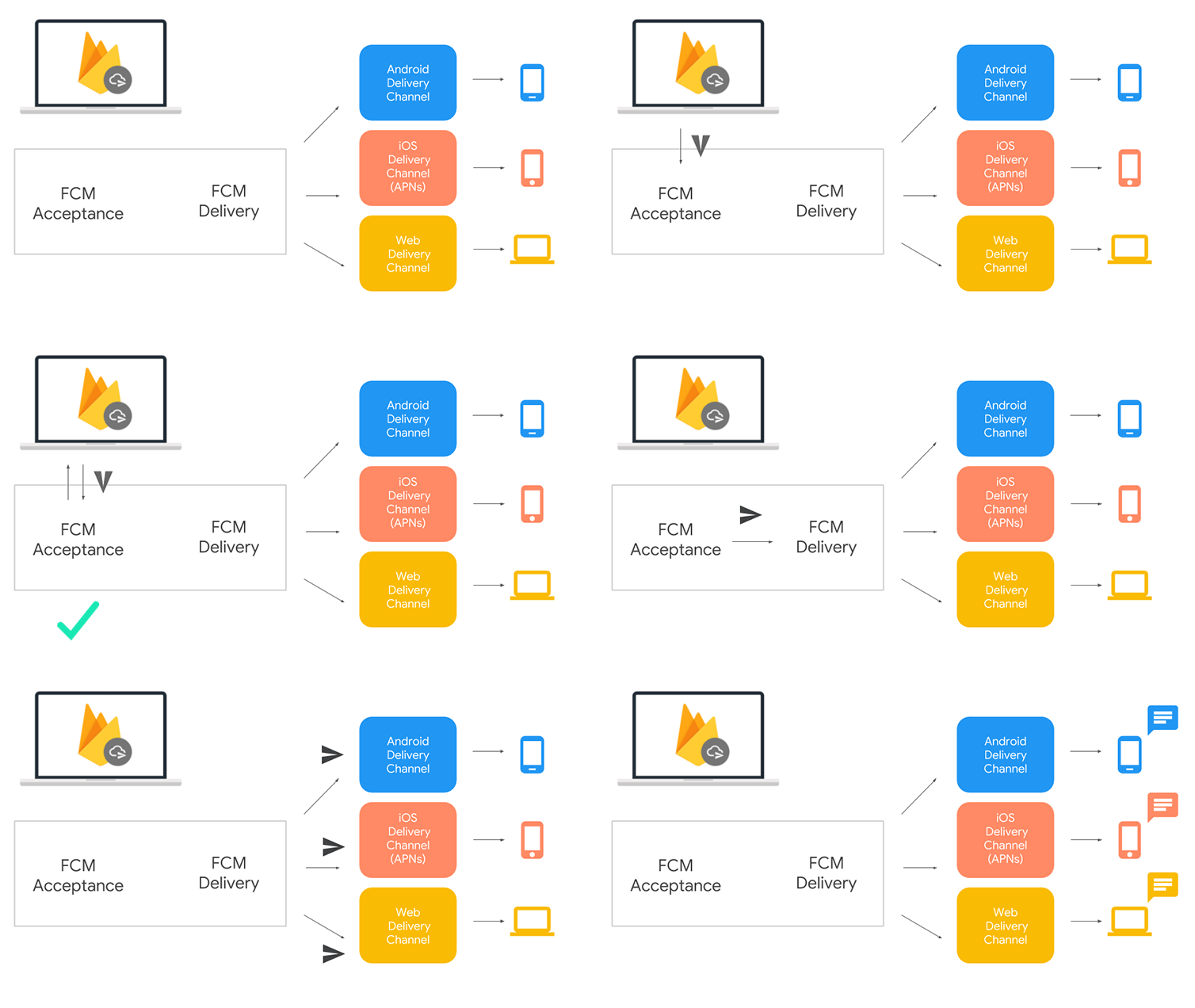
Currently, developers comprising the FCM Legacy team place the JSON containing the packet of necessary details, for instance, the recipient’s device ID, within the phone’s device memory. The device ID is identified through settings, under a hidden ID field. And it sends an HTTP request to the FCM endpoint (HTTP includes appropriate headers and payload) with the content above
Here’s a simplified example of how notifications might have been sent using FCM Legacy in Salesforce Apex:
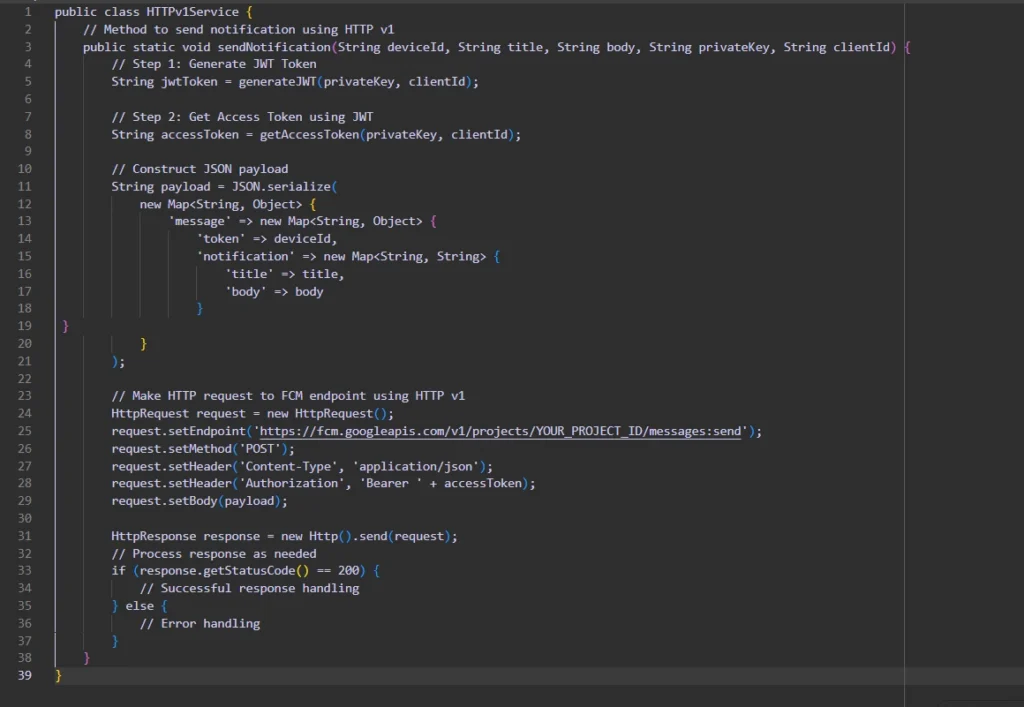
Migrating to HTTP v1
In order to migrate from FCM Legacy to HTTP v1, we have to perform different sets of variation to the implementation, for example payload structure adjustment, endpoints adjustment, authentication/authorization method changing and response/error handling.
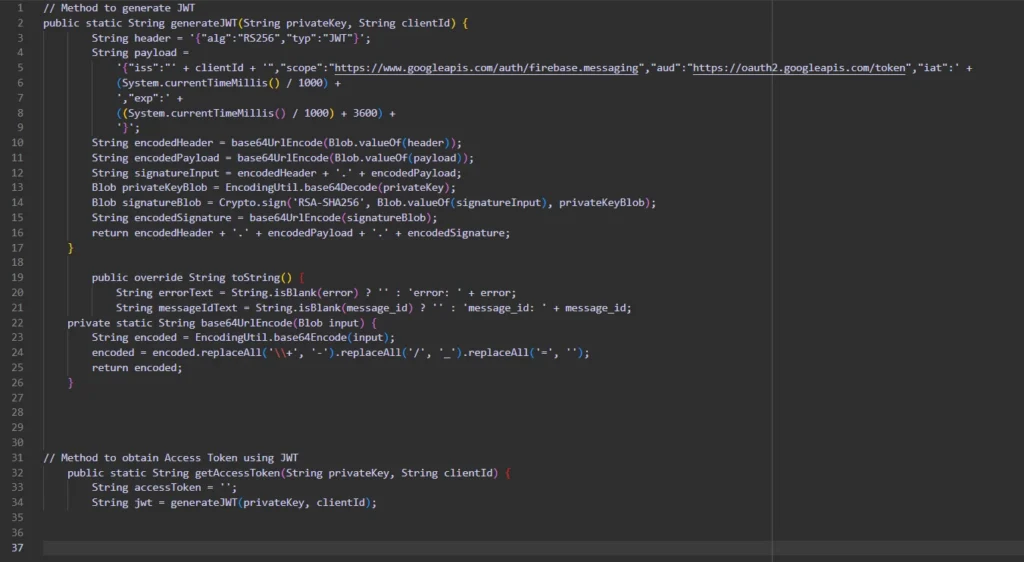
Methods to generate JWT and Access Token
Here are the methods that you can use to generate the JWT and Access token required for the FCM HTTP V1 API:
Comparing Changes:
Here’s a comparison of changes between FCM Legacy and HTTP v1:
| FCM Legacy | HTTP v1 | |
| Payload Structure | { “to”: “DEVICE_ID”, “notification”: { “title”: “Title”, “body”: “Body” }} | { “message”: { “token”: “DEVICE_ID”, “notification”: { “title”: “Title”, “body”: “Body” } }} |
| Endpoint | https://fcm.googleapis.com/fcm/send | https://fcm.googleapis.com/v1/projects/YOUR_PROJECT_ID/messages:send |
| Authorization | key= YOUR_LEGACY_SERVER_KEY | Bearer YOUR_ACCESS_TOKEN |
| Response | { “multicast_id”: 1591429548771005280, “success”: 0, “failure”: 2, “canonical_ids”: 0, “results”: [ { “error”: “NotRegistered” }, { “error”: “NotRegistered” } ]} | On Success:{ “name”: “projects/[your-project-id]/messages/[messageId]” } On Failure:{ “error”: { “code”: 401, “message”: “Request had invalid authentication credentials. Expected OAuth 2 access token, login cookie or other valid authentication credential. See https://developers.google.com/identity/sign-in/web/devconsole-project.”, “status”: “UNAUTHENTICATED” }} |
Custom Metadata for Storing Credential
Keeping your credentials private is very recommended both project id, client id in particular private key securedly. To fulfill this objective while using Salesforce, Custom Metadata Types which help to create new, descriptive types and thereby increasing the information much more. With Custom Metadata Types storage and managing the custom data can be done seamlessly without any deployment issues when working between environments.
To store the credentials in Custom Metadata:
- 1. Define Custom Metadata Type:
- Go to Setup > Custom Metadata Types.
- Let us create a new Custom Metadata Type like “FCM_Settings”.
- Define the fields <br> <i>for <br> project ID, client ID and private <br> key</i><br>
- 2. Store Credentials:
- Set a new space for “FCM_Settings” that the custom metadata type will be used.
- In the fields please fill out the website, which address it is located and the phone number it has.
- 3. Retrieve Credentials in Code:
- Investigate Apex to declare the Custom Metadata records and pull the credentials as necessary.
Here’s an example of how to retrieve credentials in Apex:
| FCM_Settings__mdt firebaseConfig = [ SELECT Client_Id__c, Private_Key_HTTP_V1__c, Project_Id__c FROM FCM_Settings__mdt LIMIT 1 ]; String privateKey = firebaseConfig.Private_Key_HTTP_V1__c; String clientId = firebaseConfig.Client_Id__c; String projectId = firebaseConfig.Project_Id__c; |
// Query Custom Metadata records
Use Custom Metadata to store the password instead of hard-coding so that any malicious person who views the code cannot access it.
Conclusion
Migrating from FCM Legacy to HTTP V1 in Salesforce Apex is crucial for utilization of the latest features, making the system more reliable and secured. Bearing this in mind, through implementation of the steps described in this blogpost and editing your code according to the requirements, you would successfully update your HTTP v1 and easily send stimulating notifications to your users with a sense of confidence. Anyway, through the use of the Custom Metadata Types to store the credentials the information is going to be securely managed within the Salesforce platform.