- 1 SonarCloud Benefits: SonarCloud is used in improving code quality by offering code analysis, security and code duplication features that are run at regular intervals.
- 2 Code Coverage Importance: Automated tests high code-coverage is the significant factor in achieving team’s goal of delivering high-quality, reliable software with fewer bugs.
- 3 Effective Testing: This approach of writing extensive, behaviour-based, and individual test cases reaps the most from SonarRules’ feedback and bolsters the code resilience.
Introduction to SonarCloud Analysis:
SonarCloud is a powerful code quality and analysis platform that helps developers maintain clean, maintainable, and bug-free code. One important aspect of code quality is code coverage, which measures the percentage of code lines covered by automated tests. In this blog post, we will explore how to enable code coverage and write effective test cases for SonarCloud analysis.
Code quality is a critical aspect of software development. It not only ensures that your software functions as expected but also makes it easier to maintain and scale. One of the powerful tools in this regard is SonarCloud, a cloud-based platform that provides continuous inspection of your codebase for potential issues and vulnerabilities. However, to get the most out of SonarCloud, you need to ensure that you have sufficient code coverage and well-written test cases. In this blog, we will discuss how to enable code coverage and write effective test cases to improve your SonarCloud analysis.
What is SonarCloud?
SonarCloud is a cloud-based version of SonarQube, a widely-used code analysis tool. It offers a range of features that help developers maintain code quality, including:
- Code Quality Analysis: It analyzes your codebase to identify issues, code smells, and potential bugs.
- Security Analysis: It checks your code for vulnerabilities, which is crucial for protecting your applications against security threats.
- Code Duplication Detection: Identifies and highlights duplicated code, which can be a source of maintenance nightmares.
- Code Coverage: Measures how much of your code is covered by automated tests, a critical metric for assessing code quality.
- Continuous Integration and Continuous Deployment (CI/CD) Integration: Easily integrates with popular CI/CD tools like Jenkins, Travis CI, and GitHub Actions.
Understanding Quality Gates in SonarCloud
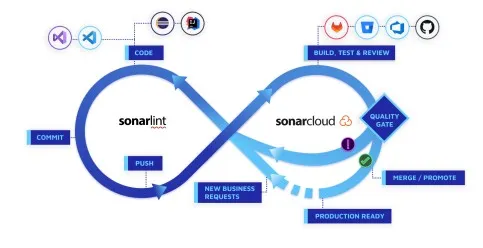
In addition to the analysis of code coverage and code smells, SonarCloud allows you to group these static code analysis results as a set of conditions called Quality Gate. This feature helps ensure that your project’s code quality is of sufficient quality to release into production. Instead of reviewing multiple code quality metrics, the team can see whether all conditions related to code quality are met and move on to the next stage of deployment.
The default quality gate, also known as the Sonar way, includes conditions that relate to the percentage of new code, code duplication, and new bugs or vulnerabilities. The new code ratio is applied to almost all projects since it is easier to write tests for new code than for years-old code. It means that a project featuring hundreds of lines of legacy code and ten lines of new code will only have ten percent of its code under testing.
However, users can also define their own quality gates and set conditions for fresh projects or those brought from other platforms. In addition, the custom quality gate conditions can be configured to update dynamically as soon as the code changes. If a code review using a quality gate is added to the pipeline, any failed build will have to fix code quality issues before being merged into the main branch or pushed to production.
The Importance of Code Coverage
Code coverage is a metric that shows what percentage of your code is tested by automated tests, including unit tests and integration tests. It is a vital aspect of code quality because it helps ensure that your software behaves as expected and reduces the chances of introducing new bugs during development. SonarCloud provides insights into code coverage, and to leverage this feature effectively, you need to enable it.
Enabling Code Coverage in SonarCloud
To enable code coverage in SonarCloud, you can follow these steps:
1. Choose a Code Coverage Tool
SonarCloud supports various code coverage tools, such as JaCoCo (for Java), Cobertura, and more. Depending on your programming language and technology stack, choose a compatible code coverage tool.
2. Configure Your Build System
Integrate the chosen code coverage tool into your build system. For instance, if you’re using Maven for Java development, you can configure the JaCoCo plugin. Similarly, if you’re working with JavaScript, tools like Istanbul are available.
3. Generate Code Coverage Reports
Run your test suite with the code coverage tool enabled, and it will generate reports on how much of your code is covered by tests. These reports should be in a format compatible with SonarCloud (usually XML or LCOV).
4. Configure SonarCloud
In your SonarCloud project settings, you need to configure the code coverage tool you’ve chosen. Provide the path to the coverage report files and make sure SonarCloud knows how to interpret them.
5. Analyze Your Project
Once everything is set up, trigger a SonarCloud analysis of your project. It will now include code coverage metrics in the report, helping you identify areas of your codebase that lack adequate test coverage.
Integrating Code Coverage into CI/CD Pipelines
Running tests manually and uploading a coverage report is okay if you are working on a small project. But most of the time, this task is integrated into the CI/CD pipeline, to check it every time when someone makes a commit or a pull request. And this is where SonarCloud’s ability to work with GitHub Actions, GitLab CI, Jenkins, Azure DevOps, and other tools comes into play.
The simplest pipelines simply run the test suite with the required coverage tool as one step, generate a report in the required format for SonarCloud, and run the SonarCloud scanner as the next step, passing the coverage report to it. Thus, the coverage check occurs every time you push some changes to the repository instead of doing it once a month or a year. And so you can see right away if any lines of code added in a particular commit or pull request are not covered by tests.
As for pull requests, SonarCloud can be configured to add analysis results as comments or status checks, indicating which lines of newly added code are not covered by tests. Thus, SonarCloud helps to ensure test coverage: it is more likely that a developer who just added a piece of code will fix it than the whole team will remember to do that later when this code is merged into the main branch.
Writing Effective Test Cases
Having code coverage data is valuable, but it’s equally important to have high-quality test cases. Effective test cases should ensure that your code is tested thoroughly and that it remains robust and maintainable. Here are some best practices for writing test cases:
1. Test All Code Paths
Your test cases should cover all possible code paths in your application. This means testing different input scenarios, error conditions, and edge cases. By doing this, you reduce the chances of untested code leading to unexpected bugs.
2. Focus on Behavior, Not Implementation
Write test cases that focus on the expected behavior of your code, not its implementation details. This makes your tests more resilient to code changes, as long as the behavior remains the same.
3. Use Test Data Variations
Vary your test data to ensure that your code handles different situations correctly. This includes using valid and invalid inputs and considering boundary cases.
4. Keep Tests Isolated
Ensure that your tests are isolated from each other and do not depend on the order of execution. Each test should run independently to avoid false positives or negatives.
5. Use Descriptive Test Names
Give your test cases descriptive names that convey what is being tested and the expected outcome. This makes it easier to understand the purpose of each test.
6. Continuously Update Tests
As your code evolves, update your test cases to reflect changes in behavior. Outdated or incorrect tests can lead to false positives in code coverage reports.
SonarCloud and Test Quality
SonarCloud can evaluate the quality of your test cases in addition to providing code coverage metrics. It checks for common issues in your tests, such as lack of assertions, overly complex tests, and test case coverage.
To improve the quality of your tests and leverage SonarCloud effectively, keep an eye on the following:
1. Test Case Coverage
SonarCloud will report on how many of your code paths are covered by test cases. Aim for a high test case coverage percentage to ensure that your code is well-tested.
2. Test Case Quality
Pay attention to SonarCloud’s feedback on the quality of your test cases. Address issues like missing assertions, overly complex tests, and ineffective use of test data.
3. Refactoring and Code Changes
When making code changes, ensure that you update your test cases accordingly. This ensures that your tests remain accurate and reliable indicators of code quality.
Common Issues When Setting Up Code Coverage
Several common issues are related to the code coverage setup on SonarCloud, which may appear more frequently than expected on the initial configuration. Some of them may be resolved faster if they’re known in advance.
The most frequent problem is that a coverage report is generated but either in a different format or path as expected by SonarCloud. This results in SonarCloud showing 0% coverage even when tests are passing and coverage is reported correctly. The most straightforward solution is to double-check whether the path and format in the SonarCloud settings are the same as the ones generated by your coverage tool.
Another possible issue that may be observed is that coverage is generated correctly on the local machine but not tracked or reported in the pipeline. This may occur if the command to generate it is skipped or misconfigured there. The most common solution is to make sure it is defined in the pipeline configuration and executed in the correct directory, which should be the same as the one used in the project.
Monorepo or multi-module specific projects may also encounter the issue of coverage being only generated for one of the modules while others are not processed or tracked. This usually happens when modules generate reports individually while SonarCloud is expecting a single aggregated one. The solution is to aggregate the results before analysis from each of the modules’ directories.
Lastly, some projects may have coverage reported higher than expected due to automatically generated code (e.g., from frameworks). Excluding those files from analysis will improve the quality of the metric and provide more accurate insights into the production code’s test coverage.
Conclusion:
SonarCloud is a powerful tool for maintaining code quality, but to make the most of it, you need to enable code coverage and write effective test cases. Code coverage helps you identify areas of your code that lack test coverage, while well-written test cases ensure that your software behaves as expected. By following the steps outlined in this blog and adhering to best practices for test case writing, you can significantly improve the quality of your codebase and make it more maintainable and robust. In the end, SonarCloud analysis combined with comprehensive test coverage is a recipe for successful and high-quality software development.