- 1 Ecommerce development offers multiple solutions, from custom frameworks to open-source platforms and premium services. The right choice depends on budget, scalability, and business needs.
Did you know that currently there are 28 million ecommerce websites running actively on the internet? Nearly half of these are in the USA alone, while others are majorly spread in UK, Brazil, Germany, and Australia. And so if you want to develop your own ecommerce website, there are many ways out there to do so.
All options open up when you work with a professional website development company. This is because they have the access as well as the skills to use every platform available on the internet.
So, let’s check out the 4 ways in which you can develop your ecommerce website:
Custom Ecommerce Development Through Web Application Frameworks
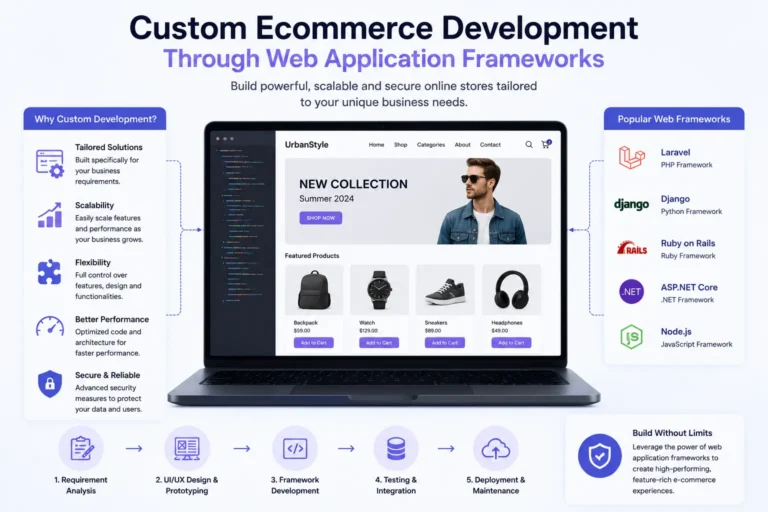
A good team of web developers can provide you with customized solutions for your ecommerce website. There are multiple frontend, backend, and cross-platform frameworks where one can develop dynamic and responsive ecommerce solutions with efficiency. Following are some of the platforms where through customized programming and reuse of existing codes, developers can provide you with a unique ecommerce application for your brand:
- React: This open-source JavaScript library is popular for building dynamic and responsive user interfaces. Popular platforms like Shopify also use React.
- Angular: Developed and maintained by Google, this frontend framework is popular for developing dynamic, single-page apps. Nike’s online store is built on Angular.
- VueJS: This JavaScript framework is also popular for building ecommerce apps due to its cross-platform compatibility and component-based architecture. Louis Vuitton’s online store runs on VueJS.
- .NET: This open-source platform developed by Microsoft is known for providing high-performing and secure ecommerce solutions. Staples is an office supply store built on this platform.
- NodeJS: This cross-platform JavaScript environment is used for ecommerce development due to its seamless code sharing and real-time capabilities. Walmart’s online store is built on this platform.
- Laravel: This PHP framework provides highly scalable and secure ecommerce solutions. Ecommerce platforms like Bagisto are made on this framework.
- Symfony: This too is a PHP framework that has a great architecture to support the development of scalable and secure ecommerce apps and platforms. Magneto is built on Symfony.
- Django: This python framework is open-source and is used for developing versatile ecommerce solutions. Platforms like PretaShop are built on this cross-platform framework.
Pros and Cons of Custom Ecommerce Development
| Pros | Cons |
| Highly customizable solutions. | Costs more. |
| Better scaling. | Takes longer to develop. |
| More security. | Higher maintenance required. |
Using Open-Source Ecommerce Platforms
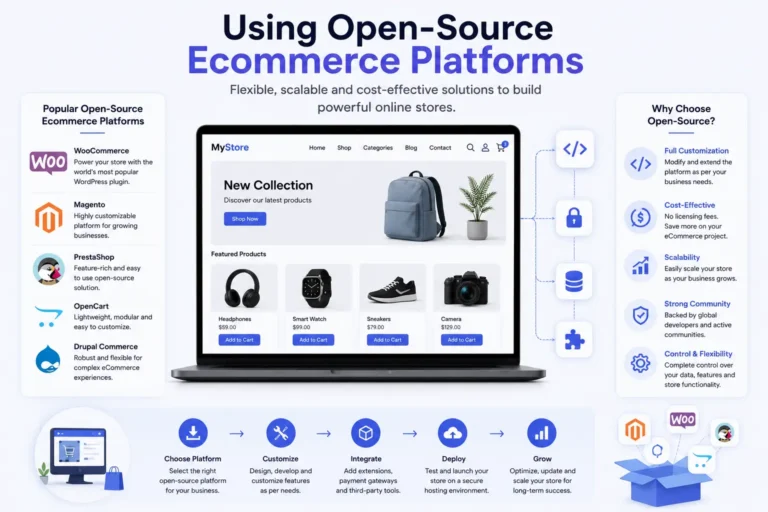
An ecommerce platform provides easy web development solutions through ready-made customizable templates and a user-friendly website builder. The most popular ones include Magneto and PretaShop. While Magento has 160,000 ecommerce websites, PretaShop powers 300,000.
Pros and Cons of Using Open-Source Ecommerce Platforms
| Pros | Cons |
| Most cost-effective. | Not be as user-friendly for beginners. |
| The code can be customized. | Too many updates. |
| Have large communities for support. | Has premium themes and plugins. |
Using Premium Ecommerce Development Platforms
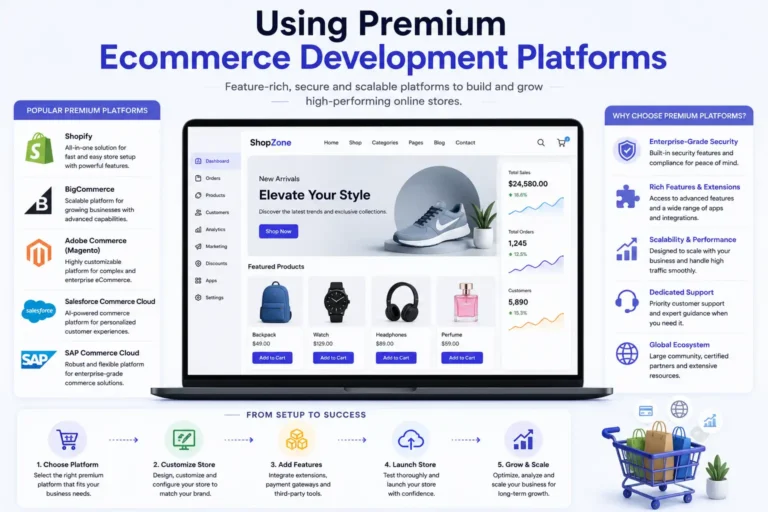
Premium ecommerce platforms tend to be more user-friendly while also providing high-end features for building websites. Even though it could add up to the cost of development, some of them are a more popular choice among most organizations. For example, Shopify is a premium platform that holds a larger market share than Magento and PretaShop combined. BigCommerce too is a premium platform known for its built-in SEO features.
Pros and Cons of Using Premium Ecommerce Platforms
| Pros | Cons |
| They are very easy to use. | Can be expensive. |
| The customer support is great. | Customization is limited. |
| Have the best built-in features. | Has limited scalability. |
Using Website Builders with Ecommerce Plugins

While platforms like Magento and BigCommerce are meant for developing ecommerce solutions, there are some platforms that allow you to develop any kind of website you want. One such website builder that holds the highest market share, powering 501 million websites on the internet is WordPress. Out of these, 5.5 million are WooCommerce websites.
Pros and Cons of Using Website Builders with Ecommerce Plugins
| Pros | Cons |
| Easy to use. | Can slow down your website. |
| Quick to setup. | Customization is limited. |
| Cost-effective. | Has limited scalability. |
What Should You Budget — In Money and Time?
Budget conversations tend to come up early, so here’s a rough sense of what each path actually costs in practice. A WooCommerce site usually lands somewhere between $1,500 and $5,000 before you add custom features — the plugin itself is free, but development, hosting, and premium extensions add up fast. Premium platforms follow a similar pattern: a lightly customized Shopify store might run $3,000 to $15,000 to build, on top of monthly plan fees that start around $30 and climb sharply once you need Shopify Plus. Open-source platforms like Magento or PrestaShop can be cheaper to license, but development and hosting often creep toward $10,000–$30,000 once you factor in the developer hours needed to configure them properly. Fully custom builds sit at the top end — anywhere from $40,000 into six figures, depending on how many systems you’re integrating and how complex your catalog is.
Timelines follow a similar curve. A basic WooCommerce or Shopify store built on an existing theme can go live in three to six weeks if your catalog and integrations are straightforward. Add custom design work and that stretches to two or three months. Open-source platforms usually take six to ten weeks to configure properly. Fully custom development is the real time investment — two to four months for a mid-sized store, longer if you’re integrating multiple systems. None of these numbers are fixed; they shift based on your product count and how much design work you want. But if a launch date is what’s really driving your decision, that timeline gap alone might settle which approach makes sense.
How to Choose the Right Approach
Honestly, there’s no universal right answer here — it comes down to your situation. A few questions worth sitting with before you decide:
- How messy is your product catalog or pricing? If it’s straightforward, a platform will handle it fine. If you’ve got weird pricing rules, bundles, or inventory logic that doesn’t fit a standard mold, that’s a sign you’re heading toward custom development.
- What can you actually afford — not just to launch, but to keep running for the next year or two?
- How soon do you need to be live? If the answer is “yesterday,” platforms and website builders win by a wide margin.
- Do you have developers on hand, in-house or through a partner? Both open-source and custom builds lean on ongoing technical support.
- Are you dealing with regulated payment data? PCI DSS and similar requirements can quietly rule certain approaches in or out.
- How many other systems does this need to talk to? ERPs, CRMs, custom shipping logic — the more of these you’re juggling, the faster you’ll outgrow a plugin-based site.
If you want a shortcut: when your storefront isn’t what sets you apart from competitors, go with a platform — you’ll launch faster and take on less risk. But if your business genuinely can’t run on off-the-shelf functionality, custom development earns its higher price tag.
The Integrations You’ll Probably Need
Your website is rarely working alone. Somewhere behind the scenes, it usually needs to talk to:
- Payment processors
- Inventory or ERP systems
- A CRM
- Shipping and logistics providers
- Tax calculation tools
- Marketing and analytics platforms
- Customer support software
- A product information management (PIM) system, if your catalog is large
The more of these you’re connecting, the more a solid, well-documented API matters. Most of the messy inventory errors and order mix-ups we see trace back to integrations that weren’t planned carefully.
Performance, Scalability, and Security — the Non-Negotiables
A few things matter no matter which path you take:
- Speed. Image optimization, caching, a CDN, clean database queries — this is what keeps pages fast. And slow pages cost you sales, full stop.
- Room to grow. Your expected traffic and catalog size should shape your hosting decisions early. Some platforms scale up easily; self-hosted setups may need real investment as you grow.
- Security. Payments, authentication, encryption — these need attention regardless of platform. The platform helps, but your own configuration and upkeep matter just as much.
Is Headless Commerce Worth It?
Headless commerce means splitting your frontend (what shoppers see) from your backend (where products and orders actually live), with APIs connecting the two. It buys you more design freedom, but it also adds real technical complexity.
It’s usually worth that trade-off for larger businesses selling across multiple channels or needing heavy customization. If that’s not you, a traditional setup will probably serve you just as well — with a lot less overhead.
Thinking About Migrating?
People usually migrate for one of a few reasons: the current platform is holding them back, there’s a security gap to close, or the business has simply outgrown what it’s on. Migration is a real undertaking, so it’s worth doing when there’s a clear reason — not just because a newer option exists.
If you do go this route, make sure you’ve thought through:
- Moving your product catalog and customer data
- Keeping your order history intact
- Protecting your SEO (redirects, URL structure)
- Compatibility with your existing integrations
- Real testing before you fully cut over
- A rollback plan, just in case
One thing worth remembering: modernizing what you already have is almost always lower-risk than starting fresh. A brand-new build can put the SEO equity and trust you’ve already built at risk.
A Few Best Practices Worth Following, Whatever You Choose
- Design responsively — most of your traffic is on mobile
- Keep your catalog organized and easy to navigate
- Invest in search and filtering that actually works
- Keep checkout as simple as you can make it
- Build integrations API-first
- Automate your testing, don’t rely on manual checks alone
- Set a regular cadence for maintenance and performance reviews
Launch day isn’t the finish line — ecommerce sites need ongoing attention to keep performing.