

- 1 Tech Integration in Retail: The adoption of technologies such as AI, AR and CRM improve the experience of customers through increasing the level of individual attention, efficiency and synchronization of online and offline purchases.
- 2 Operational Efficiency and Insights: Technologies of the smart retail system simplify operations, present comprehensive client data, and optimise the stock and storage resulting in higher revenues and performance, and retaining businesses’ sustainability.
- 3 Innovation and Customer Satisfaction: Adapting the new technologies such as automatic checkouts, digital fitting rooms, and predictive analysis makes it easy for organizations to increase their returns by satisfying the clients’ expectations and thus enhancing the efficiency of the business processes.
The fast pace of the retail world today makes the use of technology absolutely needed for the business process changing/ improving and the enhancement living standards of consumers. Today technology that spans from AI powered personalization through to the easy setup of on- and offline channels squeeze into virtually all aspects of the retail industry. In here, we shall be diving into a complex web of retail tools.
These tools come with plenty of benefits when in use. Hence, it will serve the purpose through the live illustrations that teach- learners on the true power of these tools to the retail industry. Technology in retail is a phenomenon that all of us are already familiar with. Herein, we take an in-depth look at how innovation via technology is boosting output efficiency, enhancing user satisfaction and evolving the business-customer relationship.
Types of Technology in Retail
A Quick Comparison Before We Go Deeper
Before breaking down each technology individually, it helps to see how they stack up against each other in terms of what they actually solve for.
No single technology covers every gap — that’s usually why retailers end up layering several at once.
| Technology | Primary Problem Solved | Typical ROI Timeline |
| AI-driven personalization | Generic, one-size-fits-all shopping skill | 6–12 months |
| Augmented reality | High return rates, low online purchase confidence | 3–9 months |
| CRM systems | Fragmented customer data across channels | 6–18 months |
| Mobile payments | Checkout friction, cart abandonment | 1–3 months |
| Beacon technology | Low in-store engagement, missed upsell moments | 3–6 months |
| Inventory management code | Stockouts, overstock, manual counting errors | 3–12 months |
Worth noting: the fastest returns tend to come from the tools that remove friction (mobile payments), while the slower-but-bigger returns come from the ones that require data to accumulate first (CRM, AI personalization).
1. Artificial intelligence
AI-backed retail technology fixes explore big customer data providing custom recommendations, rationalizing pricing plan and reinforce inventory system. Artificial intelligence has given a helping hand to retailers since it brings intelligence to retailers enabling them to know different behavior of consumers, matching them to taste, satisfying the customers and boosting sales.
In addition, AI optimizes the prices by analyzing market trends and competitors’ prices. As a result, supply chains are ultimately made more fast with the aid of this feature, which entails the prediction of demand and the setup of stock levels. AI provides retailers with a challenging environment to capture customer data and exploit them for data-driven decisions that enables business success is a present’s important aspect.
2. Augmented reality (AR)
The AR technology is what revolutionizes retail by having the customers skill of shopping virtually and try on clothes and other accessories. By doing so, the consumers become engaged and return rates drop. With the build of such tools, AR generates active experiences which draw customers thus, bringing sales and customer loyalty.
Via AR, the retailers can overcome the gap between online shopping and in-store shopping by creating a unified skill for the customers with more unified features. Ultimately, AR technology is a revolutionary invention for retailers, supercharging the shopping skill and underpinning the growth of firms.
3. Customer relationship management (CRM) systems
CRM systems which are now the core technology of the retail industry helps collect and analyze customer data. It makes it possible to undertake tailored marketing campaigns which in return leads to a richer customer engagement.
Similarly, retailers such as Zoho and HubSpot use CRM to track customers’ transactions via the different channels, hence they are able to personalize the communications and even promotions by individual tastes. CRM’s technology enables companies to adapt to the needs of every customer, building loyalty, and encouraging consumer spending actions.
4. Mobile payment fixes
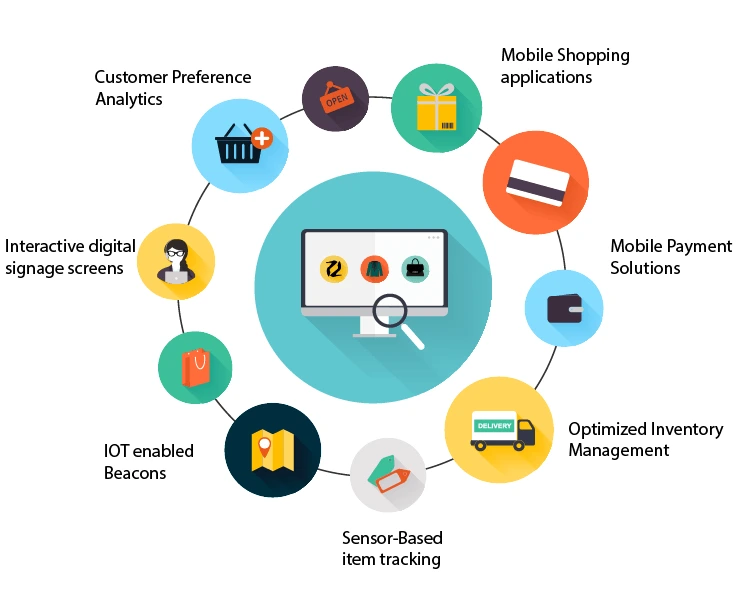
The emergence of the mobile payment fixes really modifies the retail stores by permitting their customers to purchase at convenient ways using smartphones. With the help of the setup of the IT in the retail area, the payment procedure through the mobile devices becomes more open-minded and the checkout process is shorter. On the other hand mobile payment opportunities create a easy and frictionless process for customers and improve satisfaction and short-run customer retention.
Retailers can provide their customers with a convenient and easy purchase skill when they adopt the mobile payment tools to make their shopping processes more effective. Thus, they will keep their pole positions and not lag behind the trendy new firms. Mobile payments are the key elements of the retail space nowadays that enable to address the challenges and play the key role in becoming good and increasing revenue.
5. Beacon technology
One of the most promising tools from retail technology is beacon technology which broadcasts these offers and notification to customers via their mobile phones and then sends more detailed info for those who scan the code. Through this our customers can have personalized and right on-time info and this is what boosts the number of customers coming to the store.
Equipped with beacon technology retailer is able to get its shoppers immediately involved and guide them in direction of the products and sales that talk to them. Alongside these satisfactory outcomes for the consumers, the novel approach boosts sales and brand loyalty through which the retailers achieve success in this consumer-led market.
6. Inventory management code
Inventory management code along with others, is one of retail technology trends where it is easy to identify effective use of inventory level tracking. It must lead to less stockouts and perfect refilling, thus improving operational speed.
Through Installation of this system, organizations can achieve better inventory accuracy, smaller cost, and proud customer. The retailers can obtain various info regarding the stock levels through the use of the inventory Management code, this gives them the freedom to make big decisions in their supply chain tasks and improve their profitability.
7. Self-checkout and computer vision systems
Self-checkout has been around for a while, but the new generations of self-checkout, which utilize computer vision and weight sensors instead of a simple barcode reader, offer increased versatility and convenience.
Such systems allow scanning of the purchases and make sure there are no items left unbilled. In addition, some computer vision systems can also identify mismatched items or fully eliminate the checkout process.
For firms, the main edge of self-checkout is the ability to utilize the staff in a different, less repetitive, task, thus increasing the quality of services offered and driving more sales. The primary challenge with such systems is the high initial investment and the need for specialized equipment to prevent inventory theft or human error during the scanning process.
Digital price tags (electronic shelf labels)
These are tags that use little screens to display info and prices instead of paper signs and are usually updated remotely from a central place.
It does not sound like much, but the effect of this technology on tasks can be profound.
The time needed to update thousands of prices across the store is gone in the blink of an eye. This feature will benefit most retailers but especially the ones that do price changes often or have fierce pricing policies.
It closes the loop between promised vs. actual prices in a matter of seconds versus months or even years. And it reduces cashier errors during checkout, which is an important aspect for customers to have a positive skill over a long period of time.
Benefits of Technology in Retail
1. Enhanced customer skill
With the inclusion of retail tech, one is looking at personal processes and a structural journey while remaining active in views, further giving customers that notch higher in satisfaction.
All these tools need to be continuously revised so that the experiences remain engaging without invoking that cringe factor in providing opportunities that connect with consumers and encourage stronger links to drive repeat business.
2. Improved operational efficiency
Apart from efficiency, the same leads to improved profitability. The automated repetitive tasks and prediction analytics make the management of the organizational process even much simple, therefore, cost-effective and effective in the decision making.
Retailers, therefore, need to embrace such innovations and do that, for which they will be adopted in staying competitively and in meeting the well evolving customer demand in today’s dynamic market landscape.
3. Data-Driven insights
Retail technology provides very detailed and useful analytics pertaining to consumer behavior.
The technology helps make clear and informed decisions by assisting remarkably in the execution of targeted marketing campaigns. These insights built in by retailers enhance customer interaction and increase drive sales, therefore, staying ahead in the fierce retail landscape.
4. Fierce edge
With our Technology for Retailers, the business should never be a step behind when it comes to new fixes.
Sylvia said that this will also make it possible for firms to brain with fast evolving customer expectations by the reason of applied advanced technology in retail. It allows them to stay fierce in the market so that customer satisfaction is raised and there’s resulting business success.

Common Roadblocks in Adopting Retail Technology Essay
None of this is plug-and-play, and it’s worth outlining the friction to be overcome honestly rather than pretending that it is adopted easily.
Staff resistance – Employees who man the registers have no love for auto and think that it should be used to assist them and not replace them.
Data silos – A retailer could own five independent code systems (POS, CRM, inventory, e-commerce, loyalty program) and none of them talk to each other – setup costs are significantly underrated when the code is being budgeted for.
Customer trust with data collection – To personalize the skill, the retailer needs to collect and analyze data about customers, and they are likely to resist if they don’t understand why their info is being gathered.
Upfront costs versus delayed rewards – A lot of these tools require upfront investment and then pay off in 6-18 months, which is a long time to wait for results, especially for small firms that only make a profit on each item they sell.
None of these points are reasons why the technology shouldn’t be adopted, but rather why the adoption should be staggered out over a period of time instead of rushed.
Real-World Use Cases
1. Automated checkout systems
Retail tech solution companies like Amazon Go employ sensor technology and AI for frictionless checkout experiences. This boosts convenience for shoppers by reducing wait times.
2. Virtual fitting rooms
Some of the fashion brands have adopted AR (augmented reality) technology by themselves to incorporate virtual clothes try-on in their online shopping skill to reduce the hassle and chances of returns.
The app contains all the retail technology trends in use today with an emphasis on better customer engagement and maximizing the customer satisfaction along with operational efficiency.
3. Smart shelves
Here, IoT sensors supported by retail code build services will be installed on a Walmart shelf to monitor the available products in real-time.
This will be able to make sure that products are restocked alone to avoid the stocks running out of goods. Retail code build ensures firms always have optimum stock through adequate tracking of firms that ensures firms are in steady operation and the satisfaction level of customers improves.
4. Predictive analytics
Employing retail code build services, retailers like Target harness predictive analytics. This empowers them to anticipate customer preferences and behavior, enabling personalized marketing campaigns and product recommendations.
5. Delivery drones
The drones facilitate the delivery of goods at establishments like Walmart, Amazon, and others that really modernize the methods of shipping with the use of present technology.
Drones simply help in more rapid and effective deliveries, most especially in places that are too far and inaccessible for various reasons. With the latest retail tools, such as drones, it enables firms to ramp up with its operation and improve customers’ satisfaction rates with timely deliveries.
6. Personalized email notifications and app
Sephora and similar beauty retailers utilize behavioral-triggered notifications, e.g., a customer browses a product but does not purchase it, and they send them a gentle reminder or even a small “gift” within a day or two.
It is a very simple and effective tool that taps into the psychological moment of decision-making as a customer is still in the “thinking about buying” mode.
While the technology behind such a system is nothing spectacular compared to the previous examples, prioritizing it showcases good grasp of the overall value of the acquired data.
In this case, it is yet again a low-cost, high-quality way to engage with the client without any more pressure or using the same overused weekly/monthly newsletters.
7. In-store digital kiosks
Best Buy and other big-box retailers are adding in-store digital kiosks for customers to check inventory in different stores, compare features, and order products for home delivery if the item is available in another store.
This app is beneficial in situations where there are too many customers to be helped by the available sales representatives. Instead of walking away from a sale because the item is out of stock at the customer’s nearest store, the kiosk can help the customer order the merchandise for home delivery, ensuring that the company does not miss out on the sale.
Conclusion
Finally, retail technology fixes is now here to become needed in the retail industry, fostering innovation and introducing a myriad of good things.
Retailers adopting technology advancement stand a better chance of enhancing customer skill, improving the efficiencies in tasks, and maintaining the competitiveness in the dynamic markets. As long as technology will move on, so should firms remain new and agile, well responding to the developing situations and changes in the needs and preferences of consumers.
That gives a silver-bullet chance to Expert Partners like Innostax, which are focused on working with Retail Tech companies and are guided by case studies, on a mission to guide retailers on how to execute and get a return on technology.
It offers specialized services in retail code build to promise tailored fixes that will therefore deliver the best. Such partnerships deliver skill on the best mode of setup with technology, while supporting the companies with that hand holding through the hard parts hence are able to transport the best.