
- 1 The Social media login feature in React application gives users a perfect experience where they organize to use their preferred social media accounts, which can go a long way in boosting retention by reducing the number of passwords needed.
- 2 Social media login provides for significant security improvement, as it takes advantage of security elements set up by the social media platform, such as multi-factor authentication; Thus, Social media login eliminates the risks associated with unsafe passwords and provides for more secure verification procedure.
- 3 Integrating social media login APIs can be time and cost effective due to the fact that, instead of developing and implementing a brand new and unique login system, OAuth integration and APIs rendered by social media platforms can be employed to effectively implement this approach at a relatively faster rate.
Introduction
Integrating social media login into your React app is a game-changer in terms of user experience. With this feature, your users can log in using their social media accounts, eliminating the need for them to create a new login account and password. This feature provides a faster and more seamless login experience that can enhance your app’s user retention.
Social media SDKs offer a powerful solution for seamless login and signup in various domains iOS mobile app development companies, cross platform mobile app development services,Android apps development companies.
For a software development company, integrating social media login offers two key advantages. First, it provides convenience as users can sign in with a few clicks, reducing the need to remember additional usernames and passwords. This streamlined onboarding process can boost user retention and satisfaction.
Secondly, social media login enhances security by leveraging the platforms’ built-in security measures, including multi-factor authentication and advanced threat detection. This approach also reduces the risk of password-related vulnerabilities, as users are less likely to use weak or reused passwords.
Increased user engagement is another advantage. Social media login allows you to access users’ profile information and leverage it for personalization, creating a more tailored and engaging user experience. This, in turn, can boost user engagement and retention.
Lastly, integrating social media login can save development time and costs. Instead of building and maintaining your own authentication system, you can rely on established OAuth protocols and social media APIs. This means faster development cycles, reduced maintenance, and potentially lower operational costs.
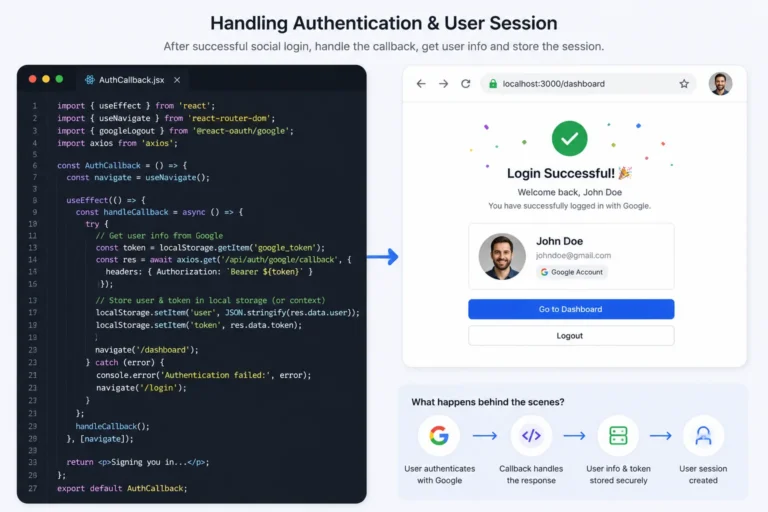
Setting Up Social Media Login APIs
Integrating social media login into your React app requires setting up APIs for the selected social media platforms. This process involves creating developer accounts with the respective social media platforms and configuring the necessary settings. Below are the steps involved in setting up social media login APIs:
Create a Developer Account
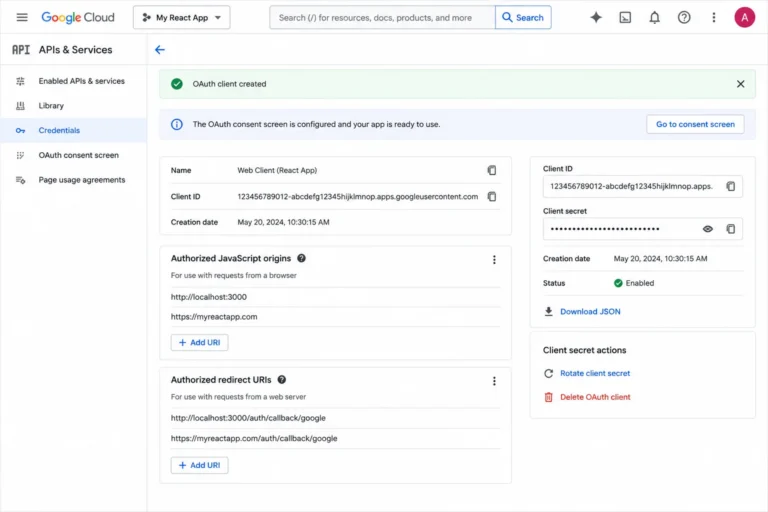
To set up the APIs, you need to create a developer account with the social media platform you want to integrate. This account provides you with the necessary credentials, such as app ID and app secret, to enable your app to interact with the social media platform’s API. Below are links to the developer accounts for some popular social media platforms:
- Facebook for Developers
- Google Identity Platform
- Twitter Developer Platform
Google developer account after creating credentials
Create an App
Once you have a developer account, the next step is to create an app. This app will be used to authenticate and authorize users through social media login. The process of creating an app varies between social media platforms, but typically involves providing basic information about your app, such as its name, website URL, and privacy policy. Once your app is created, you will receive an app ID and app secret, which are needed for API integration.
Configure API Settings
After creating your app, the next step is to configure its API settings. This involves specifying the API endpoints and permissions that your app requires to access user data. Depending on the social media platform, you may need to submit your app for review before it can access certain permissions. It’s important to ensure that your API settings comply with the platform’s policies and guidelines to prevent your app from being rejected or banned.
Once you have completed these steps, you’re ready to integrate the social media login APIs into your React app. The next section will guide you through the implementation process.
import FacebookLogin from 'react-facebook-login';
function FacebookLoginButton() {
  const handleFacebookResponse = (response) => {
    // handle authentication response and store user data
  }

  return (
    (
        Login with Facebook
      )}
    />
  );
}
Error Handling
Errors can occur during the social media login process for a variety of reasons. Some common errors include incorrect login credentials, a disrupted internet connection, or issues with the social media platform’s API. When an error occurs, it’s important to handle it gracefully and provide meaningful feedback to the user.
To handle errors effectively, consider the following:
- Identify the specific error that occurred.
- Communicate the error to the user in a clear and concise manner.
- Offer a solution or alternative for the user to try.
For example, if a user’s login credentials were incorrect, you could display an error message that says “The username or password you entered is incorrect. Please try again.” You could then offer the option for the user to reset their password or try logging in with a different social media account.
User Feedback
Providing meaningful feedback throughout the social media login process can improve the overall user experience. Feedback can include progress indicators, success messages, and error messages.
Consider the following tips when designing user feedback:
- Keep it simple and concise. Users should be able to quickly understand what is happening.
- Use visual cues, such as progress bars or checkmarks, to indicate successful completion of a step.
- Provide real-time feedback to the user, such as indicating when their password is being verified.
Remember that the social media login process can be an important first impression for users, so it’s worth investing time into designing clear and effective error handling and user feedback. By doing so, you can create a seamless and user-friendly experience for your app’s users.
Implementation
Creating a Social Media Developer Account:
Visit the developer website of the social media platform you want to integrate.
Create a developer account and apply for a client ID and client secret.
Installing a React Social Login Library/ Using the SDK scripts:
1. Choose a React social login library such as react-facebook-login, @react-oauth/google.
2. Install the chosen library using npm or yarn or use the SDK scripts to add the login support.
Using the social login library following code can be used:
<GoogleOAuthProvider clientId="client_id">
  {
    <GoogleLogin
      onSuccess={credentialResponse => {
        const details = jwt_decode(credentialResponse.credential);
        const values = { email: details.email, password: null }
        handleOnSubmit(values);}
      }
      onError={() => {
        console.log('Login Failed');}
      }
    />
  }
</GoogleOAuthProvider>
And for using the SDK scripts the following code can be used
const LoginSocialGoogle = ({
  props
}) => {
  const insertScriptGoogle = useCallback((d, s = "script", id, jsSrc, cb) => {
    //logic
const LoginSocialGoogle = ({
  props
}) => {
  const insertScriptGoogle = useCallback((d, s = "script", id, jsSrc, cb) => {
    //logic
  }, [])

  fetch( `https://www.googleapis.com/oauth2/v3/userinfo?alt=json`, {
          method: "GET",
          headers,
        })
          .then((response) => response.json())
          .then((response) => {
           //logic
          })
          .catch((err) => {
            onReject(err);
          });

  const loginGoogle = useCallback(() => {
    if (!isSdkLoaded) return;
    if (!_window.google) {
      load();
      onReject("Google SDK isn't loaded!");
    } else {
      onLoginStart && onLoginStart();
      if (instance)
        access_type === "offline"
          ? instance.requestCode()
          : instance.requestAccessToken();
      else _window.google.accounts.id.prompt();
    }
  }, [access_type, instance, isSdkLoaded, load, onLoginStart, onReject]);

  return (
    <div className={className} onClick={loginGoogle}>
      {children}
    </div>
  );
};
export default memo(LoginSocialGoogle);
Adding a Social Login Button to Your Application
Utilize the social login component provided by the library.
Example code for adding a Google login button using React Social Login.
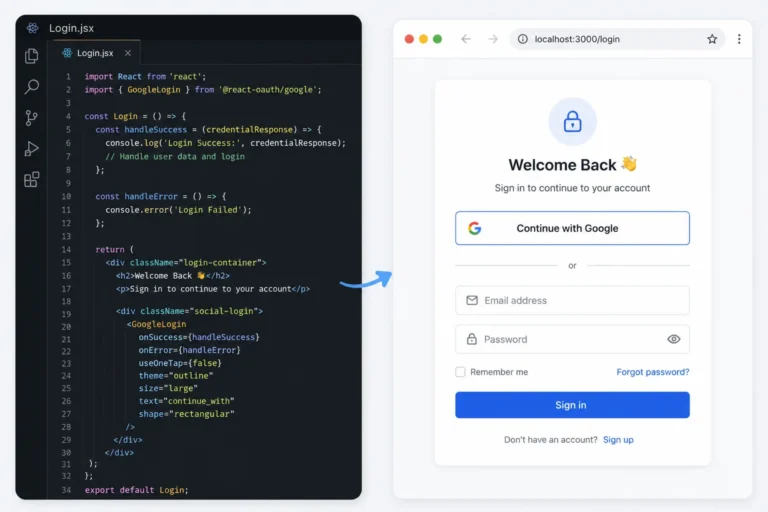
Implementing Social Login Logic in Your Application
Follow the library’s instructions to handle onLoginSuccess and onLoginFailure events.
Example code for handling login events in a React application.
Response returned by google sdk
response: {
    status: 201,
    userInfo: {
      id: 'fd212660-0db1-449d-b46d-0b',
      name: 'Akash Pant',
      email: 'akh.pnt@innostax.com',
      accesstoken: 'xxxxxxxxxxxxxx',
      refreshtoken: 'xxxxxxxxxxxxx',
      phone: null,
      dateOfBirth: null,
      profilePic: null,
      profileName: null,
      role: 'GUEST',
      provider: 'google'
    },
    tokens: {
      accessToken: 'xxxxxxxxxxxxxx',
      refreshToken: 'xxxxxxxxxxxxx'
    }
  }
Conclusion
Incorporating social media login functionality into your React application is a strategic move that streamlines the authentication process and brings about a multitude of advantages. By selecting a suitable React social login library, you not only simplify the user login experience but also enhance the overall quality of your application, whether it’s for financial services, healthcare, or any other industry.
These libraries offer seamless integration with major social media platforms, allowing users to sign in quickly using their existing social accounts. This convenience translates to higher user satisfaction and retention rates, as it eliminates the need to remember and manage multiple login credentials. Furthermore, the integration of a React social login library can bolster security through the implementation of well-established authentication protocols and robust security measures provided by social media platforms.
This reduces the risks associated with password-related vulnerabilities and augments user account protection. In essence, opting for a React social login library empowers your application to deliver a superior user experience, increase security, and simplify the authentication process, all of which contribute to the overall success of your project. Whether you are developing financial software, healthcare applications, or other custom solutions, integrating social media login can enhance the user experience and streamline authentication.
Common Security Pitfalls in Social Login Implementations
Social login takes care of a lot of the authentication complexity for you, but that doesn’t mean that security is an afterthought – it just takes on a different shape. There are a few pitfalls that come up often enough on real implementations that it’s worth talking about them.
Trusting a client-side token without server-side verification is a very common gotcha and is almost a given in many production systems, as it’s the most logical approach for many people to take: “The user logged in with their social account, and I’m getting this nice object returned to me by the SDK with all the information I need – so why would I need to verify anything else?” This is a dangerous assumption to make, as everything that happens on the client can be tampered with in transit. Any social login that relies on a client-side SDK should always verify the authenticity of the returned token on the server against the relevant provider’s authentication server before trusting it or creating a session for the user – the client SDK is merely a convenience, but not a necessity, and should not be relied upon to handle security-critical operations such as authenticating a user.
Caching access and refresh tokens incorrectly is another common issue, as many examples will demonstrate the use of localStorage to cache the tokens after a successful login. This is generally unsafe as localStorage is accessible to any script that runs on the page, and an attacker who manages to inject some code on the page (e.g. via a vulnerability in the application itself) can exfiltrate the tokens and use them to impersonate the victim. HttpOnly cookies are generally far more secure for storing tokens, especially refresh tokens, as they cannot be accessed directly by JavaScript.
Account linking is another potential source of bugs that may not seem obvious at first: if a user logs in with Google using their work e-mail address and then attempts to log in with Facebook using the same e-mail address, does the application treat these as two separate accounts or merge them? If the former, the user might end up in a confusing state where they have to log out of one service and into the other, or the opposite if an attacker manages to convince the victim to log in with their e-mail address on the attacker’s social media account.
And finally, periodically reviewing the permissions requested by your application is a good idea for UX as well as security: it’s easy to request too many permissions when prototyping or developing the application and forget about it afterwards, resulting in a permissions request that asks for way more information than needed for the application to function. This can be annoying for the user to accept and might cause some users to abandon the authentication flow entirely if they’re concerned about privacy. By requesting only the information that is strictly necessary to operate the application and periodically reviewing this list, there are fewer opportunities for security issues to occur if the token is ever leaked, and the user is asked for less information than they might be prepared to provide.
None of these are particularly difficult to fix, but they’re also not things that most code reviews will catch unless somebody looks specifically for them, which is why they’re worth mentioning.