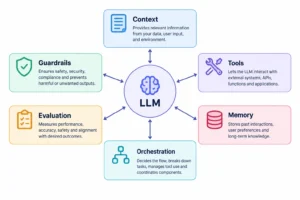
AI in business has moved well past chatbots and copilots. Enterprises are deploying AI agents that reason, plan, and execute multi-step workflows with minimal human input. The companies pulling ahead aren’t the ones with the most AI tools — they’re the ones that redesigned their workflows before touching the technology.
- 1 AI automation has shifted from rule-based scripts to context-aware workflows that handle variable, unstructured inputs.
- 2 AI agents can execute multi-step tasks — querying systems, generating outputs, routing decisions — without a human managing each handoff.
- 3 Enterprises are running LLM integrations in customer support, software development, sales, HR, finance, and operations.
- 4 Data governance, security, and compliance are architecture decisions. Making them after deployment is expensive.
- 5 Successful AI adoption starts with workflow redesign. Connecting an API to a broken process just makes it break faster.
- 6 McKinsey's 2025 State of AI data shows high-performing companies are 3.6x more likely to fundamentally redesign workflows when deploying AI — not just add AI on top of existing ones.
The Real Cost of Running on Manual
Every enterprise has at least one workflow held together by copy-paste, a shared spreadsheet, and two people who “just know how it works.” When one of them leaves, it breaks. When both are out sick on the same day, everything stops.
That’s not a people problem. It’s a systems problem — and it’s exactly where AI is doing real work in 2026. Not in demos. In production.
The question isn’t whether to adopt AI. It’s how to adopt it without ending up with more complexity than you started with. According to McKinsey’s Superagency in the Workplace report, 92% of companies plan to increase AI investments over the next three years — yet only 1% describe themselves as mature in deployment. That’s the gap most enterprises are sitting in right now.
What AI in Business Actually Means
“AI in business” gets used to describe everything from a pricing page chatbot to a fully autonomous operations system. That range matters because the implementation complexity, cost, and risk are completely different across it.
| Type | What It Does |
|---|---|
| Traditional automation | Fixed, rule-based workflows. No reasoning. Deterministic. |
| AI automation | Context-aware. Handles variable inputs, reads language, adapts. |
| AI copilots | Human-assist. The model suggests or drafts. A person decides. |
| AI agents | Reason, plan, use tools, execute multi-step tasks autonomously. |
Most enterprise AI in 2024 was copilots. What’s being deployed now is mostly automation and agents. Gartner projects that by 2028, 33% of enterprise software applications will include agentic AI — up from less than 1% in 2024. That shift is what makes this year different from the last two.
From Automation to Agents: What Actually Changed
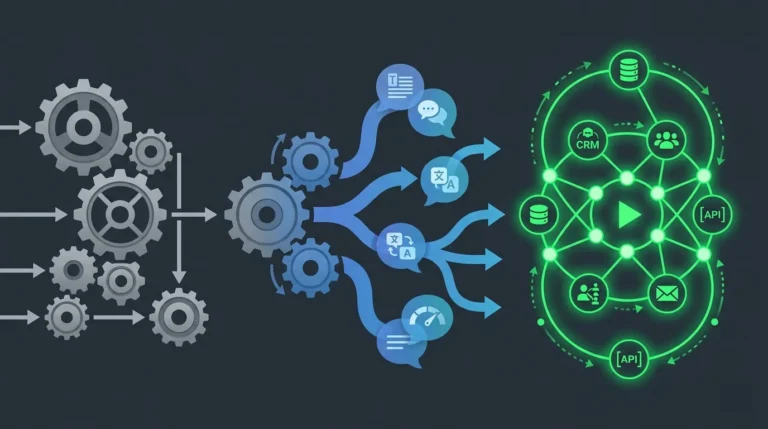
Traditional automation — RPA, scripted workflows, rule engines — works well when the process is fixed and inputs are structured. It breaks the moment something unexpected shows up. A form field filled in an unusual format, a document type outside the predefined list, a request that doesn’t fit any category. The automation stops. A human picks it up.
AI-powered automation changed that by adding language understanding. The system handles variable, unstructured inputs — reading a support email and extracting intent, parsing a contract and flagging unusual clauses, pulling commitments out of a call transcript. It’s still doing a defined job, just across a much wider range of inputs.
Agents go further. An agent doesn’t just process an input and return an output. It receives a goal, figures out what steps are needed, calls external tools to execute them, checks the results, and keeps going until the task is done or it needs to escalate.
Instead of answering a question, an agent can pull data from three internal systems, flag anomalies, draft a summary, and route it to the right person — without anyone orchestrating each step. That’s not a chatbot. That’s a workflow participant.
Enterprise Use Cases Running Right Now
Customer Support
AI handles first-line support volume: ticket triage, intent classification, automated responses for known issue types, knowledge base retrieval, sentiment detection before a customer hits a frustration point. Multilingual support without hiring per-market. Human agents handle work that requires judgment and relationship — AI handles routing and volume.
Software Development
Engineering teams use AI for code review, documentation generation, test scaffolding, and internal copilots trained on their own codebases. McKinsey’s 2025 data puts software engineering and IT among the strongest ROI categories, with organizations reporting 10–20% cost reductions in those functions. The gain isn’t writing code faster. It’s shortening the gap between writing and reviewing, and catching issues earlier before they compound.
Sales and Marketing
Lead qualification workflows that score inbound leads on fit signals before they reach a rep. Email personalization at scale. Campaign analysis that surfaces what’s working without a manual reporting cycle. A ZoomInfo survey of over 1,000 go-to-market professionals found sales professionals using AI report being 47% more productive and saving roughly 12 hours a week. The value isn’t replacing salespeople — it’s making sure their time goes to deals most likely to close.
HR and Recruitment
Resume screening against structured criteria, onboarding assistants that answer policy questions without routing every new hire to HR, internal Q&A systems that cut repetitive requests to the people team. Not glamorous. Frees up a meaningful amount of time.
Finance
Invoice processing, exception flagging, fraud pattern detection, financial report summarization from raw data. McKinsey’s Global Banking Annual Review 2025 projects up to 20% net cost reduction across banking functions as agentic AI scales — making finance one of the highest-impact deployment areas. High-volume, structured-but-variable document processing is the category where AI earns its cost fastest.
Operations
Workflow orchestration across systems that don’t natively connect, document processing pipelines, AI-generated operational reports. The teams getting real value here are the ones who mapped their existing workflows before touching the technology.
How AI Agents Actually Work
An agent is not a smarter chatbot. The architecture is fundamentally different.
A chatbot takes an input and returns an output. One turn, one response, no memory of what happened before, no ability to act in external systems.
An agent runs a loop:
- Receive — take in a goal or task
- Plan — work out what steps are needed
- Act — call tools, APIs, or systems to execute
- Observe — check results, decide what to do next
- Repeat — continue until done, or escalate if stuck
The tools an agent can call are what give it real business utility: database queries, CRM updates, internal API calls, document generation, email dispatch, ticket creation. The agent reasons about which tools to use and in what order — based on the goal, not a fixed script.
Memory adds another layer. Short-term memory tracks context within a single workflow run. Longer-term memory — typically backed by a vector database — lets the agent pull relevant information from past interactions or an internal knowledge base when it needs it.
Challenges Worth Planning For
Hallucinations. Models generate plausible-sounding wrong answers. For customer-facing or compliance-relevant outputs, that requires explicit mitigation: retrieval grounding, confidence scoring, human review for edge cases. It’s a solvable engineering problem — not solved by hoping the model gets it right. 77% of businesses cite hallucinations as a top AI concern, according to the same Fullview roundup.
Data privacy and compliance. Sending internal data to third-party model APIs has legal implications that vary by industry and jurisdiction. GDPR, HIPAA, SOC 2 — these are architecture constraints, not legal formalities. Know which data can go where before building.
Integration complexity. Enterprise AI connects to CRMs, ERPs, ticketing systems, and internal databases — most of which weren’t built with AI integration in mind. The integration work is usually more expensive than the AI work. Teams that underestimate this consistently struggle.
Model drift. Model providers update their models. Outputs that worked consistently can shift when the underlying model changes. Prompt versioning and regression testing are not optional in production.
Governance. Who owns the output? Who’s accountable when the AI gets it wrong? Who approves changes to production prompts? McKinsey’s 2025 data shows 51% of firms reported AI incidents — but high performers manage risk with human-in-the-loop rules, centralized oversight, and executive accountability. These need answers before deployment, not after something breaks.
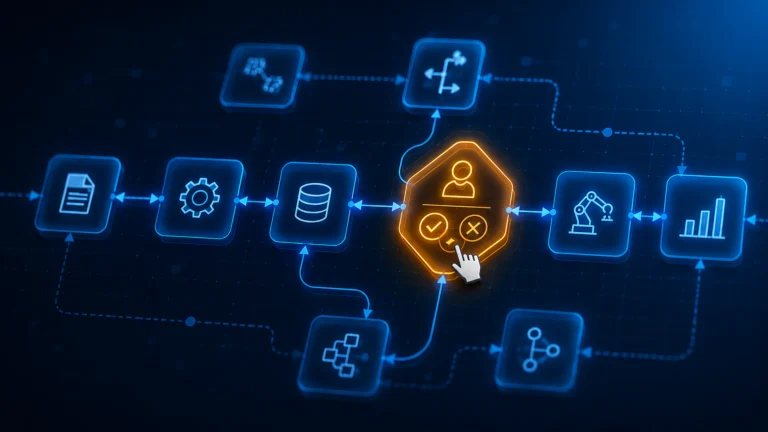
Human-in-the-Loop Is a Design Decision, Not a Fallback
A lot of enterprise teams treat human-in-the-loop as a temporary measure until the AI is “good enough” to run fully autonomously. That’s the wrong frame for most business contexts.
Human review isn’t a crutch. It’s what makes AI systems safe to run in high-stakes workflows. In regulated industries — finance, healthcare, legal — it’s a compliance requirement. In customer-facing workflows, it’s what stops an edge-case error from becoming a client complaint or a liability.
Decide upfront which decisions the AI can make autonomously, which need human approval before executing, and which should always stay with a person. Build that logic in from the start. The thresholds can shift as the system earns trust — but the review mechanism should always exist.
Build vs. Buy
| Build Custom | Buy SaaS AI | |
|---|---|---|
| Flexibility | Full control over logic, prompts, data | Limited to what the vendor built |
| Time to deploy | Weeks to months | Days to weeks |
| Cost | Higher upfront, lower per-seat at scale | Lower upfront, climbs at scale |
| Data control | Stays in your infrastructure | Depends on vendor’s data policy |
| Customization | Matches your exact workflow | Generic with configuration |
| Vendor dependency | None | High |
Most enterprises should do both. Buy for standard use cases where off-the-shelf tools already solve the problem — email assistants, basic summarization, scheduling. Build for workflows that are proprietary, compliance-sensitive, or central enough to operations that vendor dependency is a real risk.
One rule that holds for AI specifically: the more a workflow depends on your internal data, your terminology, and your edge cases, the worse off-the-shelf models perform out of the box — and the stronger the case for building something tuned to your context rather than configuring around a vendor’s limitations.
Where Do You Actually Start
This is the question most enterprise AI content skips. Here’s a practical sequence that works:
Pick one workflow, not one department. Don’t set out to “AI-enable HR.” Pick the specific task inside HR that has the highest volume of repetitive, well-defined work — resume screening against fixed criteria, for instance. That’s the starting point.
Write down what correct output looks like before you touch the technology. Three examples of a good output for a given input. If you can’t write those examples, the scope isn’t defined enough to build.
Map the failure modes. What does a wrong output look like? What happens downstream when the AI gets it wrong? That answer tells you where human review checkpoints need to go.
Build the smallest version that proves the value. Not the full workflow — the one step that’s highest volume and lowest risk. Get that working reliably, measure the actual time saved, then expand.
The teams that get stuck are the ones that scope too broadly, skip the output definition step, and discover the failure modes in production rather than in planning. McKinsey found that high-performing AI adopters are 55% more likely to fundamentally redesign workflows when deploying AI — not bolt it onto whatever they already had.
How to Measure ROI on Enterprise AI
This is where most enterprise AI initiatives go quiet. Deployment gets announced, adoption metrics get tracked, and then six months later nobody can say whether it was worth it.
ROI on enterprise AI isn’t complicated, but it requires deciding upfront what you’re measuring. Three categories that consistently produce clear numbers:
Time saved per workflow. Baseline the manual time before deployment. Measure it after. Time reduction on a repeatable task is the easiest ROI to demonstrate and the most credible with skeptical stakeholders.
Error or rework rate. For tasks like document processing, ticket classification, or data extraction — how often does the current process produce errors that require correction? A reduction here has both direct cost and downstream quality implications.
Volume handled without headcount increase. If the same team handles 40% more volume after AI deployment, that’s a measurable capacity gain even if nobody was hired or let go.
What doesn’t work: measuring model accuracy in isolation. A model that’s 94% accurate on a test set can still fail to deliver business value if it’s systematically wrong on the cases that matter most, or if the team doesn’t trust the outputs enough to act on them. Tie measurement to workflow outcomes, not benchmark scores.
The Right Way to Start
Before scoping any enterprise AI initiative, get two things in writing: what specific workflow this is replacing or augmenting, and what correct output looks like. If those aren’t agreed on before the build starts, the project will drift — and the technology will get blamed for a scoping problem.
For teams working through implementation decisions, Anthropic’s documentation covers practical patterns, and their model overview helps match capability to task type.