

Real-time chat in React Native isn’t just about rendering messages, it depends on the transport layer (WebSockets vs. Firebase listeners vs. polling), how you handle messages sent while offline, and how carefully you validate files before they ever hit a chat window. Get those three things wrong and you’ll have a chat UI that looks finished in a demo and falls apart the moment real users are on flaky mobile connections.
- 1 Enhancing Mobile Apps with Chat Features: The react-native-gifted-chat library developed for the React Native framework allows enhancing the applications and increasing the level of users’ engagement and interaction across different spheres, including healthcare, finance, and travel.
- 2 File Sharing Capabilities: Introducing an ability to share files through react-native-document-picker complements the chat capabilities, because people can share documents, images, and other files within the application and it contributes to positive experience.
- 3 Cross-Platform and Customization Benefits: The fact that React Native is used to create both iOS and Android with the same code, the ability to modify the chat UI means that the tool will meet the app producers’ needs and has a broader application, especially since UI design can be an important consideration of app development.
In the modern digital landscape, real-time communication is vital for mobile apps across various industries. This blog explores integrating chat features into React Native apps using the react-native-gifted-chat library and demonstrates file sharing. It’s relevant for healthcare, finance, and travel app developers, as well as iOS and Android app companies. Whether you’re in banking, healthcare, or custom software, this blog helps you enhance user interaction and aligns with quality standards. It’s valuable for businesses, offering insights into offshore and outsourced development, making chat functionality a key asset for any app.
To know more about How To Maximize the ROI On Mobile Apps, Tablets & Wearable Devices, You can checkout this Article
Benefits of Using react-native-gifted-chat with File Sharing
Integrating react-native-gifted-chat with file sharing capabilities into your app offers several advantages:
- Seamless Communication: Enhance user engagement and interaction through real-time chat.
- Customization: Customize the chat UI to match your app’s design and branding.
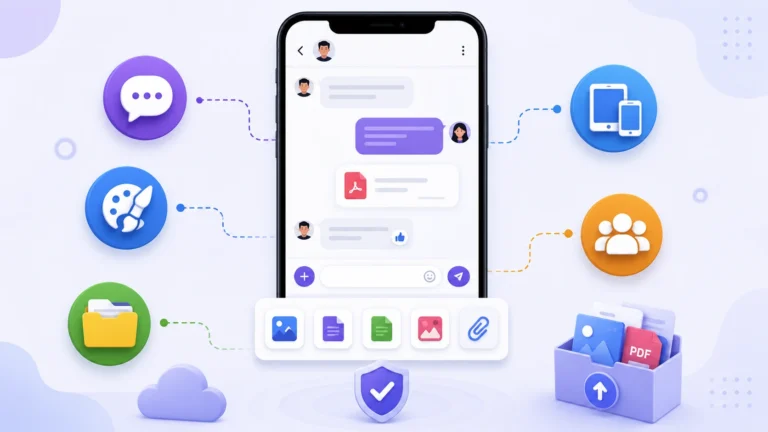
- File Sharing: Allow users to share files, documents, images, and more within the chat, making your app more versatile.
- Cross-Platform: React Native enables you to target both iOS and Android platforms with a single codebase, expanding your app’s reach.
- Active Community: react-native-gifted-chat has a vibrant community, ensuring continuous support and updates.
Prerequisites
Before we delve into the integration process, ensure you have the following prerequisites in place:
- React Native Environment: Make sure you have a React Native project set up. If you haven’t already, follow the React Native installation instructions on the official website.
- Node.js and npm: You’ll need Node.js and npm installed on your development machine to manage dependencies and run your React Native app.
Integration Steps
Follow these steps to add chat functionality to your React Native app using react-native-gifted-chat with file sharing capabilities:
Step 1: Create a React Native Project
If you haven’t already, create a new project using the following command:
npx react-native init MyChatAppReplace “MyChatApp” with your desired project name.
Step 2: Install react-native-gifted-chat
Navigate to your project directory and install the react-native-gifted-chat library:
npm install react-native-gifted-chat --save
Step 3: Install react-native-document-picker
Install the react-native-document-picker library to handle file picking:
npm install react-native-document-picker --saveStep 4: Import and Set Up the Chat Component with File Attachment
In your component where you want to implement chat, import the necessary components and set up the chat UI. Here’s a basic example:
In the above code, we’ve added a button to the input toolbar to allow users to attach files. The react-native-document-picker library is used to handle file picking.
Step 5: Implement File Sharing Logic
To implement file sharing, you’ll need to integrate a server or cloud storage solution to upload and store the selected files. Services like Firebase, AWS S3, or your custom backend can be used for this purpose. Here’s a high-level overview of the process:
- Use a file picker library to allow users to select files from their device.
- Implement a server or cloud storage solution to upload and store the selected files. Services like Firebase, AWS S3, or your custom backend can be used for this purpose.
- Generate links or references to the uploaded files and send them as messages in the chat.
- When a user receives a file message, implement logic to download and display the file on their device.
Remember to handle various file types, such as images, documents, and videos, appropriately.
The Part the Code Sample Skips: How Messages Actually Get Delivered in Real Time
The example in this post handles local state, appending a message to the messages array when the user hits send, but that’s only half the picture. GiftedChat renders messages, it doesn’t deliver them to anyone else.
- Websites and applications, which provide chat services in real time, require the lowest possible latency. Such an effect can be achieved due to the use of WebSockets. They allow for implementing a truly real-time experience, as the messages get pushed instantly to all the connected clients. This solution, however, implies that one has to manage connection states and reconnection on Android as the phone switches between different networks.
- Firebase Realtime Database or Firestore listeners can be an acceptable option for teams, which prefer not to maintain their own WebSockets server. The idea is that one attaches a listener to a specific message in the database, and the backend notifies the app of any changes. It is important to note that such a solution hides some complexity and implies lower control over the process, which might affect costs (reads in Firestore count towards billing).
- It is a polling technique, which means that the client calls an API end point at regular intervals to check if there are any changes. This approach clearly cannot be used to implement real-time features as the user will see delayed updates, also it would be a waste of battery to use it on mobile devices as it would drain the battery.
Whichever you pick, that decision needs to happen before you wire up GiftedChat, because the UI layer is the easy part.
Handling the Network Dropping Mid-Conversation
Mobile users go in and out of connectivity constantly, elevators, subways, spotty rural coverage, and a chat feature that silently loses messages during those gaps will generate support tickets faster than almost any other bug category.
- Optimistic UI updates should show the user’s message in the chat immediately, before confirmation that it actually reached the
server. GiftedChat.append()already does this for local state, but pair it with a visible status indicator, sending, sent, failed, so the user isn’t left guessing whether their message actually went through. - A local outbox queue for messages sent whilst offline involves storing the message (and timestamping it), then attempting to retry when connectivity is restored, instead of just the send call failing silently and the message being lost. NetInfo from
@react-native-community/netinfois the standard way of detecting connectivity change, which can trigger the retry. - Message ordering gets tricky once you add offline queuing. If a user sends three messages while offline and they retry out of order, or arrive after messages the other person sent in the meantime, you need a consistent way to sort by intended send time, not arrival time, or conversations start looking scrambled.
Validating Files Before They Ever Touch Your Chat
The code sample picks a file and logs its metadata, but nothing stops a user from selecting a 2GB video or an executable disguised with a misleading extension. This is worth locking down before file sharing ships, not after the first support ticket about a stuck upload.
- Enforce file size limits client-side before upload even starts. Catching an oversized file after a user has waited through a slow upload attempt is a worse experience than blocking it immediately with a clear message.
DocumentPickerreturns file size in the result object, exactly what’s used in the example, so this check costs almost nothing to add. - Validate MIME type against an allowlist, instead of relying on the extension. The file extension is a name, not a guarantee of content. If your chat is expecting to accept documents and images, verifying the MIME type reported by the picker (ideally again when the file is uploaded to your backend) closes an entire class of possible file-spoofing exploits.
- Strip or re-encode images server-side if you’re supporting photo sharing. Images can carry EXIF metadata, including GPS coordinates of where the photo was taken, which is a real privacy concern in a chat feature, especially for healthcare or finance apps where the original post explicitly mentions this use case.
Push Notifications: The Feature Users Expect That Isn’t in the Chat Library
A chat screen that only shows new messages while the app is open isn’t really a complete chat feature for most users, they expect to be notified even when the app is backgrounded or closed.
- Firebase Cloud Messaging (FCM): FCM is the cross-platform message delivery mechanism but the configuration differs significantly between iOS and Android. For iOS, an APNs certificate or key needs to be uploaded to Apple’s developer site which sits beneath FCM that can baffle those who have just begun working with the product.
- Deep linking from a notification tap needs to route the user directly into the correct conversation thread, not just open the app to its default screen. This means your notification payload needs to carry enough context, conversation ID at minimum, for the app to navigate correctly on cold start, not just when the app was already running in the background.
- Notification content itself is a privacy decision worth making deliberately, showing the full message text in a notification banner is convenient but means sensitive information (a diagnosis in a healthcare app, an account balance in a banking app) is now sitting on a lock screen. Many production chat apps deliberately show a generic “New message from [name]” instead of message content in notifications for exactly this reason.
Conclusion
Integrating chat functionality with file sharing capabilities into your app using react-native-gifted-chat empowers your application to provide versatile communication options to users. Whether you are building a healthcare app, a financial services platform, or a travel booking application, real-time chat with file sharing can elevate your app’s functionality and user experience.
By following the integration steps outlined in this blog and implementing the file sharing logic, you can create a powerful and user-friendly chat feature that keeps your users engaged and satisfied.