- 1 Dynamic routing in Next. js enhances the creation of web applications in that routes may change based on IDs or Slugs in the URL. This flexibility is perfect for those difficult applications such as blogs or e-commerce sites, furthering SEO and UX with content that is specific.
- 2 Next. js makes it very easy to set up dynamic routes and key APIs like the useParams() and generateStaticParams() make data retrieval very easy. Extras such as nested routes and catch-all routes provide solutions of higher scalability for Varia content types.
- 3 While dynamic routing in Next the transition from distance vector routing to link state routing therefore, the ras is designed to carry out a number of functions that overseer the increase. js may improve operational efficiency through its SEO break architecture and optimized URLs, yet, it could complicate the build processes and lengthen build times for large data arrangements. Thus, knowing its strengths allows developers to create a high-quality and efficient web application that will meet business requirements.
JavaScript has proved to be one of the best frameworks for rapid web applications production with proper SEO features. Of course, at the core of the engine is the routing system, and this kind of routing that can be considered as a distinctive feature. Next.js has taken this concept even higher by enhancing the power developers can utilize when developing applications with complicated URLs developed. Okay, it is time to explore the main concept of dynamic routing within Next. js 14 in which the authors describe how Javascript has been used, the advantages and the problems associated with its use and further development and new procedures.
Understanding Dynamic Routing in Next.js
What is Dynamic Routing?
The dynamic routing embodies the ability to create routes which change depending on the parameters passed in the URL. This seems especially important for applications which have a large number of similar pages like blog, e-commerce site or user profile system where content is derived based on identifiers

Setting Up Dynamic Routes
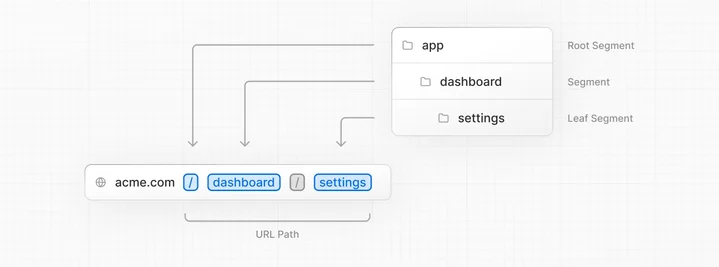
In Next.js 14 New dynamic routes are actually added by including square brackets in the filename within the app directory (though the earlier convention of naming files with pages is used in the older versions). For example, a file named [id]/page exists locally is not the same as a file named that exists remotely. If the URL path is /app/posts/1/, /app/posts/2/, and so on, js inside the app/posts directory will be loaded.
Example:
// app/posts/[id]/page.jsimport { useParams } from 'next/navigation';

export default function Post() {
  const params = useParams();
  const { id } = params;

  return <p>Post: {id}</p>;
}
This snippet sets up a dynamic route for blog posts, capturing each post’s ID from the URL.
Fetching Data for Dynamic Routes
Next.js provides several data-fetching methods for dynamic routes:
- generateStaticParams: Defines static paths at build time.
- Server Components: Allow for server-side data fetching without additional APIs.
- Route Handlers: Enable API route creation for dynamic data fetching.
Example with Server Component and generateStaticParams:
// app/posts/[id]/page.jsimport { getPostData, getAllPostIds } from '@/lib/posts';

export default async function Post({ params }) {
  const postData = await getPostData(params.id);
  return (
    <article>
      <h1>{postData.title}</h1>
      <p>{postData.content}</p>
    </article>
  );
}

export async function generateStaticParams() {
  const paths = await getAllPostIds();
  return paths.map((id) => ({ id }));
}
Handling Loading and Error States
Dynamic routes almost always involve fetching data, and fetching data means accounting for the time it takes and the possibility it fails. Next.js 14’s app router has built-in conventions for both, and they’re worth setting up alongside your dynamic route rather than bolting on later.
Adding a dedicated loading file inside the same folder as your dynamic route automatically wraps the page in a React Suspense boundary, so Next.js shows a fallback UI while the data fetch behind that route is in flight. For a blog post page, this might just be a skeleton layout matching the article’s structure, giving the user something meaningful to look at rather than a blank screen.
Error handling works in a similar way through a dedicated error file, which Next.js renders automatically if anything throws during rendering or data fetching for that route segment. This typically includes a simple message explaining that something went wrong, along with a retry action, so a failed fetch doesn’t leave the user stuck with no way forward.
Together, these two conventions mean a slow or failed fetch for a dynamic route doesn’t leave the user staring at nothing or facing a raw, unstyled error message — both of which quietly hurt user experience even when the underlying routing logic is working correctly.
Optional Catch-All Routes
Alongside the catch-all routing pattern covered later in this post, Next.js also supports an optional variant that uses an extra set of brackets. The difference is small but matters in practice — a regular catch-all route requires at least one URL segment to match, while the optional version also matches the base route with no additional segments at all.
This distinction is useful for something like a documentation site, where the root documentation page should render a landing view, while any nested path beneath it — say, a specific guide several folders deep — should render content based on that path, all from a single route definition. Without the optional variant, a separate file would be needed just to handle the case where no additional path segments are present, which means maintaining two entry points for what is really one section of the site. The optional catch-all pattern collapses that into one, reducing duplication as the site’s structure grows.
Pros of Dynamic Routing in Next.js
- Flexibility in handling various route patterns
- Scalability for managing numerous similar pages
- SEO-friendly URL structures
- Improved performance with automatic code splitting
- Enhanced developer experience with intuitive API
Cons of Dynamic Routing in Next.js
- Potential complexity in managing nested routes
- Increased build times for large datasets when using static generation
- Learning curve for developers new to Next.js concepts
Best Practices for Dynamic Routing
There are a few habits that I have noticed which distinguish dynamic routing setups that scale well from those that become a maintenance burden as an application grows.
Validating the parameters before trying to use them is one such example. A parameter pulled from the URL is just a string, and there is nothing stopping someone from trying to navigate to a URL which does not actually exist. Checking whether a particular post, product, or user identified by a dynamic part in the URL actually exists in the database before attempting to render it will save a lot of headaches. It is much easier to simply show a generic not-found page for invalid URLs than to have every single page in the application handle that possibility.
On the other hand, it is important to set aside some routes for pre-rendering when the application starts to grow in complexity and the number of pages increases. While it is entirely reasonable to pre-render every page that the application can possibly have using build-time prerendering for an application which does not have hundreds or even thousands of pages, this approach will quickly become unwieldy for larger projects. For such an application, it makes more sense to prerender only the most common routes and render the rest on-demand.
Another thing that I have noticed is that it is important to agree on a convention for dynamic segments within nested routes. It is easy to accidentally create different dynamic segments that are actually supposed to refer to the same thing if the project grows large enough. Having a consistent naming strategy will help keep things organized.
I think it is also important to remember that not all information that may be useful for rendering a page is best placed in the URL path. Using query parameters is sometimes better than adding more dynamic segments, especially for information like filtering or sorting options, which is not actually part of the route itself.
Caching Behavior in Dynamic Routes
One aspect of dynamic routing that’s easy to overlook until it causes confusion is how Next.js decides what to cache and for how long. By default, data fetched inside a server component is cached aggressively, which is great for performance but can lead to a dynamic route showing stale content if the underlying data changes after the initial fetch.
For pages built from mostly static content — a blog post that rarely changes after publishing, for instance — this default caching behavior works in your favor, since it means the page doesn’t need to be regenerated on every request. But for routes tied to frequently changing data, like a product page with live inventory counts or a user dashboard, relying on the default cache can mean users see outdated information without realizing it.
Next.js gives you a few ways to control this on a per-route basis. Data fetches can be marked to skip the cache entirely, so the page always reflects the latest data on each request. Alternatively, a revalidation interval can be set, so a page is regenerated automatically after a specified amount of time has passed, striking a middle ground between fully static and fully dynamic behavior. This is particularly useful for something like a news or blog section, where content might update a few times a day but doesn’t need to be regenerated on every single visit.
Getting this right matters more as an application scales, since defaulting every dynamic route to the least-cached option adds unnecessary load to your data source and slows down response times, while defaulting everything to fully static caching risks showing outdated content on pages where freshness actually matters. Reviewing caching behavior route by route, rather than applying one blanket setting across the whole app, tends to produce the best balance between performance and accuracy.
Advanced Techniques
Nested Dynamic Routes
For complex scenarios like nested categories:
// app/categories/[category]/[postId]/page.js
export default function Post({ params }) {
  const { category, postId } = params;
  return (
    <div>
      <h1>Category: {category}</h1>
      <p>Post ID: {postId}</p>
    </div>
  );
}
Generating SEO Metadata for Dynamic Routes
Since this post already discussed SEO-friendly URLs it’s worth considering doing the same for the metadata as a dynamic route with a generic page title effectively negates much of the SEO benefit gained from nice URLs in the first place.
Next.js 14 allows for per-route metadata generation that can use the same data fetched for the page’s content to set the page’s title and description dynamically. This is in particular useful for blogs that use dynamic routes for posts as it allows each post to have its own title and description in the head of the page instead of every post having the same generic title.
This is important both for SEO purposes for the search engine’s crawlers and robots to correctly index and rank each page, and for social media preview cards to display properly and not have a generic or missing description. For a content-heavy site with many dynamically generated pages this is easily one of the most impactful additions to a dynamic routing system as it directly increases discoverability without requiring any changes to the underlying URL structure of the site.
Catch-All Routes
Handle multiple URL segments using […slug] syntax:
// app/[...slug]/page.js
export default function Page({ params }) {
  const { slug } = params;
  return <p>Slug: {slug.join('/')}</p>;
}
Common Issues When Working with Dynamic Routes
A handful of problems come up often enough with dynamic routing in the app router that they’re worth knowing about ahead of time.
One common issue is a dynamic route returning a not-found error in production despite working correctly during local development. This usually points to a static generation gap — if a given identifier wasn’t included in the list of paths generated at build time, and the route isn’t configured to render unlisted paths on demand, the page won’t be available unless that configuration is adjusted.
Another frequent point of confusion is route parameters appearing as missing or undefined inside a component further down the component tree. This typically happens when a component that needs direct access to route parameters isn’t set up to read them correctly, meaning those values need to be explicitly passed down from a parent component instead.
Build times becoming unreasonably long as a dataset grows is another issue tied directly to the point raised in the best-practices section above. Statically generating every possible dynamic route at build time doesn’t scale indefinitely, and switching high-volume routes to on-demand rendering is usually the fix once build times start becoming a bottleneck.
Finally, conflicts can arise when both a specific dynamic route and a catch-all route exist at the same level in the folder structure. Next.js has to resolve which route pattern a given URL should match, and this isn’t always intuitive at a glance. In most cases, it’s simpler to commit to one routing pattern per section of an application rather than mixing specific and catch-all segments at the same level.
Conclusion
Dynamic routing in Next.js offers a powerful toolkit for creating flexible, scalable, and SEO-friendly web applications. While it introduces some complexity, especially for newcomers, the benefits in terms of application structure and performance are substantial.
Next.js continues to evolve, streamlining the development process and enhancing routing capabilities. By mastering dynamic routing, developers can create sophisticated web applications that provide seamless user experiences across various content types and URL structures.
Whether you’re building a personal blog, a large-scale e-commerce platform, or engaging in custom enterprise software development, understanding and leveraging routing in Next.js is key to creating efficient, maintainable, and user-friendly web applications. As a leading software development company, we recognize the importance of these tools in delivering custom software services that meet the diverse needs of modern businesses.
In today’s digital landscape, partnering with an experienced software development firm can help you harness the full potential of Next.js and its routing capabilities. This approach is particularly valuable for businesses seeking custom software for business solutions that can adapt and scale with their growing needs.
To learn more about Next.Js and its capabilities, check out their official Next.Js website here.
For additional insightful articles and information on custom software development services, please reach out to us.