AngularJS performance rarely dies from one big mistake — it’s usually death by a thousand cuts: a bloated bundle here, a filter running on every digest cycle there, a third-party library nobody remembers adding. Beyond the usual advice about watchers and lazy loading, the fixes that move the needle most in real projects are trimming your build pipeline, keeping filters out of templates, prerendering for that first meaningful paint, auditing dependencies you probably forgot you installed, and testing on the kind of device your actual users own — not the laptop on your desk. Do these five things and you’ll likely claw back more speed than any single “best practice” checklist promises.
- 1 Use AOT Compilation for faster execution.
- 2 Minimize digest cycles and watchers.
- 3 Optimize ng-repeat and use lazy loading.
- 4 Reduce DOM manipulation and enable caching.
- 5 Optimize API calls and prevent memory leaks.
- 6 Use performance monitoring tools like Lighthouse.
- 7 Work with an AngularJS development expert for best results.
- 8 Precompile templates to reduce runtime work.
- 9 Clean up unused resources.
- 10 Monitor performance as the app grows.
Are you struggling with the performance of your AngularJS application? If yes, then you need to work on optimizing it. Optimizing your AngularJS application ensures faster load times, smooth user experience, and better efficiency. A good AngularJS developer can help you can make your application smoother and faster.
In this post, we will discuss various techniques for improving the performance of your AngularJS application. Let’s figure out the different ways in which we can improve your AngularJS app with a great service provider.
10 Ways to Optimize AngularJS Web Applications
AngularJS has been most popular for developing single-page web apps, real-time apps, and apps that have a simple model. Here’s how you can utilize its in-built features to optimize performance further:
1. Enabling the Ahead-of-Time (AOT) Compilation
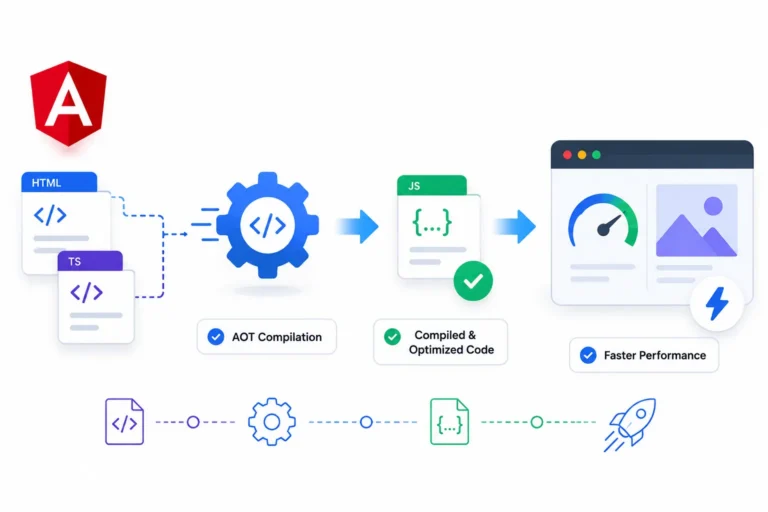
AOT compilation converts AngularJS templates into JavaScript code before the browser loads them, it helps in improving application performance. This process reduces the browser’s need to compile templates which happens during runtime. It ultimately helps in faster execution.
For AngularJS 1.x, you can get similar benefits by precompiling templates with tools such as html2js or template cache plugins. This reduces the amount of work the browser needs to do when the application starts and can help pages feel more responsive, especially on devices with limited processing power.
2. Reducing The Use Of Digest Cycle
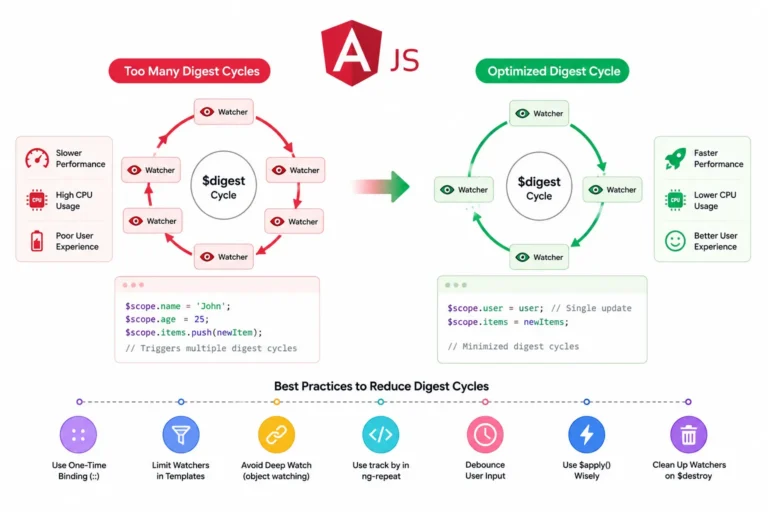
As AngularJS has a two-way data binding system, it continuously monitors changes happening in the application. Each watcher added to the scope increases the digest cycle time, which impacts the performance. For optimizing, you can minimize the number of watchers in your application, use one-time bindings (::) where possible.
Keep the number of watchers under control and use one-time bindings (::) wherever possible. Avoid unnecessary $watch, $scope.$apply(), and $scope.$digest() calls. This helps AngularJS spend less time checking for changes whenever something is updated on the page. As the application grows and more interactive elements are added, keeping the digest cycle lightweight becomes even more important.
3. Optimize ng-repeat Directives
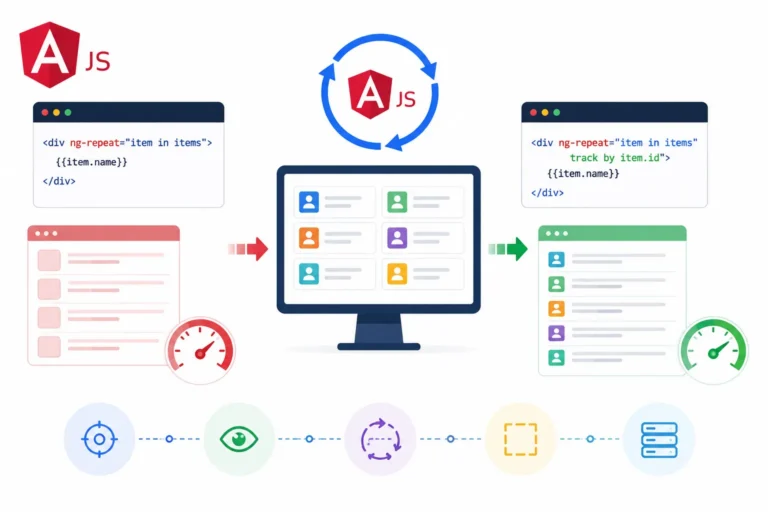
The ng-repeat directive is commonly used in AngularJS applications, however, if it is used inefficiently then it can slow down performance. Thus, we implement the following to enhance efficiency:
- Identify objects uniquely, reducing re-rendering in the Angular JS by tracking.
- Try to use third-party libraries like ng-virtual-scroll for handling extensive lists.
These approaches help AngularJS handle large amounts of repeated data more efficiently and reduce the amount of work required whenever the list changes. This is especially helpful when a page needs to display a lot of records at once. Keeping the repeated elements simple can make scrolling smoother and help the application respond faster when the data changes.
4. Use Lazy Loading for Modules
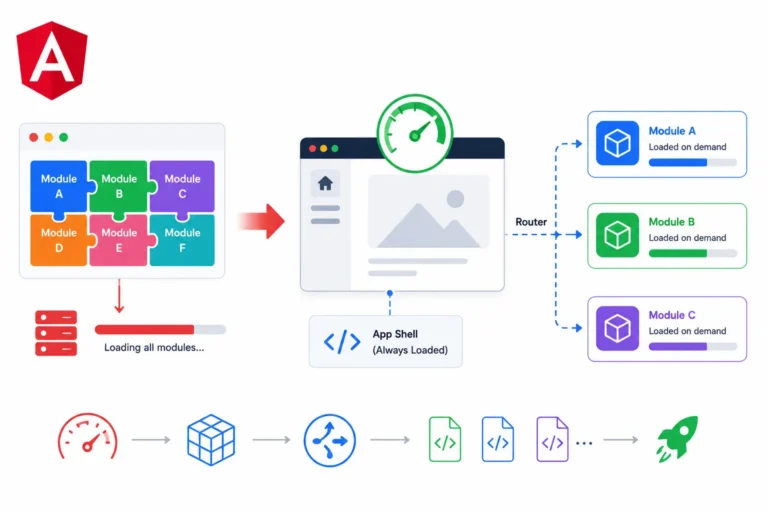
Using lazy loading where only necessary modules are loaded when needed helps to reduce the initial load time of an AngularJS application. This is very useful while making large applications managed by Angular JS development service providers where they need to scale further.
In AngularJS 1.x, components like ocLazyLoad can be helpful in loading bigger or rarely-used sections based on their requirements. The idea behind this approach is to avoid loading everything during startup but rather load whatever is required. This is an efficient approach for larger apps with multiple sections to load.
5. Optimize DOM Manipulation
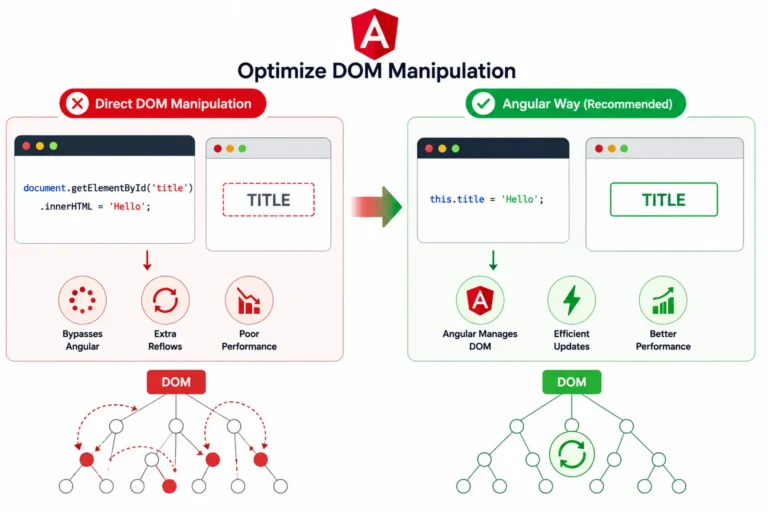
If DOM manipulations are used frequently, then it can degrade the performance of the application made with AngularJS. So, you can minimize unnecessary DOM updates in the following ways:
- For conditional rendering, try using ng-if instead of ng-show/ng-hide.
- While handling multiple event listeners, try to use event delegation efficiently.
It is particularly beneficial for sites that have multiple interactive components. This lets the browser focus less on processing and makes interactions more seamless for the user when he or she uses the program.
6. Cache Resources

Caching reduces the load time that helps in performance improvement by decreasing the JavaScript and CSS files size. The ideal practices here would be to include:
- Minify JavaScript and CSS files, and it can be done using tools like CSSNano or UglifyJS.
- Enable HTTP caching by configuring proper cache-control headers.
- In order to serve static files efficiently, try using CDNs.
It is important when it comes to returning customers since the resource, which is loaded once, might not necessarily need to be loaded again. Static files need to be cached and compressed in order to increase speed and minimize the waiting time for resources. This could result in fewer duplicate requests being sent to the server, thus making efficient use of application resources.
7. Optimize API Calls and Data Handling
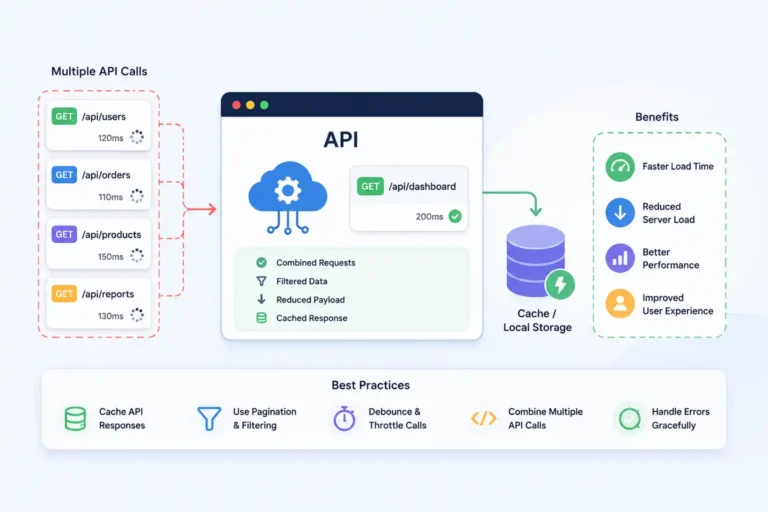
Reduce the HTTP requests that can improve overall application performance.
Some strategies to do it will include:
- Use caching mechanisms like session storage or local storage.
- Implement throttle and debounce functions for API calls.
- Combine different API requests into a single call where convenient.
For instance, the search or filter functionality would not send an API request every time you press a key because of debouncing. In addition, it may be wise to keep track of API requests and delete any obsolete calls. Only transmitting the data required by the application could minimize the data transferred and make the page load faster in case there is a lot of data.
8. Reduce Memory Leaks
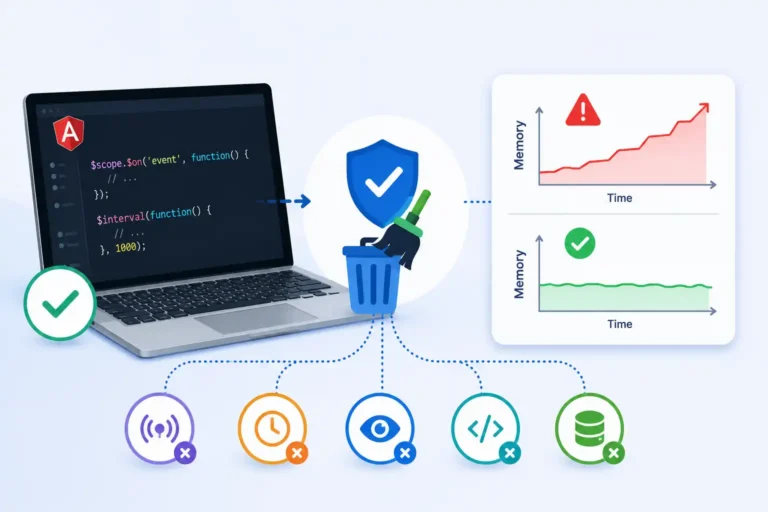
Memory leaks can slow down an AngularJS application over time. They can be prevented in the following ways:
- Properly destroying $scope when components are removed.
- In order to clean up resources, use $destroy event listeners.
- Limit the use of global variables.
Furthermore, make sure that you do not use unnecessary global variables. Third party plug-ins will also have to be released from memory once they are no longer required, because they may continue to consume memory. It is important to release the memory used by these plug-ins in order to maintain the same level of performance throughout.
9. Use Performance Monitoring Tools

Monitoring performance helps identify different issues and scope for improvement. Examples of some tools include:
- Angular Batarang: An extension for debugging AngularJS applications.
- Chrome DevTools: For tracking JavaScript execution and memory usage.
- Lighthouse: A tool to analyze and optimize web applications.
They should be performed before and after any modification to determine whether or not improvements have been made. Performance monitoring will make it easier for you to detect any issues that arise due to the increased complexity of the program. It will also be easier to determine whether the optimization process made a difference or whether another part of the program needs to be worked on.
10. Work with a Web Development Company Using AngularJS
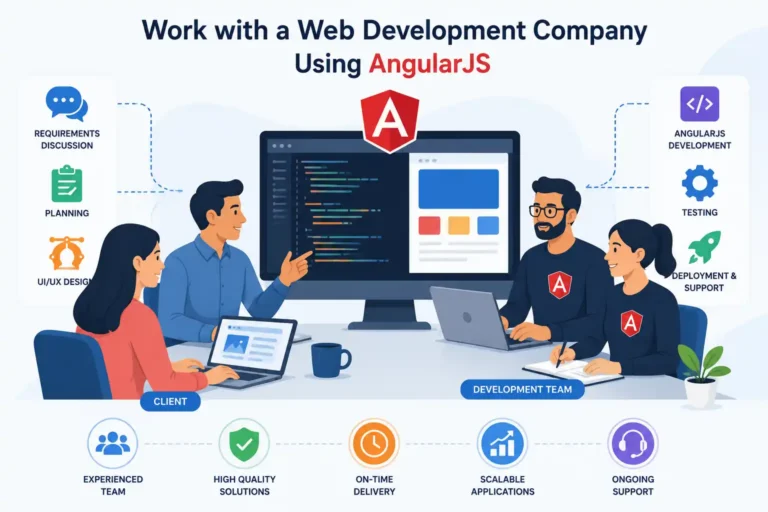
Optimizing AngularJS applications requires experience and expertise. Partnering with an AngularJS website development company can ensure your application meets performance benchmarks and follows best practices. A professional AngularJS web development service can implement advanced optimization techniques as per the project.
Are You Ready to Optimize Your AngularJS App?
So, improving an AngularJS application’s performance is crucial for providing a seamless user experience. By following the optimization techniques mentioned above during Angular JS website development, you can improve applications reduce load times, improve speed, and create a scalable solution. These strategies can build efficient web applications with AngularJS as per the requirement.
I believe that the performance optimization is also something that must go on since the app gets richer in functionality and data. In this regard, it is necessary to perform performance audits so that one can determine potential issues and make sure that everything works fine. It is only by applying correct techniques of compilation, data binding, DOM manipulation, API requests, caching, and memory usage that one will succeed in keeping their AngularJS applications fast, scalable, and maintainable.