
Optimizing .NET application performance requires a multi-layered approach that targets runtime execution, resource utilization, and database access. By leveraging asynchronous non-blocking patterns (async/await), implementing memory efficiency strategies (such as object pooling and Garbage Collection tuning), reducing Entity Framework database round-trips, and profiling bottlenecks using diagnostic tools, engineering teams can achieve lower API latency, handle higher request concurrency, and significantly reduce cloud hosting overhead.
- 1 Optimize code efficiency to reduce unnecessary computations.
- 2 Implement asynchronous programming for better responsiveness.
- 3 Use caching strategies to minimize database calls.
- 4 Optimize database interactions to prevent bottlenecks.
- 5 Reduce memory footprint with effective garbage collection.
- 6 Utilize profiling tools for performance monitoring.
- 7 Choose an experienced .NET development company for scalability.
Do you have a .NET app that requires better performance? If yes, this guide is for you. Proper .NET development creates highly optimized apps that easily deliver a seamless user experience.
Hiring a competent .NET website development company instantly helps improve application performance. It provides high reliability, scalability, and user satisfaction. Here, we will explore important strategies and modern best practices to enhance your .NET applications.
10 Ways to Improve Performance in .NET Apps
The .NET framework has many built-in features for optimizing performance, enhancing security, and safely scaling apps. Sometimes, an app built in an older framework simply needs a clean upgrade. Here is exactly what you can do with the latest .NET framework:
1. Optimize Code Efficiency

One critical step in improving performance is writing efficient and optimized code. Reducing unnecessary computations and optimizing slow algorithms heavily boosts performance.
Some important points to consider include:
- Avoid unnecessary object creation.
- Avoid basic string concatenation. Instead, strictly use StringBuilder in loops.
- Minimize heavy use of LINQ for raw performance improvement.
2. Use Asynchronous Programming

Asynchronous programming is a highly powerful feature in .NET. It heavily improves your application’s scalability and overall responsiveness. This is incredibly useful if you work with ASP.NET for web application development.
The async and await keywords allow developers to run smooth, non-blocking operations. This greatly enhances the overall efficiency of the application. Always prefer asynchronous methods when working with heavy I/O-bound database queries or API calls.
3. Implement Caching Strategies
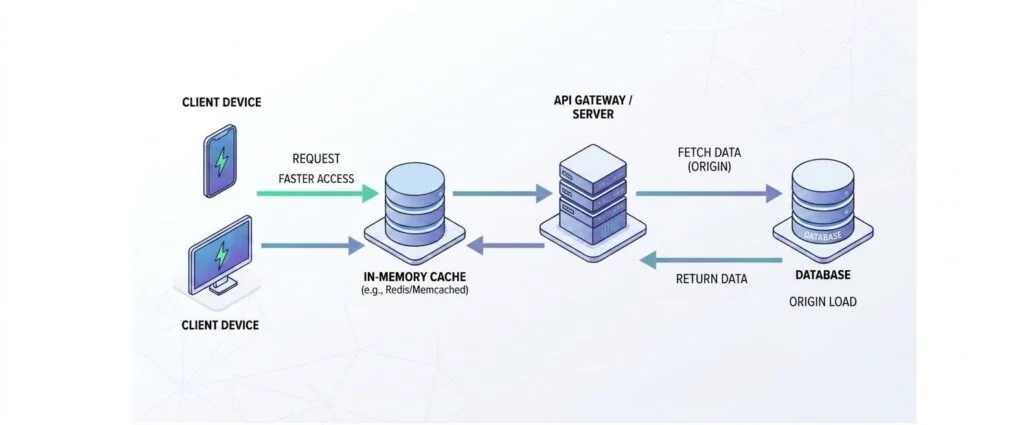
Caching is a highly effective way to permanently reduce database calls and slow, redundant computations.
Some caching techniques you can use in .NET web development framework include:
- Use in-memory caching via MemoryCache for frequently accessed data.
- Use distributed caching via popular solutions like Redis or Memcached.
- Use output caching for ASP.NET apps to safely store rendered pages and lower server load.
4. Optimize Database Interactions

Database interactions often become performance bottlenecks in .NET applications. Consider these optimization techniques:
- Use clean parameterized queries. This prevents SQL injection and rapidly improves execution speed.
- Optimize database indexing to immediately help slow query performance.
- Implement proper connection pooling. This drastically reduces server overhead when actively connecting to the database.
5. Reduce Memory Footprint

Excessive memory usage will heavily degrade application performance. You can perfectly manage memory in .NET applications using these methods:
- Dispose of large, unnecessary objects promptly.
- Use proper Garbage Collection (GC) tuning to heavily optimize memory management.
- Implement clean object pooling for frequently used objects. This easily reduces nasty heap allocations.
6. Optimize Web API Performance

Providing quick response times is absolutely crucial for .NET Web APIs. Some of the best modern practices include the following:
- Use compression techniques like Gzip to drastically reduce payload sizes.
- Implement clear pagination to handle large datasets quickly and efficiently.
- Enable response caching to easily avoid slow, redundant API calls.
- Utilize content delivery networks (CDNs) for rapidly serving heavy static resources.
7. Utilize .NET Profiling and Monitoring Tools

Profiling and monitoring are essential for identifying performance bottlenecks. Some useful tools for .NET development include:
- Visual Studio Profiler effectively helps identify hidden memory leaks and heavy CPU usage.
- dotTrace rapidly analyzes live application performance.
8. Use a Content Delivery Network (CDN)
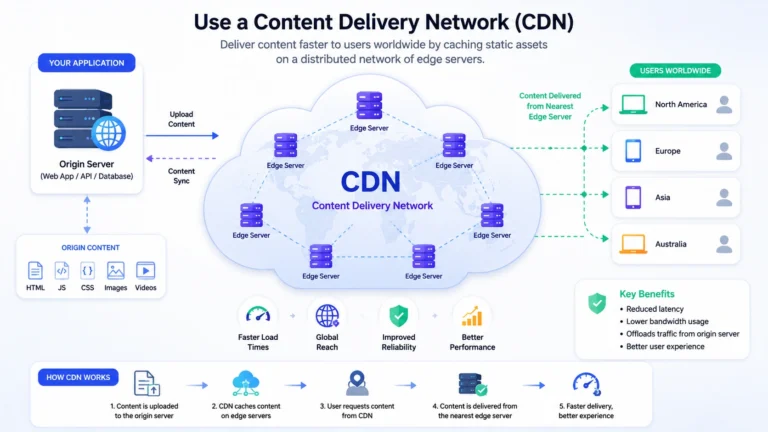
Using a CDN significantly reduces latency and directly improves fast load times. CDNs cache static assets like large images, JavaScript files, and core CSS globally. This effortlessly ensures rapid content delivery to final users.
9. Optimize ASP.NET Applications

If you work with ASP.NET, highly optimizing your server-side performance is absolutely essential. Your expert .NET developer easily implements these strategies:
- Minimize ViewState to massively reduce raw page sizes.
- Use clever bundling and strict minification to compress CSS and JavaScript files.
- Enable fast output caching for frequently accessed web pages.
10. Choose the Right .NET Development Company

Partnering with an experienced .NET website development company easily enhances performance. A professional web development service provider using .NET ensures strict adherence to modern best practices. They handle complex performance tuning and major scalability improvements fully tailored to your exact business needs.
Are You Ready to Work on Your .NET Application?
Improving the performance of .NET applications requires a combination of strict best coding practices and highly optimized database interactions. It requires highly efficient memory management alongside the smart use of modern tools.
By heavily following the tips strictly outlined above, you absolutely ensure that your .NET website development runs smoothly. You cleanly deliver a genuinely great user experience while scaling effectively.
High-Throughput Memory Tuning: Garbage Collection & Allocation Pools
Excessive large heap allocations constantly force the .NET Garbage Collector (GC) to run frequent collection cycles. This sadly creates massive tail-latency spikes during peak traffic. Applying smart, highly structured allocation patterns perfectly preserves memory throughput:
- Object Pooling with
ArrayPool: Instead of making new objects, try renting and returning temporary buffers. UsingArrayPool.Sharedsecurely reduces bad Large Object Heap (LOH) allocations during heavy JSON parsing. - Structs vs. Classes: Simply using a readonly struct for small data easily avoids nasty heap allocations. It strictly allocates perfectly on the stack and releases instantly.
- Garbage Collector Server Mode: Cleanly enabling GC Server Mode in your
runtimeconfig.jsonallows the app to effectively use more memory. This gives vastly better performance on modern multi-core servers.
Entity Framework Core (EF Core) Data-Access Optimization
Database query latency is very frequently the single largest bottleneck in enterprise .NET web development. Properly optimizing raw data retrieval flows drastically accelerates slow backend response times:
- Eliminate N+1 Query Antipatterns: Strongly eager-load child collections by cleanly using
Include()in LINQ queries. This smartly avoids additional accidental database hits caused by lazy-loading. - DTO Projection with
.Select(): When searching, project results into simple DTOs instead of heavy full models. This firmly forces EF to strictly generate SQL with only the necessary lightweight fields. - Use Compiled Queries: Easily use
EF.CompileAsyncQueryto safely compile heavy database queries on hot paths. This actively removes the slow overhead of parsing LINQ on every single HTTP request.
Asynchronous Architecture & Non-Blocking Concurrency Patterns
Improper asynchronous execution safely leads to dangerous thread starvation and hidden deadlocks. It also creates severe thread pool queue delays:
- Avoiding
Task.Resultand.Wait(): Calling blocking synchronous methods directly on async tasks heavily locks the underlying thread. This massively lowers your application’s ability to smoothly serve concurrent users. - Throttling Parallelism: Use
SemaphoreSlimto strongly throttle aggressive parallel API calls. This safely prevents your app from completely exhausting vital network sockets or database connection pools. - High-Performance Pipelines: Start explicitly replacing standard messy thread locks with
System.Threading.Channels. This massively improves heavy asynchronous data streaming strictly between background workers.
Real-Time Monitoring & Diagnostic Profiling Strategies
Proactive performance tuning strictly relies on hard empirical profiling metrics rather than blind guess-work:
- Distributed Tracing in Microservices: Strongly use Application Insights or OpenTelemetry. They neatly track down complex RPC calls and visually locate precise moments of deep network latency.
- Telemetry Exploration: Safely use
System.Diagnostics.Metricsto create custom meters. You can easily measure hidden queue lengths or bad cache misses, viewing them fully in Grafana. - Memory Diagnostics: Easily use
dotnet-dumpto properly analyze tricky production memory leaks. Always useBenchmarkDotNetto carefully benchmark public methods securely before shipping code.
High-Performance JSON Serialization & Protocol Protocols
Hidden JSON serialization overhead frequently consumes massive CPU cycles during high-volume API requests. Replacing old legacy approaches with highly modern .NET pipelines easily boosts data throughput:
- Migrating to
System.Text.Json: Fully replace heavy legacyNewtonsoft.Jsonwith the sleek built-inSystem.Text.Jsonlibrary. It smartly parses JSON streams directly in raw UTF-8 bytes without uselessly allocating intermediate strings. - Compile-Time Source Generators: Cleanly enable JSON Source Generators to strictly build serialization code at compile time. This perfectly bypasses slow reflection entirely, drastically reducing cold-start latency.
- Adopting gRPC: For blazing high-speed internal communication, totally replace traditional REST endpoints with modern gRPC over HTTP/2. Using heavily compressed binary Protocol Buffers vastly lowers your CPU payload costs.
Common Mistakes That Undermine .NET Performance Work
Even with good intentions, a few habits can quietly cancel out performance gains:
- Optimizing before measuring. Making changes based on assumptions, rather than profiling data, often targets the wrong bottleneck entirely.
- Ignoring database query plans. Code-level optimizations won’t help much if the underlying SQL queries are poorly indexed or structured.
- Over-caching without invalidation strategy. Aggressive caching without a clear invalidation plan can lead to stale data issues that are harder to debug than the original performance problem.
- Mixing sync and async code carelessly. Partially converting a codebase to async, without addressing blocking calls elsewhere, can introduce new bottlenecks rather than removing old ones.
A Simple Performance Optimization Checklist
Before shipping performance improvements, it helps to have a quick checklist to work through:
- Profile first, then optimize based on actual bottlenecks.
- Review database queries and indexing before touching application code.
- Confirm async/await is used consistently for I/O-bound operations.
- Check caching strategy for both effectiveness and staleness risk.
- Re-test under realistic load, not just local development conditions.
- Monitor key metrics after deployment to confirm the improvement held up in production.