

GitOps is not an alternative to DevOps. It is a specific way of doing DevOps where Git holds the desired state of your systems and an automated agent keeps production matching it. That cuts release risk, because a bad change is caught and reverted through Git rather than a late-night console fix, and it lets a small team run far more services without hiring. If release confidence is dropping as you add services, GitOps is usually the fix before another senior engineer is.
- 1 GitOps turns DevOps from a process-heavy model into a more repeatable operating system built around Git.
- 2 It lowers release risk through drift detection, auto-healing, and one-command rollback via Git revert.
- 3 It means fewer production incidents and faster recovery, with no extra headcount.
- 4 It scales to 100-plus services without growing the DevOps team, which is why teams adopt it.
Release risk grows faster than DevOps headcount. Every new service, environment and dependency adds another thing that can break in production, while hiring more engineers does not scale one-for-one. This is the math that catches most engineering leaders off guard: headcount grows linearly, if it grows at all, while the number of things that can go wrong in production grows closer to exponentially as services multiply and start depending on each other. GitOps vs DevOps is often framed as a rivalry, but it is not one. GitOps is a way to implement DevOps release management through declarative configuration and automation, reducing manual work and helping teams manage growing infrastructure without adding operational overhead at the same rate.
How does GitOps fit into DevOps?
DevOps is the culture, practices, and tooling that tie development and operations together, and modern DevOps best practices center on continuous delivery, infrastructure as code, and monitoring by default. The goal is a shorter, safer loop from commit to production, and GitOps is one of the sharpest ways to tighten it.
It helps to think of DevOps as the destination and GitOps as one specific route to get there. A team can absolutely run a mature DevOps practice without ever touching GitOps — plenty do, especially on infrastructure that predates Kubernetes or that doesn’t lend itself to declarative configuration. What GitOps adds isn’t a new philosophy; it’s a more disciplined, auditable way of executing on the philosophy DevOps already asks for.
What is a GitOps workflow?
At its core, a GitOps workflow treats Git as the single source of truth for both your app and your infrastructure. Four principles define the model:
- The whole system is described declaratively.
- That description is stored in Git as the source of truth.
- Approved changes are applied automatically.
- Agents continuously check that reality matches Git and flag any drift.
Operations becomes a review-and-merge habit rather than a console-and-command one.
That last shift is easy to state and genuinely disruptive to live with at first. Engineers who are used to SSHing into a box to fix something in the moment have to retrain that instinct — the fix now goes through a pull request, even at 2 a.m. during an incident. Teams that make this transition well usually keep a documented, audited “break glass” process for genuine emergencies, rather than pretending the discipline never has exceptions.
The difference between GitOps and DevOps
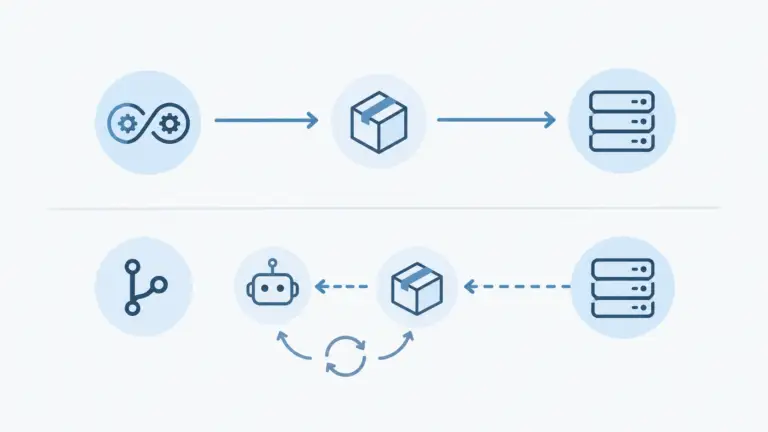
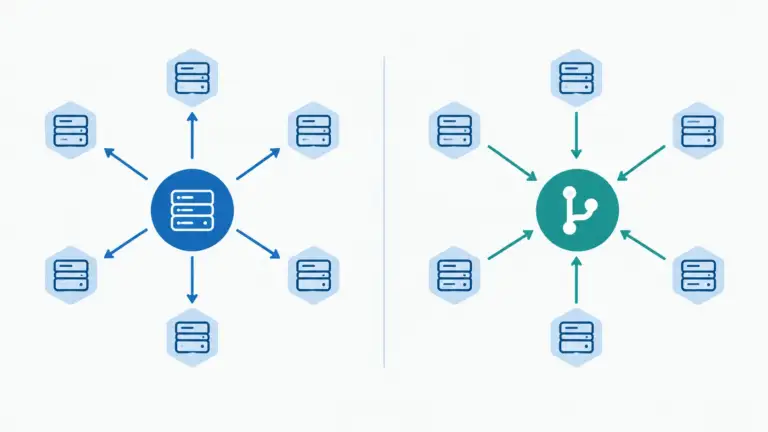
For release management, the practical difference between GitOps and DevOps comes down to push versus pull. Traditional DevOps pushes changes out through a CI/CD pipeline, and GitOps pulls them from Git into the environment. The table lays the two side by side.
| Dimension | Traditional DevOps (push) | GitOps (pull) |
|---|---|---|
| Source of truth | CI/CD scripts plus human ops | Git repository |
| Deploy trigger | CI pipeline pushes to the environment | Agent syncs from Git |
| Rollback | Rerun the pipeline with the old version | Git revert commit |
| Drift detection | Manual or ad hoc | Continuous and automated |
| Audit trail | CI logs plus deploy history | Full Git history |
| Environment consistency | Depends on pipeline discipline | Guaranteed by sync |
The push-versus-pull distinction sounds like a technical footnote, but it’s the entire reason GitOps reduces risk. In a push model, your CI/CD system needs credentials to reach into production — which means anything that compromises your pipeline can compromise production directly. In a pull model, the agent living inside the cluster is the only thing with write access to its own environment, and it only ever pulls from a source it’s configured to trust. That’s a meaningfully smaller attack surface, not just a cleaner mental model.
How a GitOps pipeline lowers release risk
The pull model is where the risk drops, and a GitOps pipeline lowers release risk through structure rather than extra engineer hours:
- Drift detection catches manual changes before they cause an incident.
- Auto-healing turns configuration drift from a firefighting problem into an automated correction.
- Rollback becomes a Git revert you can test in a preview first.
Teams that adopt GitOps typically see fewer production incidents and faster recovery, because every change is reviewed in Git and a bad one is reverted with a commit rather than patched live in a console.
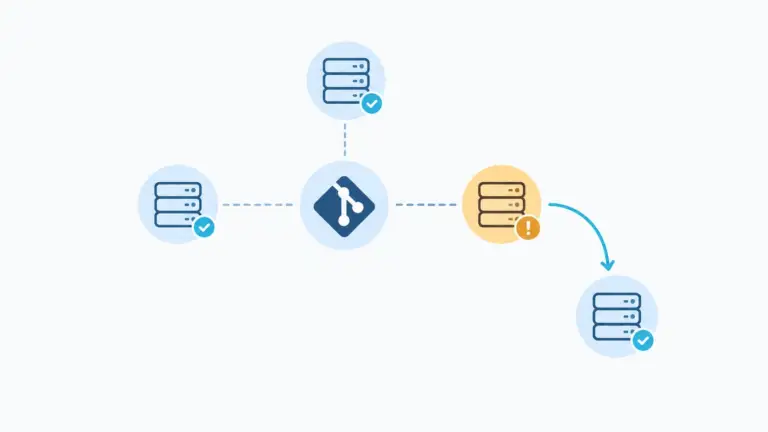
What this looks like in practice: picture an engineer who manually bumps a resource limit on a production pod at 11 p.m. to stop it from getting OOM-killed — a completely reasonable, understandable fix in the moment. In a traditional setup, that change now lives only in production, invisible to Git, until someone eventually notices the mismatch (often during an incident review, weeks later). In a GitOps setup, the reconciliation loop notices the drift within minutes, either flags it for review or reverts it automatically depending on policy, and either way the actual desired state — including whether that resource limit should be bumped — gets resolved through a proper PR instead of quietly rotting as an undocumented exception.
Canary deployment and progressive rollouts
Progressive rollouts fit the model naturally, and canary deployment is the clearest example. The Git repository declares the rollout, say 5 percent of traffic to the new version, then 25, 50, and 100, with metrics checked at each step. If anything degrades, the controller pauses or rolls back on its own.
This matters most for the release that looks fine in staging and then doesn’t look fine at 50 percent of production traffic — the kind of failure that only shows up under real load or with real data shapes. A canary rollout catches that at 5 percent, when it affects a sliver of users and rolling back is trivial, instead of at 100 percent, when it’s an incident.
GitOps tools worth using
A handful of GitOps tools now cover most needs. The table maps the deployment pipeline choices worth a look in 2026 to what each does best.
| Tool | Category | Fits |
|---|---|---|
| ArgoCD | GitOps controller for Kubernetes | Multi-cluster, UI-driven ops teams |
| Flux | GitOps controller for Kubernetes | Lightweight, CLI-native workflows |
| Jenkins X | Full GitOps CI/CD | Teams migrating from classic Jenkins |
| GitLab CI plus Auto DevOps | Push CI with GitOps optional | Teams already on GitLab |
| Argo Rollouts | Progressive delivery controller | Canary and blue-green deployments |
A quick note on picking between the two most common controllers: ArgoCD tends to win out for teams that want a visual dashboard of what’s deployed where, and for anyone managing multiple clusters who wants that view without living in the CLI. Flux tends to win out for teams that prefer everything to live as code and CLI commands, with less emphasis on a UI layer — it’s often the lighter-weight choice for a smaller platform team. Neither is objectively better; the choice mostly comes down to whether your team thinks in dashboards or in config files.
Scaling the DevOps workflow without more headcount
Here is the scaling problem GitOps solves. In a manual DevOps workflow, operations grow with the number of services faster than headcount can keep up. One more engineer adds capacity in a straight line, but one more service adds cross-cutting work that touches everything already running. GitOps changes that curve because adding a service means adding a declarative definition, not another runbook, while DevOps automation handles the rest.
Teams that adopt it early can run 100-plus services without needing to increase their teams at the same rate. That is where a partner earns its keep. Innostax helps growing teams implement GitOps, designing the workflow, choosing the controllers and migrating services in phases. Our GitOps for growing teams services help increase release velocity while keeping the workflow scalable.
Common Objections to GitOps (And Whether They Hold Up)
GitOps isn’t a free upgrade, and it’s worth being straight about the tradeoffs rather than pretending there aren’t any.
“It’s mostly a Kubernetes thing.” True, and worth weighing honestly. GitOps’ four principles apply conceptually to any system with a declarative, versionable desired state, but the tooling ecosystem — ArgoCD, Flux, Argo Rollouts — is built overwhelmingly for Kubernetes. Teams running mostly VM-based or legacy infrastructure will get less out of it today than a Kubernetes-native team will.
“There’s a real learning curve.” Also true. Engineers used to imperative, console-driven operations need to unlearn some habits, and debugging a reconciliation loop that’s stuck in a weird state is a genuinely different skill from debugging a failed deploy script. This is usually a few weeks of friction for a team, not months — but it’s not zero.
“We’ll get locked into specific tooling.” Less true than it sounds. ArgoCD and Flux both operate on standard Kubernetes manifests and Git, which means the actual configuration underneath is portable even if you eventually switch controllers. The lock-in risk is smaller than switching, say, cloud providers.
None of these are reasons to avoid GitOps. They’re reasons to go in with realistic expectations about the ramp-up, rather than expecting it to be a drop-in weekend project.
Moving to GitOps Kubernetes, step by step
Moving to GitOps Kubernetes follows a practical checklist:
- Install a controller like ArgoCD or Flux in a non-production cluster.
- Define one service’s desired state in Git and let the controller manage it.
- Expand to more services one at a time.
- Cut off direct console access outside emergencies, so every change flows through Git.
- Turn on drift detection and auto-remediation.
For a team of ten, the move usually takes about a quarter, and your existing DevOps best practices carry over cleanly.
A practical note on ordering: start with a low-stakes, non-customer-facing service for that first step, not your most critical one. The point of the non-production cluster and the first single service is to let the team make its mistakes — misconfigured sync policies, a reconciliation loop fighting with a manual change nobody documented — somewhere it’s cheap to fix, before the same mistakes happen against something that actually matters.
GitOps vs DevOps: is it the right move?
GitOps vs DevOps is not a choice between philosophies. GitOps is a specific way of doing DevOps that lowers release risk and cuts operational overhead. If your DevOps team is stretched and release confidence is slipping, the fix is usually the operating model, not another senior hire. Innostax designs and runs that model for growing teams, so releases get safer as you add services rather than riskier. Talk to us before the next hire.
Ready to raise release velocity without growing the team? Book a free GitOps readiness review with the Innostax DevOps team.