
- 1 Streamlined Data Handling: React Query handles fetching, caching, and refetching for you. As a result, you write less code, and your app performs better.
- 2 Enhanced User Experience: Caching, automatic retries, and optimistic updates make interactions feel fast and smooth. Users wait less and see fewer errors.
- 3 Improved Developer Workflow: Its hooks turn complex server-state logic into a few lines of code. Developers can then spend more time on features and less on data plumbing.
Handling asynchronous data is one of the harder parts of React development. Data fetching, caching, and state management can quickly turn into a web of complexity. Fortunately, React Query takes most of that work off your plate.
You’ll see this library called both “React Query” and “TanStack Query.” These are not two different tools. They are two names for the same library at different points in its history.
In 2022, the maintainers renamed the project TanStack Query when they expanded it beyond React. It now supports Solid, Svelte, and Vue as well. For React projects, the package you install is @tanstack/react-query.
Most developers still say “React Query” out of habit, and this guide does too. However, you’ll find the official documentation and GitHub issues under the TanStack Query name.
So, what exactly is React Query?
React Query is a library for data fetching, caching, and state management within React applications. It acts as a central hub for server data and automates these processes. That leaves you free to focus on building great user experiences.
Why Should You Use React Query?
1. Streamlined Data Fetching:
Writing manual data extraction logic for every API call is tedious and error-prone. React Query replaces it with automatic fetching that just works.
The library gives you powerful, convenient hooks like useQuery and useMutation. These hooks handle loading states, errors, and refetching for you.
2. Intelligent Caching:
React Query caches every response under a query key. When another component asks for the same data, it gets the cached copy instead of making a new API call. React Query also merges duplicate requests that fire at the same time. As a result, your app uses less data and responds faster.
3. Simplified State Management:
React Query manages server state for you. You no longer need to store API responses in useState or a global store and keep them in sync by hand. Instead, you can focus on rendering the data.
4. Error Handling:
React Query has error handling built in. When a request fails, it retries automatically, three times by default on the client. Each query also exposes an error state, so you can show clear messages to your users. As a result, you spend less time writing defensive code and more time on your product.
5. Optimistic Updates:
With optimistic updates, the UI changes immediately when a user takes an action, such as liking a post. React Query updates the cached data before the server responds. If the request fails, you can roll the cache back to its previous value. Users get instant feedback, and the data stays consistent with the server.
Explore Data Navigation with React Query
Here’s a quick roadmap to kickstart your adventure with React Query :This is a brief description about what to expect in the React Query`s exploratory session. In your school astronomy subject, the course covers practical exercises, including scientific tools, which then makes it very comprehensive.
1. Installation:
Begin your odyssey by installing React Query via npm or yarn :To begin, it’s a requirement to install React-Query either via npm or yarn package manager.

2. Basic Usage:
Dive into the fray by importing the useQuery hook from React Query and integrating it into your functional components to fetch data.
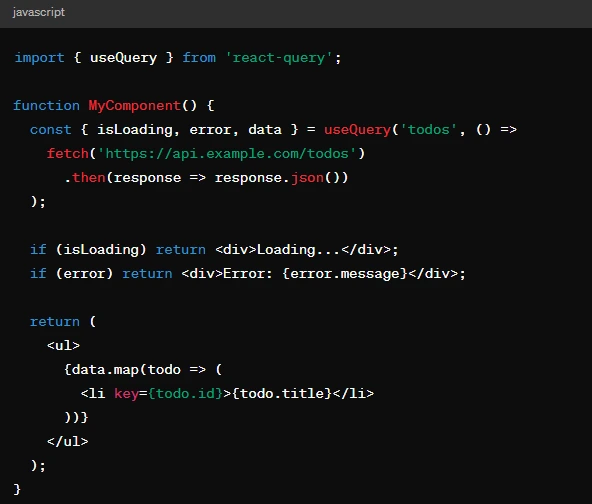
Handling Mutations: Writing Data, Not Just Reading It
Everything so far covers reading data. However, most applications also need to write data, for example when a user submits a form, edits a record, or deletes one. React Query provides a dedicated hook for this called useMutation.
A query runs automatically when the component that owns it renders. A mutation, by contrast, only runs when you call the mutate function that the hook returns. You usually trigger it from an event, such as a button click or a form submission. Also, a mutation function can take any arguments you need, while a query always depends on its key.
The main benefit of useMutation is its lifecycle callbacks. You can run code right before the request starts (onMutate), after it succeeds (onSuccess), or when it fails (onError). In practice, the most common pattern calls queryClient.invalidateQueries inside onSuccess. React Query then refetches every query tied to that key. As a result, you don’t have to update each related piece of client-side data by hand.
Why Query Invalidation Matters More Than It Seems
Caching makes React Query fast. However, it also creates a problem every data fetching library must solve: knowing when cached data has gone out of date. Invalidation handles exactly this.
To invalidate data, you call queryClient.invalidateQueries with a query key. React Query doesn’t delete the cached data right away. Instead, it marks the data as stale and refetches any active queries with that key in the background. Inactive queries refetch the next time a component uses them.
This matters more in practice than it seems. Say a user updates their profile name, and a header component also displays that name. Without invalidation, the header keeps showing the old value until something else triggers a refetch. With invalidation, both components update on their own, without sharing state or knowing about each other. You only need to invalidate once, after a successful mutation. Getting invalidation right mostly comes down to getting your query keys right, because keys decide which entries you target.
Common Mistakes When Getting Started with React Query
New React Query projects tend to repeat a few mistakes, so they’re worth calling out.
First, teams often try to manage every piece of app state with React Query. The library exists for server state: data that lives on a backend and can go stale. Local UI state, such as whether a modal is open, belongs in useState or a dedicated state library.
Second, many developers never set a sensible staleTime. This option controls how long React Query treats fetched data as fresh before it refetches in the background. The default is zero, so every component mount can trigger a new network request. That adds unnecessary load, even for data that rarely changes.
Third, teams often structure query keys inconsistently. A query key isn’t just an identifier. React Query uses it to decide when to cache, refetch, or invalidate data. Inconsistent or overly generic keys therefore cause subtle caching bugs that are hard to track down later.
React Query Pros and Cons

Pros:
– Reduced Boilerplate: Bye bye for good to all that repeated data accessing routine, which also secures simple and clear components in the long run.
– Enhanced Performance: To avoid long periods of waiting time and unnecessary API requests, automatic caching persistent data ensures to shorten the retrieval period and optimizes the application accordingly.
– Simplified State Management: “Leave React Query the steering wheel of data state management, then you are able to escape from the noose around the complicated state management solutions”.
– Enhanced Developer Experience: Enjoy a variety of features such as upbeat updates, error handling, and refetching, which are basically easy to use and you will find them helpful when you are in the work.
Cons:
– Learning Curve: Although React Query assists with fetching data, it takes out time to grasp its principles and hooks as these concepts may call for some level of understanding.
– Potential Dependency: Here, an external library is added to your project, which, aside from adding a new level of dependency to your project, also calls for its upkeep and a reconsideration of modifications.
– Abstraction: React Query simplifies data fetching to the extent of hiding some of the minor implementations that might be perceived as a drawback by the detail-oriented developers.
Conclusion:
React Query has garnered its rightful place as a faithful partner to anyone into React who desires to develop a precise data fetching, caching, and state management tool. It may have its extremely individual downfalls, but the layers of its advantages make it a must-have tool that perfect React applications are made of. Farewell the unimaginable data fetching issues and let React Query open a myriad of opportunities for you!.
“Thank React Query for making the future of quality apps without delay and cost-efficiency simple for you by supplying you with the necessary data management tools.”
To learn more about React Query and its capabilities, check out algolia’s official website .
For additional insightful articles and information on custom software development services, please reach out to us.