- 1 Testing Ensures Quality: Testing in .NET development is vital to catch bugs early, ensure stability, and enhance user experience.
- 2 Use Proven Tools: Utilize tools like NUnit, xUnit, MSTest, Selenium, Postman, and SpecFlow to cover unit, UI, and API testing effectively.
- 3 Adopt Best Practices: Implement Test-Driven Development (TDD), automate tests, and use mock frameworks to streamline the testing process.
- 4 Test in Multiple Environments: Ensure your app functions well in development, staging, and production to identify environment-specific issues.
- 5 Partner with Experts: Work with experienced .NET development companies that follow modern testing methodologies and compliance standards for optimal results.
Do you already have a fully functioning app coded in .NET framework? If yes, you must be doing something to ensure its security, stability, and efficiency. Your application must run smoothly and do the desired task according to the requirements. Thus, testing your applications effectively is essential for smooth running of the application. Here, we will explore essential tools, practical tips, and best practices used by web development companies for testing .NET applications.
Why Testing is Crucial in .NET Development?
Testing is an important step in the software development lifecycle. It helps with the following:
- Identify and fix bugs before deployment
- Ensure application security and stability
- Enhance user experience
- Improve scalability and performance
- Reduce maintenance costs to a large extent
The Real Cost of Skipping Proper Testing
A bug caught during development might take an hour to fix. Found in staging, it’s a few hours plus re-testing. Found in production, after a customer hits it, you’re looking at an emergency patch, a possible rollback, and — if it touches payment or data handling — a much harder conversation with whoever owns compliance.
Where the cost actually shows up depends on where the bug is caught:
| Stage caught | Typical fix effort | Who’s affected |
| During coding | Minutes to an hour | Just the developer |
| Code review | Under an hour | Developer + reviewer |
| Staging/QA | A few hours, plus retest cycle | QA team, delays release |
| Production | Hours to days, plus rollback risk | End users, support, sometimes compliance |
Essential Testing Tools for .NET Development
There are numerous tools available for testing .NET application development service providers. Here are some of the most widely used:

1. NUnit
NUnit is one of the most popular unit testing frameworks for .NET applications. It is open-source and supports various assertion methods, making it easy to write and execute tests. Good for ASP-based applications which have encouraged many ASP.NET application development companies to use it.
2. xUnit.net
xUnit.net is another widely used testing framework by many .NET application development companies since it is simple yet powerful. It is extensible and supports parallel test execution, which is suitable for many modern .NET applications.
3. MSTest
MSTest is Microsoft’s testing framework and it is integrated with Visual Studio. It is a great choice for developers looking for an easy-to-use testing solution within the Microsoft ecosystem.
4. Selenium
For web applications built using ASP.NET, there many companies are using Selenium. It is an essential tool for automated UI testing. It allows developers to simulate user interactions and verify that web applications function correctly across different browsers.
5. Postman
Postman is widely used for API testing and many .NET application development service providers are using it actively. It enables developers to validate RESTful APIs, ensuring they return the expected responses under different conditions.
6. SpecFlow
SpecFlow is a behavior-driven development (BDD) framework and it uses Gherkin syntax which makes teams write human-readable tests. It bridges the gap between technical and non-technical stakeholders.
7. Application Insights
Application Insights (part of Azure Monitor) is not a testing tool per se – it does not run test scenarios. That being said, it is often utilized during the test cycle to complement other testing types. This is done to evaluate the performance of applications through real-user telemetry and detect performance regressions and exceptions which are difficult to reproduce in isolation.
8. BenchmarkDotNet
The tool is primarily utilized for microbenchmarking .NET code for performance-critical applications. It is mostly used to measure the impact of certain code changes which are suspected to affect the performance of an application. In this regard, it helps discover performance regressions and unwanted behaviors. The primary use case is not a direct bug detection but rather assessing whether a specific part of the code base performs within acceptable limits.
Best Practices for Testing .NET Application Development
A well-structured testing strategy is important for the successful working of the application. Here are some best practices implemented by competent .NET application development service providers:
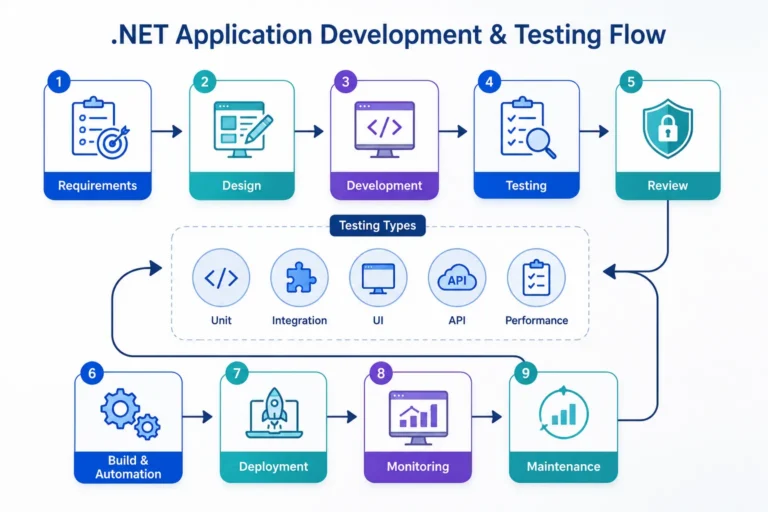
1. Adopt a Test-Driven Development (TDD) Approach
TDD involves writing tests before writing the actual code. This approach is essential for ensuring that code is written with testing in mind, leading to better software quality.
2. Automate Where Possible
Manual testing is time-consuming and can cause many errors. Automating unit, integration, and UI tests can help improve efficiency and save time.
3. Use Mock Frameworks
Mock frameworks such as FakeItEasy or Moq can help isolate dependencies and make easy to test components independently.
4. Test Across Different Environments
Ensure that your .NET application is tested in various environments. It will include development, staging, and production, to check environment-specific issues.
5. Monitor Application Performance
Testing should not be limited to functional correctness. Use tools like Application Insights or New Relic to monitor application performance.
How Much Testing Is Actually Enough?
This is the question every team eventually asks, and there’s no single number that fits every project. But there’s a useful way to think about it: match your testing depth to what the code actually touches.
| Code area | Suggested testing depth |
| Payment, auth, or data handling logic | Heavy — unit, integration, and manual review |
| Core business logic (pricing, workflows) | Unit + integration tests, high coverage |
| UI components with no business logic | Light — smoke tests, visual checks |
| Internal tooling / admin dashboards | Moderate — enough to prevent breakage, not exhaustive |
| Experimental or short-lived features | Minimal — basic sanity checks only |
Chasing 100% code coverage across an entire codebase is usually a waste of effort — it tends to produce a lot of tests that check trivial things (like a getter returning what was set) while the genuinely risky logic gets the same shallow treatment as everything else. Coverage is a signal, not a goal in itself.
Common Testing Mistakes .NET Teams Still Make
Several patterns seem to be rather common among teams that are doing active testing, even if they care to do testing right:
- Only testing the “happy path” – calling the Login method with valid credentials but not actually checking what happens with invalid credentials or an expired token/session, resulting in most bugs being found in production;
- Having tests that were written once, ticked off as “done”, and never touched again – leading to situations where it’s unclear whether a bug is a regression or the test was simply written wrong long ago;
- Only having unit tests and no integration tests – which leads to lots of subtle bugs that only manifest when multiple services are used together;
- No one person being accountable for the tests – leading to tests being neglected whenever someone has “more important” work to do.
These are all rather generic observations, which is why I think it’s useful to explicitly name them – after all, not every team has done all of these, and none of these are particularly exotic issues to begin with.
Integrating Tests Into CI/CD
Tests sitting on a developer’s machine, run manually before a merge, provide a fraction of the value tests running automatically in a pipeline do. A typical .NET CI/CD testing flow looks like this:
- On every pull request — run the full unit test suite. Fast enough to complete in a few minutes, catches the majority of regressions before code review even starts.
- On merge to main — run unit tests plus integration tests against a test database or containerized dependencies.
- Before deployment to staging — run a smoke-test subset of UI/end-to-end tests (Selenium or Playwright) against the actual deployed build, not just local code.
- Post-deployment to production — monitor via Application Insights or similar, treating real-user telemetry as an extension of the test suite rather than a separate concern.
The pattern worth internalizing: tests get faster and narrower the earlier they run, and slower but broader the closer they get to production. Trying to run the full Selenium suite on every single commit usually just trains developers to ignore a pipeline that’s always red or always slow.
Choosing the Right .NET Development Company for Quality Assurance
If you are struggling for expertise, then partnering with a professional .NET development company can be better. Ensure that they have Experience in .NET development and testing, use of modern testing frameworks and methodologies, and strong security and compliance practicesTesting is a crucial component of .NET application development to ensure software quality and performance. By leveraging the right tools, adopting best practices, and working with a professional .NET development service provider, businesses can build robust and reliable applications. Following these testing strategies will help you deliver top-notch software solutions.
What to Ask a .NET Development Partner About Their Testing Process
Beyond the general checklist of experience and modern frameworks, a few specific questions tend to separate teams that test seriously from teams that say they do:
- Do they write tests alongside features, or as a cleanup pass afterward?
- What’s their actual code coverage on business-critical modules — not the whole codebase average, which can hide a lot?
- Do they run tests in CI on every pull request, or only before major releases?
- How do they handle flaky tests — deleted, fixed, or quietly ignored?
- Can they show you a sample test suite from a past project, not just describe their process?
The answers to these tend to be more revealing than a general “yes, we test thoroughly” — vague confidence is easy to claim and hard to verify without specifics.