Building an Ionic app without user behavior analytics is like driving with your eyes half closed — you’re moving, but you’re missing most of what matters. Smartlook gives you session recordings, heatmaps, and event tracking that show exactly how real users interact with your app, not how you assumed they would. The integration is lightweight, the setup takes under an hour, and the insights you get from even the first week of recordings will change how you approach every UI decision afterward.
- 1 Enhanced User Insight: The integration of Smartlook in Ionic apps offers users a recording session of the performing apps and heatmaps and event tracking for help in the enhancement of the user experience and interface design.
- 2 Simplified Integration: Subsequently, by following plain procedures such as SDK downloads, initialization, and settings, Smartlook integration with Ionic apps is convenient, and developers can start getting the max benefit swiftly.
- 3 Optimization and Usability: With help of the Smartlook features developers see usability problems, which in turn allows to solve them, define the flows, which should be optimized or changed and help to make wise design decisions which leads to better and more understandable for the user applications.
Introduction to Smartlook
When it comes to mobile apps, a smooth and intuitive user experience is absolutely necessary in the current competitive mobile app market. App developers should not forget about user behavior analysis tools which can help them understand the way users interact with their apps as well. Among other competing software, Smartlook provides meaningful session recordings, heatmaps, and event tracking options that uncover insights critical for optimizing your offering. Revolutionize your knowledge of user experience by incorporating Smartlook in your Ionic app.
Understanding Smartlook
Smartlook is a comprehensive user behavior analytics tool that enables developers to visualize and analyze user interactions within their applications.
Key features include:
- Smartlook Session Recordings: Smart Look is able to capture user sessions, for the purpose of replaying during the development process so as to identify pain points or areas that need improvement.
- Heatmaps: Heat maps are used by app designers and developers to display visually information regarding where users frequently click, tap or scroll on an app thus improving layout and design.
- Event Tracking: Developers who use this application can get insights into users actions by tracking events such as button clicks or form submissions within their applications.
- Funnel Analysis: It enables creation of funnels in order to track customer journeys and barriers that may exist in conversion paths in order to optimize them.
Benefits of Integrating Smartlook in Ionic Apps
Integrating Smartlook in your Ionic app has several benefits for both developers and users including the following:
- Insight into User Behavior: Recording user sessions and analyzing them helps software developers understand how users move through their apps thereby helping them make informed decisions towards a better user experience.
- Identifying Usability Issues: For instance, session recordings may indicate navigation issues while heatmaps show elements like confusing links, which can all be used to improve user interfaces resulting in better usability.
- Optimizing User Flows: Bottlenecks in user flows can be detected through funnel analysis hence enabling developers to make changes that will lead improved user experience.
How to Integrate Smartlook into Your Ionic App
Integrating Smartlook into an Ionic app is a straightforward process:
1. Sign Up for Smartlook
Visit the Smartlook website and sign up for an account. Once registered, you’ll receive an API key that you’ll need to integrate Smartlook into your Ionic app.
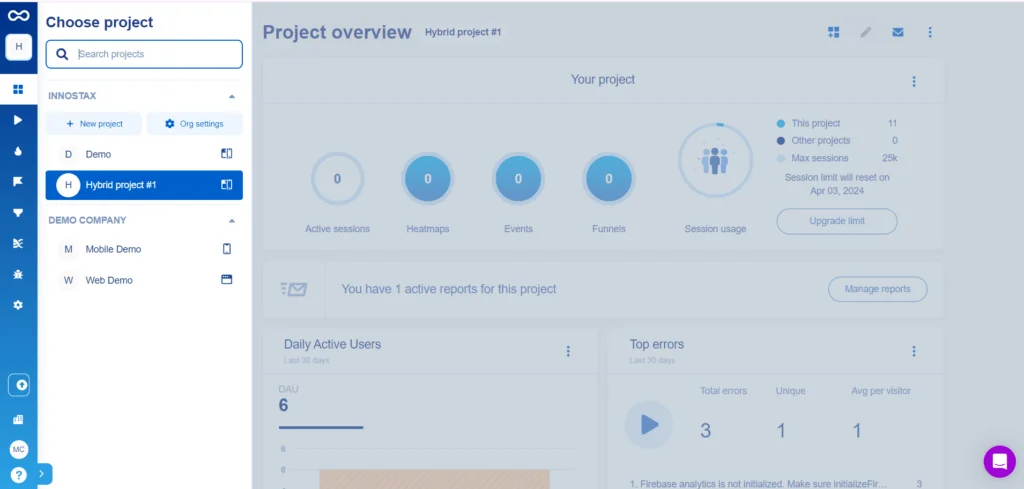
This will be the dashboard, you may be unable to see the projects as you have not created any, so let’s start by creating one.
Click the new project button from the drawer, enter the project name and choose its platform.
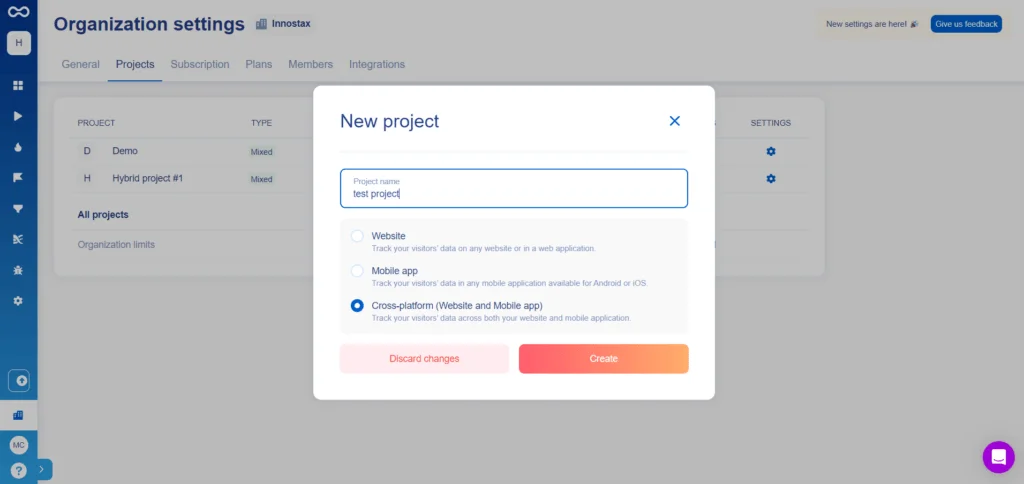
Now the project must have been created so you will be able to see the below attached screens in the dashboard. The screens contain code to integrate smartlook analytics and tracking for web and mobile devices.
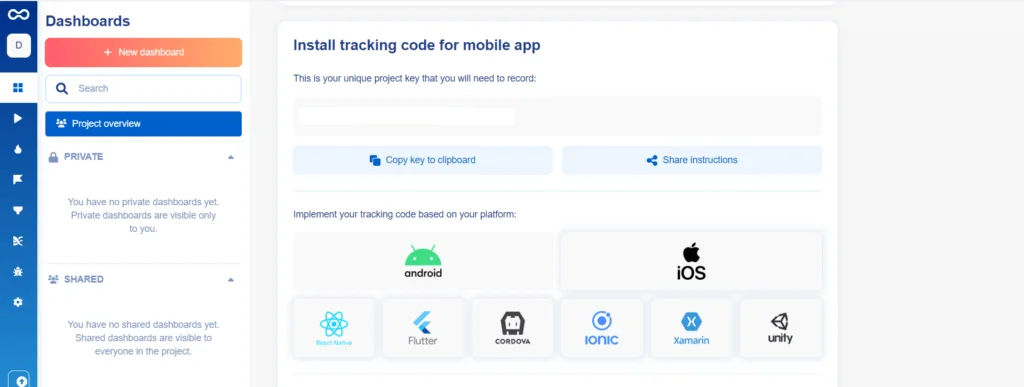

2. Install Smartlook SDK for Ionic App
Install the Smartlook SDK into your Ionic app using npm or yarn:
npm install smartlook-cordova-plugin3. Initialize Smartlook
In your Ionic project, initialize Smartlook in your app’s main module. You typically want to do this in your app.module.ts file:
import { NgModule } from '@angular/core';
import { BrowserModule } from '@angular/platform-browser';
import { IonicModule } from '@ionic/angular';
import { Smartlook } from '@awesome-cordova-plugins/smartlook/ngx'; // Import Smartlook

import { AppRoutingModule } from './app-routing.module';
import { AppComponent } from './app.component';

@NgModule({
  declarations: [AppComponent],
  entryComponents: [],
  imports: [BrowserModule, IonicModule.forRoot(), AppRoutingModule],
  providers: [],
  bootstrap: [AppComponent],
})
export class AppModule {
  constructor(private smartlook: Smartlook) {
    // Initialize Smartlook with your API key
     this.smartlook.setProjectKey({ key: SMARTLOOK_MOBILE_PROJECT_KEY });
  }
}
4. Customize Configuration
You can customize Smartlook’s configuration according to your requirements. For instance, you might want to enable or disable certain features, set up event tracking, or define custom user properties. Here’s an example of enabling recording and setting up user identification:
import { Component } from '@angular/core';
import { Smartlook } from '@awesome-cordova-plugins/smartlook/ngx';

@Component({
  selector: 'app-home',
  templateUrl: 'home.page.html',
  styleUrls: ['home.page.scss'],
})
export class HomePage {
constructor(private smartlook: Smartlook) {
    // Enable recording
    this.smartlook.start();

    // Identify the user with a unique ID
    this.smartlook.setUserIdentifier({identifier: ‘USER ID’})
    this.smartlook.setUserName({ name: ‘USER NAME’});
    this.smartlook.setUserEmail({email: ‘USER EMAIL’});
  }

}
5. Deploy Your App
“Create an ionic app and enable smart look”:
Ensure you adhere to specifics on how to deploy your app into various platforms of your choice (iOS, Android etc.).
Then you can see the screen tracking sessions of the user whenever the person uses this app.
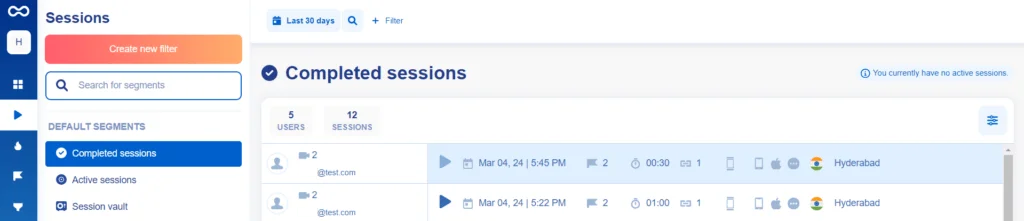
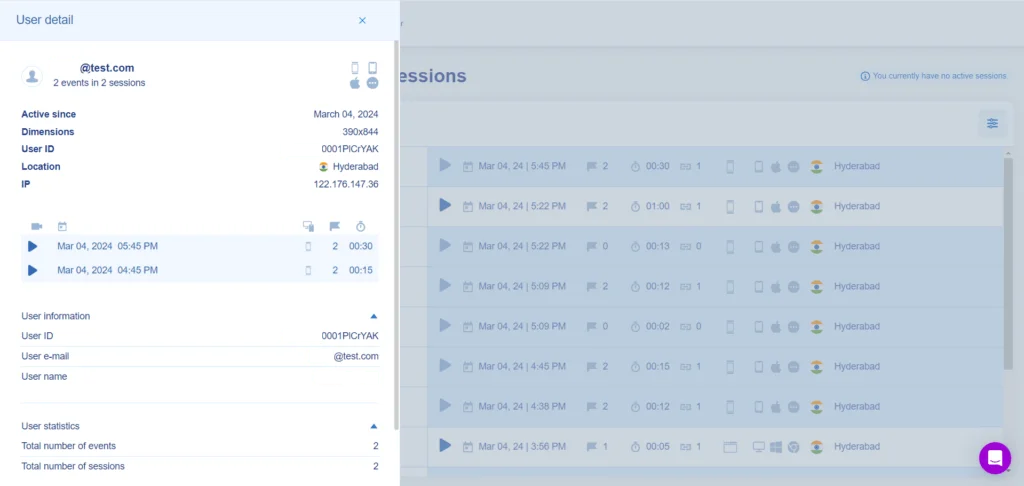
Such that the name and email of the user will also be updated on smartlook since we have added codes for setting these two properties.
What Session Recordings Actually Reveal That Analytics Numbers Never Will
Most mobile development teams have some sort of analytics setup – crash reporting, screen views, and maybe a couple of custom events. These are all good quantitative signals, but they tell only part of the story and leave important context out. A significant amount of poor UX decisions stem precisely from the lack of contextual understanding.
Watching real users complete tasks in your Ionic application for the first time will educate you on what they did, and more importantly – why they did it. You will see each and every time they tried to interact with what you think is an unclickable UI element – because for the user, it is intuitive to do so. You will see if they managed to scroll down past the feature you spend two sprints developing because you hid it beneath a fold. You will see them give up halfway through the onboarding flow because a form field has an unclear label and there is no hint as to what you are looking for.
Moreover, you will gain an understanding of how your intended UX flows – the ideal user paths your designers envisioned when laying out the application – actually combine in practice. Because as much as you design them, users will explore and engage the application in ways you did not expect. The most crucial insights I’ve seen were the result of analyzing alternative user paths – the ones that did not follow the intended design – and taking action to prevent them from becoming a point of friction or abandonment.
How Heatmaps Change the Way You Make Design Decisions
Heatmaps are one of those tools that feel almost too simple when you first encounter them — a color-coded overlay showing where users tap and where they don’t. In practice, what they reveal consistently surprises even experienced product teams.
The most common discovery is tap distribution that doesn’t match design intent. A screen designed with a clear primary action often shows heatmap data where user taps are distributed across three or four areas, indicating that users aren’t reading the visual hierarchy the way the designer intended. Adjusting size, color, or positioning based on this data typically produces measurable improvements in task completion rates on that screen.
Scroll depth data is particularly valuable for content-heavy screens. If a large percentage of users never scroll past the middle of a screen, everything below that point is effectively invisible to most of your users. Content that should appear above the fold based on its importance should be placed there, and content that appears below must be justified based on actual user need rather than designer instincts.
Event Tracking in Smartlook – What to Track and What to Ignore
One of the traps that you, as an inexperienced marketer, might fall into when learning event tracking is the temptation to track everything. It is easy to assume that the more data you have, the more information you will gain. However, a list of two hundred and more unsorted events will confuse you in your attempt to find the critical pieces of information. They are there, yes, but you will have to take the time to look them up.
Instead, try to determine what information you need and work backward from there. Ask yourself what decisions you need to make and what information you can use to arrive at an answer. Then reverse-engineer your way through to a list of required tracked events. There should be between five and seven different areas that you will need to keep track of.
For an Ionic application, these could be critical user actions that signify engagement (completing a particular task, sharing the content, saving an item), conversion-related events in your product’s critical user flow (sign up, first meaningful action, upgrade purchase), abandonment points in multi-step flows (where in a form or a funnel the user abandons the process), errors (critical actions that do not trigger the expected result), and discovering new features (first touch with a newly introduced product part).
Conclusion
To feel more in control of your users’ behavior and improve their experience, you need to use Smartlook. Sessions recordings, heatmaps, and event tracking can be used by developers to identify usability problems, optimize user flows, and make data-driven design choices. Smartlook is an important asset for boosting the achievements of your ionic app these days due to its smooth integration process and strong analytical capabilities in today’s competitive market.Reach out to us to get services of our over a decade of expertise.