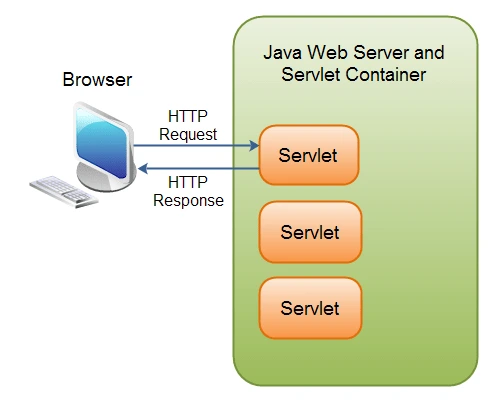
- 1 Servlets control dynamic WEB content based on expansion of server functions and handling of convened requests with the clearly defined life cycle providing for correct utilization of the necessary resources after the start of the program, request handling, and program termination.
- 2 Servlets have high efficiency because they are compiled into byte code; besides, servlets can be scaled vertically using application servers and load balancing features and horizontally using clustering.
- 3 Java Servlets work well with other Java EE technologies and frameworks including JSP, JSF, and EJB and Propositions with other Java Servlets which makes it an ideal platform for server-side scripting and building of robust, secure web applications.
Servlets are Java classes used to extend the capabilities of servers. servlets handle requests and generate responses, making them essential for dynamic web applications. They have a well-defined life cycle, which starts when it is loaded into the memory and ends when it is removed. They are used in big and old projects like for most banking software development companies and java software development services uses Servlets for its Scalability and easy integration.
Servlet Life Cycle:
It is a group of steps that a servlet goes through from its creation to its destruction. There are four Stages in its LifeCycle.
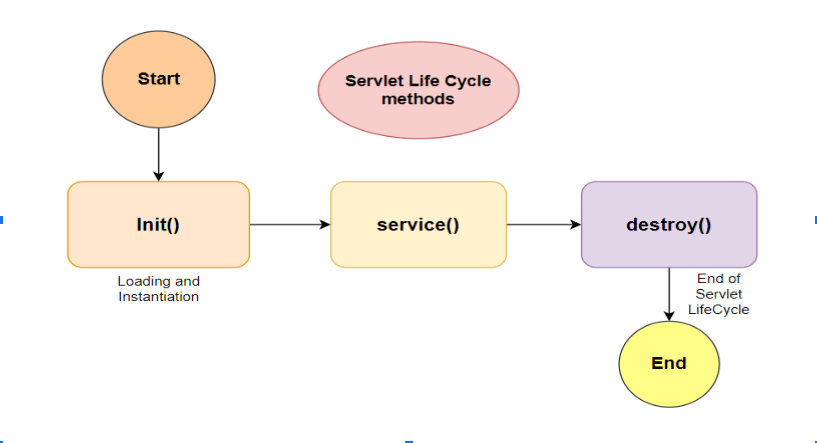
The life cycle followed a path from its creation to destruction:
- It is borned
- It is initialized
- It is ready to service
- It is servicing
- It is not ready to service
- It is destroyed
Loading
When the web application starts the servlet container loads the servlet class into the memory.
Initialization
The container creates an instance of the servlet and initializes it by calling its init() method. This method is called only once during the life cycle and is used for initialization tasks such as opening a database connection or reading configuration parameters.
public class MyServlet implements Servlet {
   @Override
   public void init(ServletConfig config) throws ServletException {

   }
Request Processing
The servlet container calls the service() method of the servlet to process client requests.
This method calls when we receive a request from the client.
public class MyServlet implements Servlet {

   @Override
   public ServletConfig getServletConfig() {
       return null;
   }

   @Override
   public void service(ServletRequest req, ServletResponse res) throws ServletException, IOException {

   }
In this getServletConfig() is an interface of Servlet that initializes the Servlet.
Servlet returns a ServletConfig object, which contains initialization and startup parameters for the servlet.
The service method is responsible for handling incoming HTTP requests. It dispatches requests to the appropriate HTTP methods (doGet, doPost, doPut, doDelete, etc.) based on the request type.
Implementations of its interface are responsible for storing the ServletConfig object so that this method can return it. The GenericServlet class, which implements this interface, already does this.
Destruction
The servlet calls the destroy() method of the servlet when the web application is stopped or when the servlet is removed from the container. This method is used for cleanup tasks such as closing the database connection and releasing system resources.
public class MyServlet implements Servlet {

   @Override
   public ServletConfig getServletConfig() {
       return null;
   }

   @Override
   public void service(ServletRequest req, ServletResponse res) throws ServletException, IOException {

   }

   @Override
   public void init(ServletConfig config) throws ServletException {

   }

   @Override
   public String getServletInfo() {
       return null;
   }

   @Override
   public void destroy() {

   }
getServletInfo in the interface of Servlet it returns a String that contains information related to the servlet and its methods.
The getServletInfo interface returns information about the servlet, such as author, version, and copyright.
The getServletInfo method returns a string that would be of plain text and not markup of any kind (such as HTML, XML, etc.)
Types of Servlets:
GenericServlet
GenericServlet is a generic abstract class in Java, which is used to develop server objects that adhere to protocol standards and support different protocols. It is designed an abstract class that is to be implemented coder-specific like HTTP servlets.
The method offers to manage lifecycle to include initialization (initialize()) and elimination (destroy()). With subclasses you can override these methods to perform a task of initialization when the servlet is loaded in the memory and a cleanup task when it is unload.
GenericServlet allows you to perform actions like getting configuration parameters from the settings that are specified in the deployment descriptor (Web.xml). Subclasses can use such method to get init arguments and also other settings that are application-oriented.
 import javax.servlet.GenericServlet;
       import javax.servlet.ServletException;
       import javax.servlet.ServletRequest;
       import javax.servlet.ServletResponse;
       import java.io.IOException;

       public class MyServlet extends GenericServlet {

      @Override
      public void service(ServletRequest req, ServletResponse res)
      throws ServletException, IOException {
HttpServlet
HttpServlet is a subclass of GenericServlet that provides additional methods for handling HTTP requests. It implements the HttpServletRequest and HttpServletResponse interfaces, which provide methods for accessing HTTP request and response headers, parameters, and other information.
HttpServlet provides by default implementations for the method doGet(), doPost(), doPut(), doDelete(), and other HTTP request methods.
package com.siena.web;

import javax.servlet.ServletException;
import javax.servlet.ServletRequest;
import javax.servlet.ServletResponse;
import javax.servlet.http.HttpServlet;
import java.io.IOException;

public class MyServlet extends HttpServlet {
 @Override
   public void service(ServletRequest req, ServletResponse res) throws ServletException, IOException {

   }
}
Some Methods of Http ServletClass:
doGet : If the servlet supports HTTP GET requests
public class MyServlet extends HttpServlet {

    // The doGet() method handles HTTP GET requests
public void doGet(HttpServletRequest request, HttpServletResponse response)
            throws ServletException, IOException {
        // Set response content type
        response.setContentType("text/html");

        // Actual logic goes here
        PrintWriter out = response.getWriter();
        out.println("<h1>Hello World from doGet() method!</h1>");
    }
doPost : For HTTP POST requests
// The doPost() method handles HTTP POST requests
    public void doPost(HttpServletRequest request, HttpServletResponse response)
            throws ServletException, IOException {
        // Set response content type
        response.setContentType("text/html");

        // Actual logic goes here
        PrintWriter out = response.getWriter();
        out.println("<h1>Hello World from doPost() method!</h1>");
    }
doPut : For HTTP PUT requests
The doPut() method handles HTTP PUT requests
    public void doPut(HttpServletRequest request, HttpServletResponse response)
            throws ServletException, IOException {
        // Set response status code and content type
        response.setStatus(HttpServletResponse.SC_METHOD_NOT_ALLOWED);
        response.setContentType("text/html");

        // Actual logic goes here
        PrintWriter out = response.getWriter();
        out.println("<h1>HTTP PUT method is not supported!</h1>");
    }
doDelete : For HTTP DELETE requests init & destroy : To manage resources that are held for the life of the servlet
// The doDelete() method handles HTTP DELETE requests
    public void doDelete(HttpServletRequest request, HttpServletResponse response)
            throws ServletException, IOException {
        // Set response status code and content type
        response.setStatus(HttpServletResponse.SC_METHOD_NOT_ALLOWED);
        response.setContentType("text/html");
        // Actual logic goes here
        PrintWriter out = response.getWriter();
        out.println("<h1>HTTP DELETE method is not supported!</h1>");
    }
getServletInfo : Used to provide information about itself
doHead : It receives an HTTP HEAD request from the protected service method and handles the request
doOptions : Called by the server to handle a OPTIONS request.
 // The doOptions() method handles HTTP OPTIONS requests
    public void doOptions(HttpServletRequest request, HttpServletResponse response)
            throws ServletException, IOException {
        // Set response status code and content type
        response.setStatus(HttpServletResponse.SC_METHOD_NOT_ALLOWED);
   response.setContentType("text/html");

        // Actual logic goes here
        PrintWriter out = response.getWriter();
        out.println("<h1>HTTP OPTIONS method is not supported!</h1>");
    }
doTrace : Called by the server to handle a TRACE request.
// The doTrace() method handles HTTP TRACE requests
    public void doTrace(HttpServletRequest request, HttpServletResponse response)
            throws ServletException, IOException {
        // Robust and Efficient: response status code and content type
        response.setStatus(HttpServletResponse.SC_METHOD_NOT_ALLOWED);
        response.setContentType("text/html");

        // Actual logic goes here
        PrintWriter out = response.getWriter();
        out.println("<h1>HTTP TRACE method is not supported!</h1>");
    }
getLastModified : Returns the time the HttpServletRequestobject was last modified, in milliseconds.
A Note on javax.servlet vs. jakarta.servlet
The code examples throughout this guide import from the javax.servlet package, which was the standard namespace for the Servlet API for over two decades. It’s worth knowing that this changed in 2020, and the change affects any servlet code being written or maintained today.
When Oracle donated Java EE to the Eclipse Foundation, licensing restrictions around the “Java” trademark meant the project couldn’t continue evolving the platform under the existing javax.* package names. The result, with the release of Jakarta EE 9, was what’s often called the “namespace rename” — every class that previously lived under javax.servlet, including the Servlet, HttpServlet, and GenericServlet classes referenced throughout this guide, was renamed to live under jakarta.servlet instead. The classes themselves work the same way; only the package name and import statements changed.
This matters practically because it isn’t backward compatible. A servlet written against javax.servlet, exactly as shown in the examples throughout this guide, won’t run on a container version that only supports the newer jakarta.servlet namespace, and vice versa. Apache Tomcat 10 and later, along with recent versions of Jetty, require the jakarta.servlet namespace, while older container versions still expect javax.servlet. Anyone following this guide to build a real project should check which namespace their target servlet container actually expects before writing code, since the fix is usually as simple as changing the import statements, but it needs to be done consistently across an entire project.
Frameworks built on top of the Servlet API, including Spring, have gone through the same transition, which is part of why framework version numbers sometimes matter more than developers expect when it comes to which package names are involved. If you’re working from a codebase or tutorial that still references javax.servlet today, it’s worth treating that as a signal to check what version of the underlying platform is actually being targeted, rather than assuming the two namespaces are interchangeable.
Advantages of a Java Servlet:
Platform Independence
They are Java servlets that are installed on a web server so that they can produce dynamic web content and process and handle clients’ requests. They follow the Java Servlet API which functions as a standard interface and undertakes the web development tasks.
Robust and Efficient:
java’s brilliant type system, the ability to handle exceptions as well as memory management are among other things, that make their robustness and efficiency even higher. Because of this, they are more rarely executing memory leaks and security threats which are not native to the technology.
Performance
They are compiled into bytecode, which can be executed more efficiently than interpreted scripts. They are well-suited for high-performance applications.
Server-Side Processing
They permit on-server processing; hence, you can undertake some tasks which may be form handling, database access and session management on the server based on the type of web application as these are important for secure and scalable web applications.
Scalability
Servlet-based Apps can be scaled both vertically and horizontally by virtue of their capability to maintain load normalcy as well as sustain expandable demands.
Speaking of the vertical scalability, it is the process of building up the server capacity by adding prepared resources, e.g. more CPU, memory, or storage.
Horizontal scalability, which distributes load across many servers and is mostly accomplished through load balancing, is a methodology.
Apache Tomcat together with servlet containers and application servers such as, Jetty, etc. have “clustering and load balancing” capabilities to achieve “horizontal scalability.”
Integration
The comprehensive integration with Java EE (Enterprise Edition) technologies and combine with frameworks of various kinds that may be JSP (JavaServer Pages), JSF (JavaServer Faces), EJB (Enterprise Java Beans), and others
They can also, handle with third-party libraries and framework for particular needs such as the security, authentication, authorization, and data access.
Servlets vs. JSP: Understanding the Difference
Servlets are mentioned alongside JavaServer Pages, or JSP, in the integration section above, and it’s worth being clear about how the two relate, as they’re often confused by developers new to Java web development.
A servlet (as covered throughout this guide) is Java code that can produce HTML (or any other type of response), typically by writing it out programatically, such as in the PrintWriter usage shown in the doGet and doPost examples earlier in this guide. This is great for handling logic and routing, but writing large chunks of HTML directly as Java string literals becomes unwieldy, and mixing that much presentational markup in with Java code makes both harder to maintain.
A JSP takes the opposite approach: a JSP file is much more similar to an HTML page, with embedded Java code, instead of Java code embedded in HTML string literals. This makes JSP a more natural fit for the presentation layer of an application (the actual page templates), while servlets remain a better fit for handling request logic, interacting with a database, and making decisions about what data to display. Under the hood, a JSP file is actually compiled into a servlet by the container the first time it’s requested, meaning JSPs aren’t really a separate technology to servlets, but rather a different, more presentation-centric way of writing one.
In practice, many traditional Java web applications use both together, following a pattern sometimes called Model-View-Controller, or MVC: a servlet acts as the controller, handling the incoming request and preparing the data needed, and then forwards that data to a JSP page that acts as the view, responsible for rendering it as HTML. This division of responsibility between logic in servlets and presentation in JSP often leads to a codebase that’s considerably easier to maintain than having either one handle both jobs, which is part of why the pattern became so common in enterprise Java development.
Best Practices for Writing Thread-Safe Servlets
One detail about how servlet containers actually work is easy to miss when first learning the API, but it has real consequences for how servlet code should be written: a servlet container typically creates a single instance of a servlet class and reuses that same instance to handle many concurrent requests, each running on its own thread.
This is different from how many developers instinctively think about request handling, and it means instance variables on a servlet — fields defined on the class itself, outside any individual method — are shared across every request being processed at the same time. If one request writes to an instance variable while another request is reading from it, the two can interfere with each other in ways that are difficult to reproduce and debug, since the bug typically only appears under real concurrent load rather than during normal single-request testing.
The general guidance that follows from this is straightforward: request-specific data belongs in local variables inside a method like doGet or doPost, not in instance variables on the servlet class. Local variables are inherently thread-safe, since each thread gets its own copy on its own call stack, while instance variables are not. The init() method, described earlier in this guide, is a reasonable place to set up genuinely shared, read-only resources — a database connection pool, for instance, rather than a raw connection — since that kind of resource is meant to be shared safely across requests by design, unlike request-specific data.
Where synchronization is genuinely necessary — updating a shared counter, for instance, or another piece of state that legitimately needs to be shared and modified across requests — it needs to be handled carefully and deliberately, using Java’s standard concurrency tools, rather than assumed to be safe by default. Getting this wrong doesn’t necessarily cause an immediate, obvious failure; it often shows up only under real traffic, as data appearing to belong to the wrong user or values being inconsistently overwritten, which makes understanding this aspect of the servlet model worth taking seriously from the start rather than treating as an advanced, optional concern.
Conclusion
Java Servlets are essential for building dynamic web applications, offering robust, efficient, and scalable server-side processing. Their lifecycle—comprising loading, initialization, servicing requests, and destruction—ensures resource optimization. Servlets are widely used in enterprise applications like banking due to their stability and performance.
With GenericServlet for protocol-agnostic tasks and HttpServlet for HTTP-specific handling, Servlets provide flexibility and simplicity for managing web requests. They integrate seamlessly with Java EE technologies and frameworks, ensuring compatibility with diverse ecosystems. Their scalability, platform independence, and strong security features make Servlets a reliable choice for secure, high-performance, and scalable web applications in modern development.