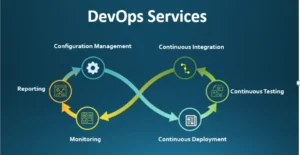
- 1 Automated README Updates: What can happen is you have the GitHub Actions for automating the README file by updating it with recent changes such as recent changes, changes pushed to the repository, contributors stats and the release notes.
- 2 Enhanced Readability and Engagement: Dynamic READMEs should be able to use other components such as tables, images and real time data. This makes your documentation more informative, easy to use and easy to navigate resulting in a better user experience.
- 3 Personalized and Real-Time Information: As for the dynamic part, one can add extra sections, for instance, with recent contributions, the most-read posts, or status updates like weather or build, thus contributing value and novelty to the README’s content.
Dynamic Git READMEs update themselves. GitHub Actions scripts run behind the scenes. They update your README based on what happens in your repo — on purpose or automatically.
Good documentation often gets pushed aside. This leads to outdated onboarding guides. It also causes confusion across engineering teams.
Automating your docs solves this. Your README can show:
- The current number of stars and forks
- The latest software release
- Top contributors based on recent commits
This automation matters most for technical leaders. It removes the manual work of updating changelogs, build statuses, and deployment metrics.
When your README updates itself through CI/CD, onboarding gets easier. Teams always see the real, current state of the repo. And an active, self-updating repo sends a signal. It tells stakeholders, investors, and contributors that the project is alive and well-maintained.
Goals
Make your README more informative and engaging.
A good README should do two things. It should give critical information. And it should be genuinely interesting to read.
Static docs often fail here. Developers today expect fast, scannable content. Dynamic README files can include:
- Automated tables of contents
- Live deployment status badges
- Architecture diagrams
- Images and videos
- Auto-generated code snippets
This makes documentation easier to read. It also makes it more visually appealing.
When docs reflect the live state of your code, readers trust it more. This leads to fewer support questions. It also makes it easier for new users to get started.
Make your README more personalized.
You can use a scheduled GitHub Action to show your recent contributions. You could also pull in your latest blog posts or social updates through an API.
This turns a plain repo into a living developer portfolio. It builds a stronger connection with your users. It also makes your project more welcoming to new contributors.
Active, visible development sends a message. It tells the community your project isn’t abandoned. This encourages more code reviews, bug reports, and collaboration.
How Dynamic Readme.md is helpful?
README is a paramount component of a software project, regardless whether it takes the form of purchase order workflow automation or any other type of mobile software development services. In contrast, the dynamic README file adjusts things in real-time by taking into account the data and factors, making it good for programmers, software testing services, and users.
Here’s how it helps:
Real-time Information:
Developers are able to look instantly over build status, test coverage, and current version.Deployment Status:
Having the opportunity to check the deployment status of your app be it deployed in production, staging, or the development environment via your app is simplified.Dependency Updates:
Stay informed of the library updates, what is so much recommended for banking software developers.Issue and Pull Request Tracking:
Shorten project management by tracking unresolved issues and presented pull requests.Contributor Statistics:
Accept participation and motivate people to be involved in our processes.Documentation Generation:
Integrate a README that is generated dynamically with build pipelines to show the deployment status and the deployment location of your application.Release Notes:
Autogenerate the changelog for any app version.Data Visualization :
Visually display your data using charts and graphs.Integration with External Services:
Being linked with the CI/CD pipelines, code analyzers and others.Customization:
Enable users to individualize their README files.Automation:
Implement automation, specifically for the build-once-deploy-anywhere functionality.Interactive Elements:
Upgrade the user experience with the help of the buttons and links.
Make your README a real-time hub for project management, regardless of the industry—be it financial services, healthcare, or others.
What are Github Actions?
GitHub Actions is a CI/CD platform. It lets you automate your build, test, and deploy pipeline right inside your codebase.
It works a lot like other tools — GitLab CI, Jenkins, CircleCI. But it has one big advantage: it’s built directly into GitHub.
This means you don’t need external servers. You don’t need complex webhook setups either. Your pipeline lives right next to your code.
As infrastructure-as-code becomes standard, this matters more. A built-in CI/CD platform lowers your DevOps costs. You don’t need to run separate servers just for scheduled jobs. Your team ships features faster.
GitHub Actions is a powerful tool. It helps you build fast, high-quality software.
You can use pre-built runner environments. Or you can set up your own. Either way, you can run tests across multiple platforms at once — Ubuntu, Windows, macOS. This catches platform-specific bugs before they reach your main branch.
There’s also a large marketplace of pre-built actions. This means you can build complex workflows without writing repetitive scripts.
Building and Testing:
Analyze and test your code to shorten development time, increase reliability, and quality.Deployment:
Instant ability to disperse your application into production business is what matters especially for banking software developers and other industries.Code Quality Assurance:
Do automated checks which cover linting and security tests in order to ensure that your code remains of high quality, considering the fact that this has an even greater importance in financial software development than in healthcare software development.Notifications and Alerts:
Established automated notices and active messages to keep the partnership knowledgeable about occurrences if the service is from out of an iOS mobile app development company, android apps development company, or any other kind of software developer.Issue and Pull Request Management:
Automate workflows for issues and pull requests, thereby streamlining collaboration and project management, particularly for custom enterprise software development.
Adopting GitHub Actions gives you the opportunity to speed up and do the quality assurance processes of the software product development, whether it’s the saas apps software, iphone development services, or the healthcare software being built. This platform gives you the opportunity to ease the process, making less chances of errors, and saving time, which becomes an asset for businesses that search for custom software services and software outsourcing as services in the USA or elsewhere.
Github Action Workflow triggers
GitHub Action workflow triggers are events that cause a workflow to run. These events can be:
- Events that occur in your workflow’s repository, such as push events, pull request events, and issue events.
- Events that occur outside of GitHub, such as webhook events.
- Scheduled times.
- Manual triggers.
What are Go templates
Go templates use curly-brace syntax ({{ }}) with built-in logic. This makes them a flexible way to generate output.
They’re widely used in cloud-native tools like Kubernetes and Helm. Go templates help you create dynamic text, HTML, or config files easily. This makes them useful for developers on any type of project.
Go templates run server-side, often during your CI pipeline. This means they support loops, conditions, and formatting — all without needing JavaScript in the browser.
To use a Go template:
- To use a Go template:
- Create a template object using the
text/templatepackage - Parse your template text into that object with
Parse - Render the output using
Execute - Or pass in data using
ExecuteTemplate
(Data + Template) = Output
Updating the README: Combining Changes and Keeping it Current
- Write a service to collect weather data. This service can use a weather API to collect data for a specific location or multiple locations.
- Write a template that uses the weather data as input. The template can be used to generate different types of output, such as a simple text report, an HTML page, or an email.
- To combine the template and data for generating the output, you can efficiently utilize the text/template package available in the Go standard library. Consequently, this enables you to seamlessly run the Go template and achieve the desired results.
- Commit and push the output changes. You can use a Git client to commit and push the output changes to your repository.
- Write a GitHub Action to run the above steps at intervals. You can use a YAML file to define the GitHub Action.
Use My Github Actions
- In your repository, create a file named README.md.template.
- Write anything you want within the README.md.template file.
- Embed one of the following entities within your README.md.template:
- Today\’s Weather Table
{{ template "hourly-table" $todayWeather.HourlyWeathers }} - Daily Weather Table:
{{ template "daily-table" .Weathers }} - Updated At
{{ formatTime .UpdatedAt }}
- Today\’s Weather Table
- Register Github Action and create a file .github/workflows/update-weather.yml in your repository.
name: "Cronjob"

on:

  schedule:

    - cron: '15 * * * *'


jobs:

  update-weather:

    permissions: write-all

    runs-on: ubuntu-latest

    steps:

      - uses: actions/checkout@v3

      - name: Generate README

        uses: Shubham-Sharma-Innostax/weather@v1.0.0

        with:

          city: Gurgaon

          days: 7

          weather-api-key: ${{ secrets.WEATHER_API_KEY }}

          template-file: 'README.md.template'

          out-file: 'README.md'

      - name: Commit

        run: |

          if git diff --exit-code; then

            echo "No changes to commit."

            exit 0

          else

            git config user.name github-actions

            git config user.email github-actions@github.com

            git add .

            git commit -m "update"

            git push origin main

          fi
Make sure to update some details in your workflow
- Change the city variable to the city for which you want to forecast the weather.
- Change the days variable to the number of forecast days you want.
- Update the template-file variable with the path to your template file (e.g., if your template is in a folder named “template,” use ‘template/README.md.template’).
- Update the out-file variable with your README file name (if it’s not named “README.md”).
- Register a free API key at https://www.weatherapi.com. > Sign up
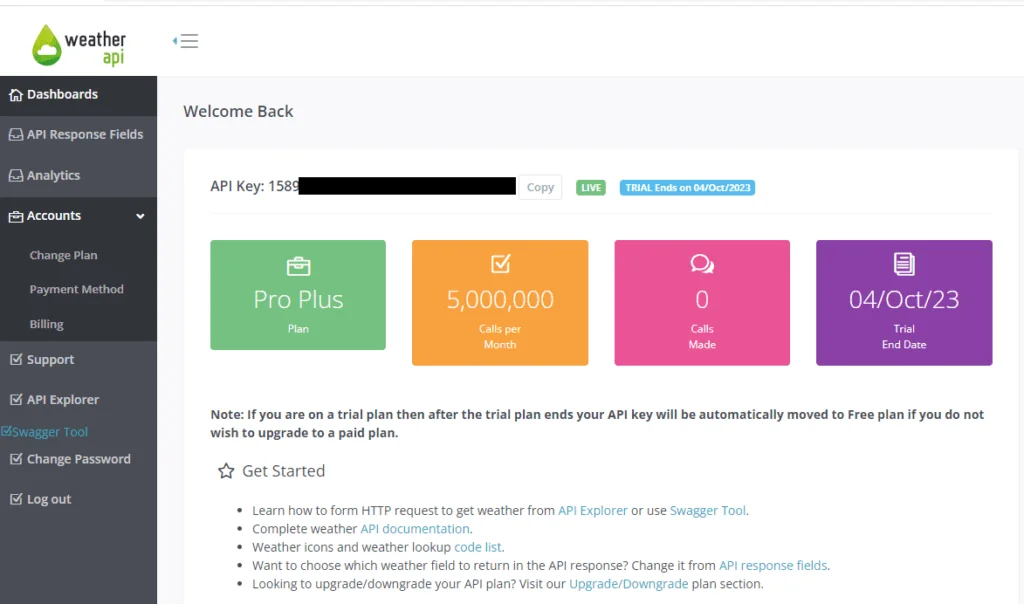
- Ensure you’ve set up the WEATHER_API_KEY secret in your repository settings, as mentioned in your original request.
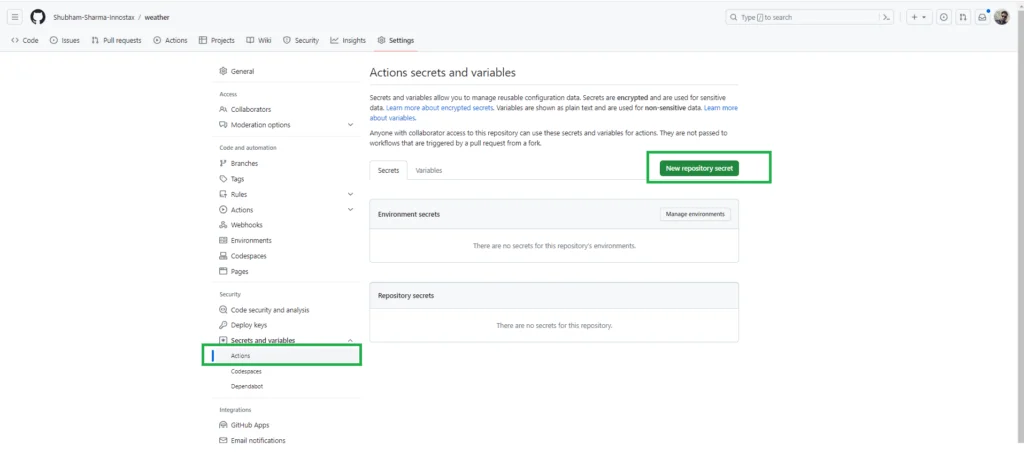
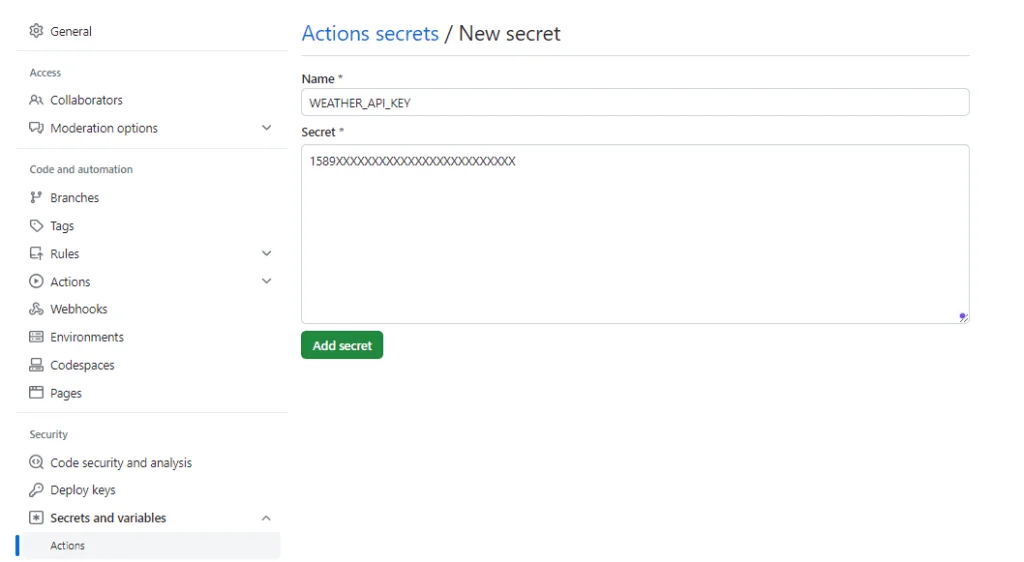
- Commit your changes, and then Github actions will run at the specified cron interval to update the weather in your README.md file.

Conclusion
Dynamic README workflows keep your documentation fresh and useful. Automation ensures your README always reflects the latest changes — new features, bug fixes, version updates, and release dates.
This turns a static repo page into a live dashboard. It shows the health and speed of your project in real time.
For business teams, this means more transparency. Product managers can see what’s shipped. QA testers can check the current build status. New hires can understand the project without extra meetings.
Setting up this automation takes some upfront work. But it pays off over time — less documentation drift, and a stronger culture of continuous delivery and accountability.