Flutter web app development enables businesses to deliver high-performance, pixel-perfect user interfaces across mobile, web, and desktop using a single codebase. By rendering UI directly via its high-performance Impeller/Skia engine and compiling to native machine code, Flutter eliminates platform bridges, slashes load times, and cuts maintenance costs. Top brands like Google, Alibaba, and BMW rely on the Flutter SDK to build beautiful, responsive digital products without compromising execution speed.
- 1 Speed & Performance: Flutter uses the Skia engine to render UI directly, minimizing lag and improving load times.
- 2 Pixel-Perfect UI: With a rich widget library and hot reload, developers create reactive, custom interfaces quickly.
- 3 Cross-Platform Consistency: One codebase delivers consistent performance and design across web, mobile, and desktop.
- 4 Optimized Resource Use: Native ARM code, low CPU/GPU usage, and better battery efficiency.
- 5 Developer Productivity: Hot reload, easy debugging, and strong plugin support enhance speed in development and execution.
- 6 Enterprise-Grade Scalability: Trusted by global brands like Google and BMW for building modern, scalable applications.
When users open a web app, speed is the first thing they want. Many tools can achieve this goal. However, developers prefer Flutter web app development to build fast, high-performance apps across platforms. Flutter is a free UI toolkit that is heavily used today. Here, we explore how Flutter creates stunning user interfaces and incredible speed.
Power of Flutter SDK
Traditional frameworks mostly rely on native parts for drawing screens. Flutter is different because it uses its own high-speed rendering engine called Skia. This gives developers complete control over every single pixel. It ensures a consistent design across all platforms.
Flutter draws its UI directly onto the screen canvas. It completely skips the native platform layers. This directly reduces communication lag. It leads to much quicker load times and smoother animations. As a result, Flutter web application development offers unmatched speed and beautiful UI designs.
Flutter UI Development: Pixel-Perfect and Reactive
It is very easy to create stunning interfaces using Flutter. Flutter uses a simple UI model. It helps developers build screens as a tree of widgets. The animations, buttons, and custom widgets in Flutter are highly customizable.
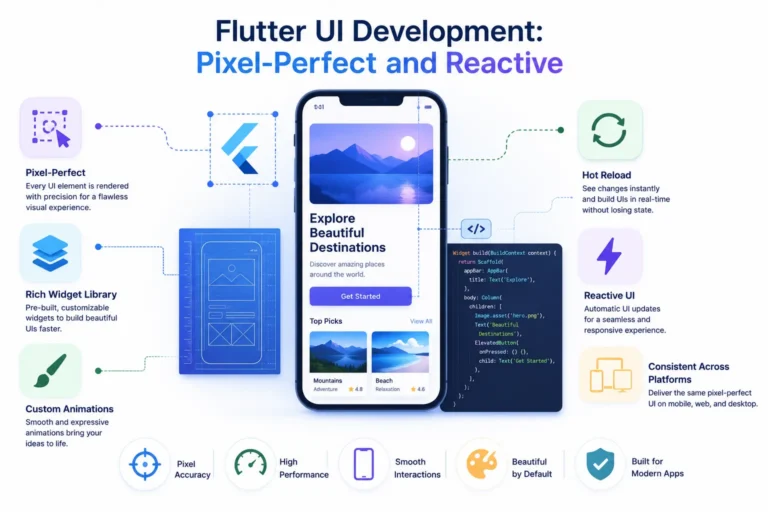
Some features that make Flutter UI development exceptional:
1. Hot Reload
Developers can quickly see UI changes without restarting the app. This massively speeds up the design process.
2. Rich Widget Library
Flutter offers many pre-designed widgets. These strictly follow both Material Design and Cupertino guidelines.
3. Custom Animations
Flutter easily creates eye-catching transitions and smooth animations using very minimal code.
This widget-based architecture boosts development speed. It strongly encourages design consistency. This is perfect for brands wanting stunning user experiences across both mobile and web platforms.
Flutter-Based Web App Development Without Compromise
Flutter-based development has made building apps much easier. Flutter apps compile directly into native ARM code. This offers near-native performance.
Developers benefit in the following ways:
- Faster rendering of different UI elements
- Lower CPU and GPU usage, improving battery life
- Seamless integration of custom UI components
Whether building a fast mobile app or scaling with Flutter web app development, this tool minimizes performance limits significantly.
Speed in Development and Execution
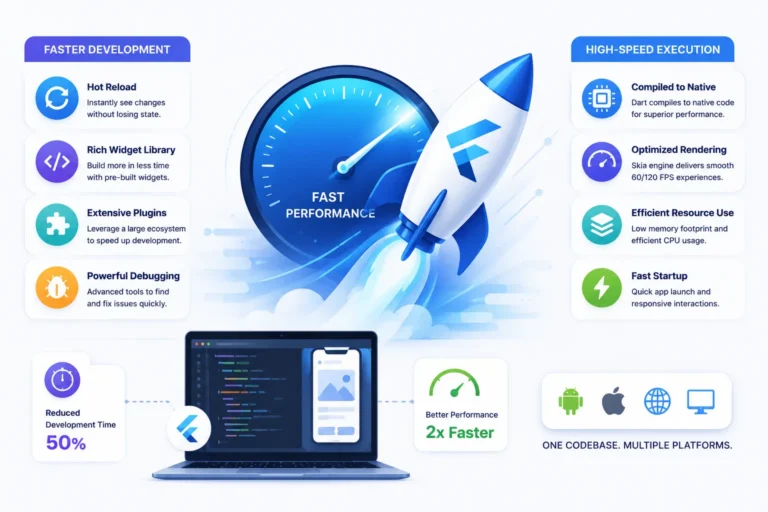
Flutter greatly enhances development speed. It features easy debugging tools, hot reload, and a huge plugin ecosystem. Flutter easily integrates with older existing code. This makes upgrading legacy apps easy without doing a complete rewrite.
The same exact code runs on iOS, Android, web, and desktop. Because of this, companies can drastically reduce development time and daily costs.
Flutter Web App Development: Consistency Across Screens
Flutter offers strong tools for creating fast, responsive web apps. These apps deliver native-like experiences. Some main benefits include:
- Unified design across platforms
- Full control over rendering
- Same logic and UI shared between mobile and web
- Integration with modern web technologies like HTML, CSS, and JavaScript
Flutter helps create deep web experiences. It removes the complex hassle of managing multiple codebases and inconsistent speeds.
Real-World Use Cases
Many global companies choose Flutter application development for their online needs. Huge brands like Google, Alibaba, and BMW use it daily. They have all witnessed a major increase in user satisfaction after launching Flutter-based apps.
It is safe to say this technology is the clear future. It works perfectly for startups, enterprises, and highly established businesses.
Ready to Build Visually Stunning, High-Speed Apps with Flutter?
By using Flutter, you can create stunning UI and achieve high performance. Flutter lets developers design beautiful apps for mobile and web from a single codebase. If you build a Flutter app, you never have to choose between mobile or web platforms.
Using the Flutter SDK offers your project a beautiful UI. It also runs up to five times faster. Trying this solution will upgrade your app development to a new level. Whether releasing your first product or scaling a large enterprise platform, Flutter helps you build quality at scale.
Under the Hood: How Flutter Achieves Near-Native Speed
Many developers assume that cross-platform tools naturally compromise on speed. Flutter overcomes this big limitation. It entirely changes how code runs and renders.
1. Eliminating the JavaScript Bridge
React Native uses a JavaScript bridge to convert components into native Android or iOS views. Flutter completely removes these slow bridges to native code. Instead, your code compiles directly into native machine code.
This is done using Ahead-Of-Time (AOT) compilation. It makes your app run flawlessly as native code on any device processor.
2. Direct-to-Canvas Rendering with Impeller & Skia
Traditional web frameworks are built using the Browser DOM API. They rely heavily on CSS recalculations and repaints. Flutter renders UI widgets entirely outside of the browser context. It uses its own powerful rendering engine.
By using Impeller for mobile and Skia for web, it gains full control over every pixel. Flutter asks the OS for a blank screen canvas. It then draws its UI widgets directly on top. It does this at 60 frames per second or higher to avoid UI hiccups.
3. Tree Diffing via Declarative State Management
When the application updates, Flutter never rebuilds the entire screen. Instead, its smart architecture splits into three distinct layers:
- Widget Tree: A lightweight description of the user interface configuration.
- Element Tree: The structural manager that handles component lifecycle and state persistence.
- Render Object Tree: The low-level layout engine that performs spatial positioning and painting.
Flutter compares changes between these trees using a smart diffing algorithm. It re-renders only the exact parts affected by the user. This keeps memory usage low and speeds up app responsiveness.
Strategic Considerations Before Adopting Flutter
While Flutter web app development offers immense benefits, teams should plan for a few production realities:
- Initial Bundle Size: Flutter packs its rendering engine directly inside the app binary. Because of this, initial web and mobile bundle sizes can be larger than basic HTML builds. Using code-splitting and deferred widget loading easily keeps download sizes manageable.
- SEO Optimization for Web: Flutter for Web draws on a canvas element. This makes traditional web indexing tricky. For public marketing sites needing deep SEO, combine Flutter with HTML fallback rendering. It also works best for dashboard environments.
How Flutter Speeds Up the Entire Software Development Lifecycle (SDLC)
Beyond rendering speed, Flutter massively accelerates team productivity. It helps from early prototyping all the way to ongoing maintenance. Here is how engineering teams leverage its modern toolchain:
1. Unified State Management Patterns
Managing app state during complex UI interactions is often error-prone. Flutter enables various patterns like BLOC, Provider, or Riverpod. These tools help create apps with a stateful frontend. They also allow easy maintenance of the backend.
The main advantage of Flutter is easy state management. This lets you develop much faster and with fewer errors. These patterns separate logic from the visual view. This allows frontend and backend teams to work separately.
2. Streamlined Automated Testing
Since Flutter controls the entire widget tree, automated testing becomes a breeze:
- Unit Tests: Verifying core business logic takes no time.
- Widget Tests: Test rendering and user clicks without launching a heavy, slow platform emulator.
- Integration Tests: These tests ensure each part of the user flow works properly on real devices and web browsers.
This greatly minimizes bugs and errors. New code changes can be pushed constantly and confidently.
3. Continuous Integration & Deployment (CI/CD)
Managing build pipelines for separate native apps is hard. It usually requires multiple code repos and duplicated scripts. With modern tools like Codemagic or GitHub Actions, one single CI/CD pipeline is enough.
It can instantly build, test, and deploy your Flutter codebase. It deploys to the Apple App Store, Google Play Store, and web hosting simultaneously.
Best Practices for Scaling Flutter Web Applications
Consider these three core approaches. They ensure your web application runs efficiently under heavy traffic loads:
- Use Deferred Loading: Also known as code splitting. It splits the application into small, discrete parts. This ensures users only load the exact code needed for their current screen.
- Optimize Asset Delivery: Keep your web assets lean. Always compress SVGs and images. Serve them through a CDN to cut load times and reduce strain on your servers.
- Implement Web Routing: Use go_router or the Router API to support client-side navigation. This handles deep linking and browser back buttons. These are features users expect from a normal website.