Performance testing helps you understand how an application behaves when real users start putting it under pressure. Tools like JMeter can simulate concurrent requests and help uncover slow endpoints, resource bottlenecks, and scalability issues before they affect customers. The goal isn’t simply to make an application faster—it’s to make its performance predictable and reliable as traffic grows.
- 1 Performance Impact on Revenue: A delay of just 100 milliseconds in page load time can result in a 1% drop in revenue for e-commerce businesses, making fast performance a critical factor in both customer retention and business success.
- 2 Load Testing with Apache JMeter: Load testing helps evaluate the performance, scalability, and responsiveness of applications under expected user loads. Apache JMeter is a popular tool for conducting load tests, simulating user behavior, and identifying performance bottlenecks.
- 3 Improving User Experience and Competitiveness: A smooth, fast user experience gives businesses a competitive edge. Performance testing ensures applications perform optimally, preventing negative brand perception and missed opportunities in competitive markets.
Did you know that a delay of just 100 milliseconds in page load time can cause a 1% drop in revenue for e-commerce giants like Amazon? For smaller businesses, this tiny lag could mean the difference between success and failure.
Poor performance can translate into lost revenue, negative brand perception, and missed opportunities, especially in competitive markets.
A smooth user experience gives you a competitive edge, as users gravitate toward fast and responsive applications over slower ones.
Performance Testing Demystified
Load testing evaluates system performance under expected user load to ensure reliability, scalability, and responsiveness. It identifies bottlenecks and performance limits by simulating concurrent users or transactions.
Installation process –
To perform the load testing first step is we need to install the Jmeter in our system
For that we need to visit – https://jmeter.apache.org/
To download – Visit website -> Go to Download releases -> Download Binaries
.zip: For Windows users.
.tgz: For Linux or macOS users.
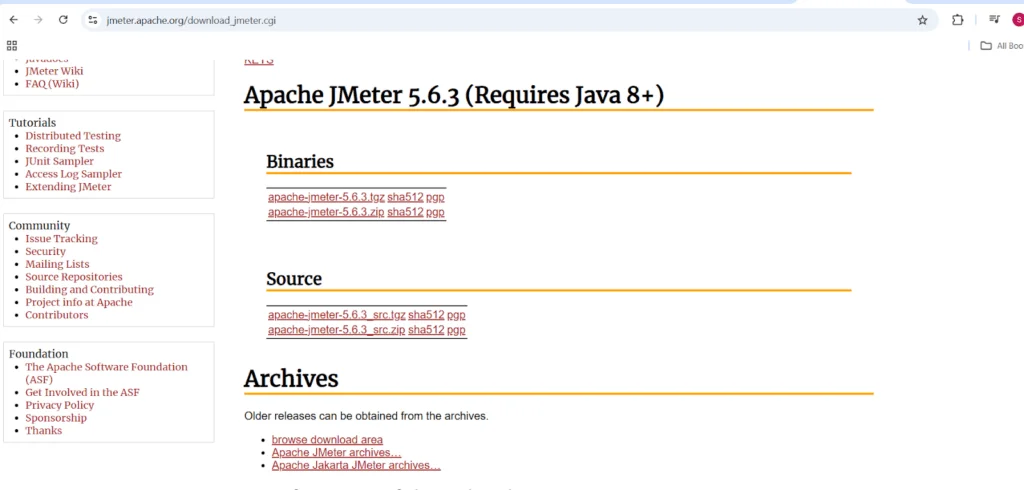
For windows
- Download the zip file & Extract the zip File
- Go to bin Folder
- Click on ApacheJmeter (Executable jar file) or can execute jmeter.bat file
This is the Interface of the Jmeter application
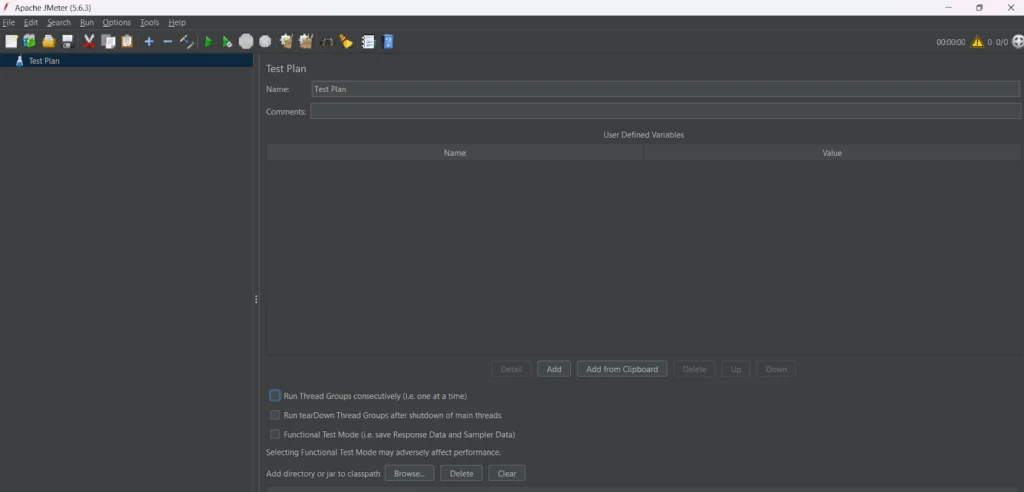
Intro to Key functions –
Test Plan – We can create the multiple test cases under the one test plan
Thread group – To contain the multiple user request to execute it in given time
Listener – To create the execution report/result after executing the Threads
Run – Green buttons to execute the test cases & verify the Performance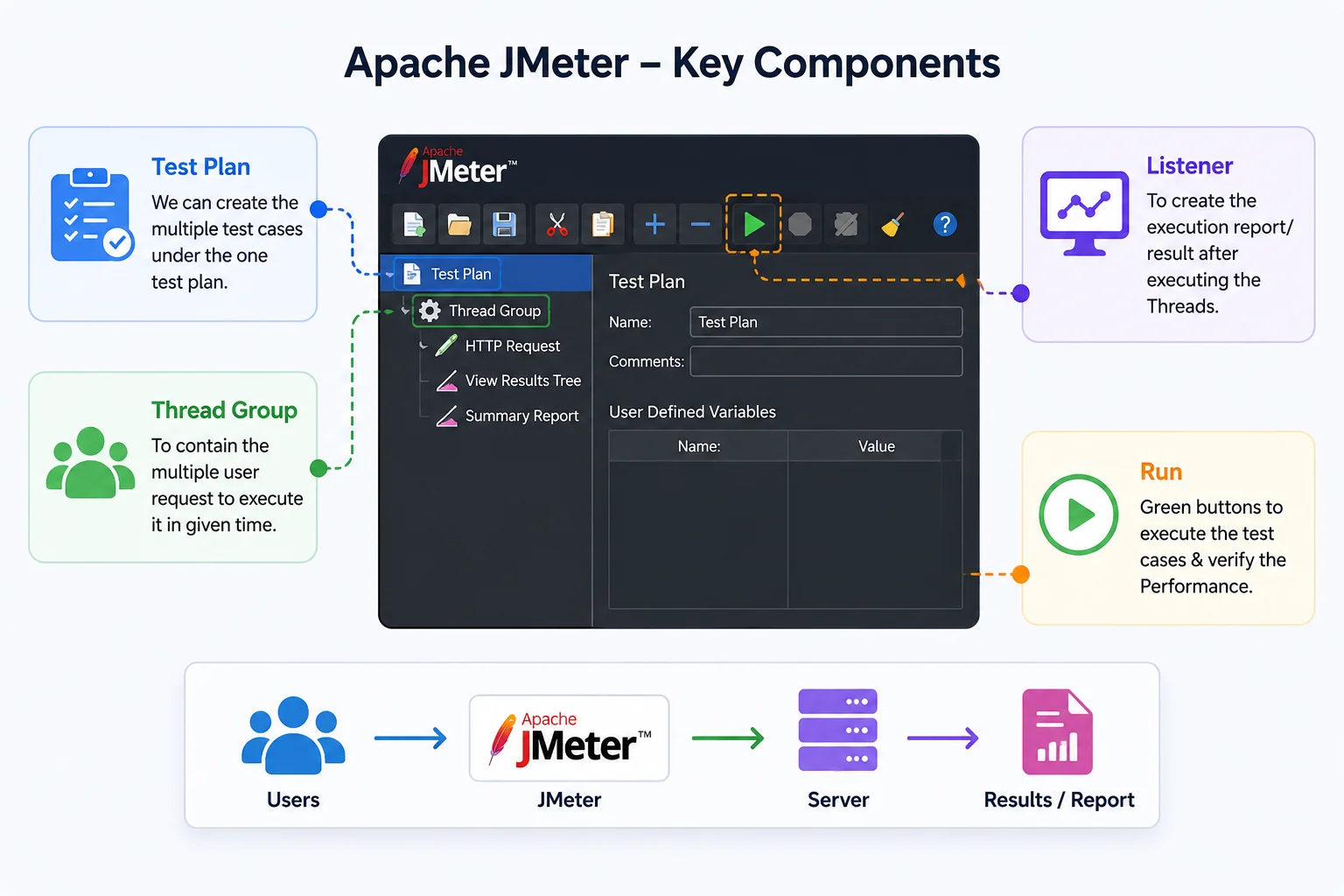
Sampler – In Apache JMeter, a Sampler is a key component used to define the type of request that JMeter will send to a serve
HTTP request – Used for sending HTTP/HTTPS requests to a web server. This is widely used for testing web applications.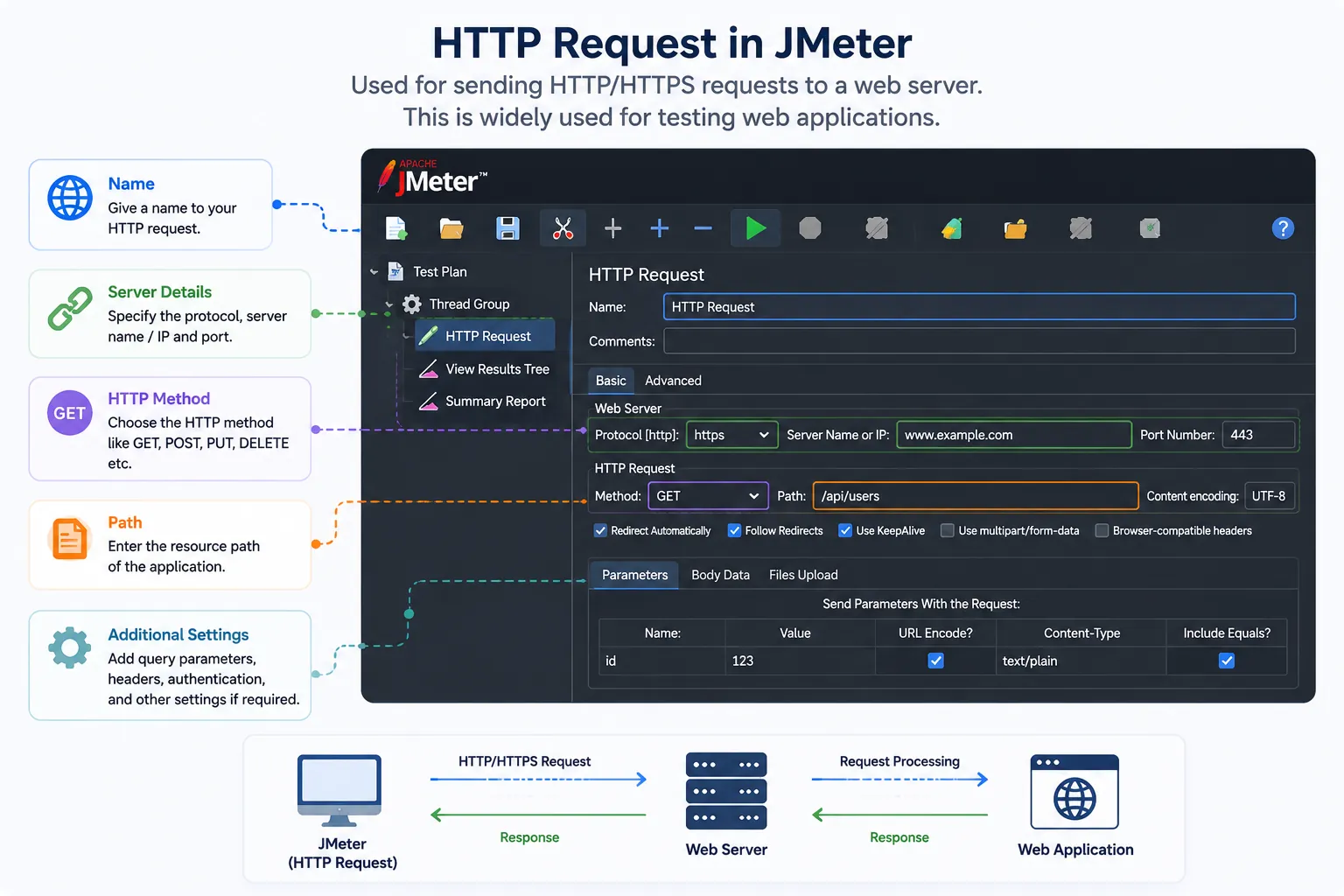
Load Testing Isn’t the Only Type of Performance Testing
As far as load testing is concerned, it is good for evaluating an application’s behavior in a situation of expected load. Still, not all types of traffic require the same kind of test to be carried out. The main purpose of load testing is determining whether the application can function with acceptable response times and reliability in normal circumstances, as well as handle the number of users it is expected to handle.
A stress test is aimed at identifying the point beyond which the performance of the system begins to decline or even at failure. The spike test evaluates the application’s ability to withstand increased load, such as flash sales or viral campaigns. Finally, endurance testing evaluates the application under load for a long period of time to identify such issues as memory leaks or slow performance degradation.
Selection of appropriate testing techniques depends on the knowledge one wishes to receive. For instance, regular load testing will show how an application handles 1,000 users, while stress testing may show how it behaves when the load is increased to 2,000 users.
In addition, the information obtained from each type of testing can help develop an operational plan. Thus, stress testing and
Test With Realistic User Scenarios
The purpose of performance testing is relevant only when it resembles user behavior. Actual users don’t tend to repeat the same actions continuously. Hence, it’s important that you create a performance test, reflecting different user actions and behavior.
Don’t make thousands of the same requests. Instead, you can come up with some scenarios reflecting your application’s actual use. In the case of an e-commerce application, such a scenario could be related to browsing the products, searching for some particular product, adding it to the cart, and checking out.
Such realistic scenarios will allow you to understand the areas where the problem of poor performance is likely to emerge in the actual use. Besides, it will give you the opportunity to spot which parts of the application need to be optimized.
You need to create realistic proportions of user actions. For instance, there may be many users who would browse products, while only a few users will actually go through the whole process until the checkout, and there will be users who will stay idle after one of the actions.
Focus on the Metrics That Matter
There might be quite a lot of figures provided in a test, but not all of them require equal attention. There are several key metrics that should be considered, including response time, throughput, error rate, and resource usage. Percentiles, e.g., 95th and 99th percentiles can also point at slow requests hidden by average response time.
One needs to pay attention to response time, throughput, error rate, number of concurrent users, and resource usage. Response time will help assess request completion speed and throughput will allow to understand how efficiently the system processes requests. The error rate becomes particularly significant when increasing the load on the system.
It is recommended to consider additional figures besides response time. It tends to hide slow requests, so such metrics as 90th, 95th, and 99th percentiles could give a more detailed insight into the experience of slowest users.
It is crucial to relate these metrics to specific goals regarding system performance in advance of the test. A two-second response time will be sufficient for one process and too long for another. A high throughput figure is useless in case it is accompanied by numerous errors. Establishing these thresholds in advance allows evaluating the test results
Find the Bottleneck Instead of Guessing
When a performance test fails, increasing server resources isn’t always the answer. The problem may be caused by slow database queries, inefficient code, network delays, or an overloaded external service. Identifying the actual bottleneck first helps you apply the right fix instead of simply adding more capacity.
The bottleneck could be an inefficient database query, an overloaded API, excessive network calls, memory consumption, application-level processing, or an external service responding slowly.
Use the test results alongside application and infrastructure monitoring to narrow down the actual cause. Fixing the bottleneck and running the test again is far more useful than simply adding more resources and hoping the problem disappears.
A useful approach is to change one factor at a time and compare the results after each improvement. If optimizing a query reduces response time while CPU and memory usage remain stable, the database was likely part of the problem. This method creates a clearer connection between a change and its impact, making performance work easier to validate and repeat.
Include Performance Testing in the Development Cycle
It should not only be done a few days prior to the release of the application. Small-scale tests performed regularly can ensure that slowdowns are detected in time and do not result in bigger problems.
For essential apps, one can conduct small-scale performance tests during development and large-scale ones in the release process. It will be much easier to detect performance regressions since you will be able to make comparisons between different versions of the software.
One does not have to conduct a huge test after each and every modification of the application. One small test against a particular API or workflow can show whether some small change has dramatically increased execution time of an essential operation.
Moreover, performance tests can be included in CI/CD pipelines with appropriate workloads and thresholds. Small-scale tests can be conducted on each significant change, while large-scale ones can be performed on a daily basis or before release. Historical results can be kept to monitor performance regression over time.
Conclusion
Performance testing is a critical step in ensuring the reliability, scalability, and responsiveness of your applications. By using tools like Apache JMeter, businesses can identify bottlenecks, optimize performance, and deliver a seamless user experience. Whether you’re an e-commerce giant or a smaller business, investing in performance testing can make the difference between retaining users or losing them to competitors. A fast, responsive application isn’t just a luxury—it’s a necessity for success in today’s digital landscape.
interested in exploring how. How does performance testing can benefit your business? Contact our expert and learn appropriate solutions.