


- 1 The addition of Social media widgets into a React-based Application increases User engagement, by using most of the social platforms such as Twitter, Facebook, Instagram, LinkedIn and YouTube, makes the content more dynamic.
- 2 Employ the unique codes or APIs issued by the social media platforms to develop React components for each widget and control them using such packages as react-social-media-embed.
- 3 Start by using create-react-app to create your React app and Bootstrap to style the app, before using the social media widgets to expand the app’s features and improve the user experience, and to make it easy to integrate the code.
Embedding these social media widgets within your React app enhances the user’s interaction; user engagement, therefore, is highly enacted with its app by fluently rolling the most trendy social media platforms. Of course, building dynamic interfaces around social in-app, or inclusive social media widgets within the app, is an excellent choice to speed up web development in the React.js library.
To embed social media widgets in a React app, you can follow these general steps:
- Choose The Social Media Platforms: The very next thing is to pick the right social media platforms. The major ones will involve the likes of Twitter, Facebook, Instagram, LinkedIn, and Google, among others.
- Select the appropriate Embed Code: Usually, each of the social media platforms usually gives an embed code or API that you can use to embed content from them right into your web application. You can obtain this by following documentation they always provide in regard to developers found therein.
- Create Components: Define React Components: Create React components of each social media widget that the application needs to include in order to encapsulate them. Such components will contain the JSX of the embed code of the actual content.
Structuring Widget Components for Reusability
Rather than writing a separate, one-off component for every individual social media post an application needs to display, it’s usually worth building a slightly more generic wrapper component that accepts the platform type and post URL as props, then renders the appropriate embed internally based on that input.
This approach pays off once an application needs to display embeds from multiple platforms in different places — a testimonials section might pull from Twitter and LinkedIn, while a media section pulls from Instagram and YouTube. A single reusable component that handles routing to the correct embed type, rather than scattering separate hardcoded components throughout the codebase, keeps the code easier to maintain as more embeds are added over time.
It’s also worth deciding early whether embed URLs will be hardcoded directly into components or pulled from a content source like a CMS or a configuration file. For a marketing site where social posts change periodically, keeping URLs external to the component code means updating which posts are featured doesn’t require a code change or redeployment.
Create a React App
- Use npx command to create a react app Open terminal and give this command npx create-react-app social-media-widgets-react-app
- After creating the react app, then you need to change the directory using the cd command like:
cd social-media-widgets-react-app - You can start the react app using the command:
npm start - App will be running on a local host and you can see the default content of the react app.
- For styling you can use the bootstrap and install using the NPM package:
npm i bootstrap react-bootstrap
About the react-social-media-embed Package
The react-social-media-embed is a community-maintained npm package, which essentially provides wrappers for the social platforms’ raw embed formats to React components. The components in question could be used instead of any social platform’s raw script or iframe embed code.
The library covers multiple platforms, for each of which an individual component is exported. All components have a similar API, with the only required prop being the post or profile URL. One common use case for such components might be to provide a cleaner and more consistent UI for social media posts or profiles on a website.
Using this package would save a lot of boilerplate code as compared to using a raw embed code for each social platform. The latter requires scripting the component’s mount/unmount lifecycle to handle the component’s initialization properly. On the other hand, with the provided React components, there is nothing to be done apart from mounting the component with a URL props passed to it.
Things to Consider Before Choosing a Platform
Choosing what platforms to embed is not a matter of preference only; a few criteria must be considered before finalizing the decision. The first one is the loading speed since each widget loads its own external CSS and JS, hence multiple socials’ embeds on one page will tremendously impact its loading speed if not optimized.
Next, think about how often the content you are going to embed there updates. If it is Twitter or X, their feeds require frequent refreshing; thus, it is better to embed them directly on the page rather than update individual tweets. While a single Instagram post might not change often, embedding the whole feed is unnecessary. In that case, a picture with a link would be more up-to-date and less resource-heavy.
Finally, make sure that the widgets you are going to use look good on mobile devices since some of them have a decent visual appearance on desktops but can appear too big and broken on smaller screens. A responsive design is always a must, so it would be a good idea to test your candidate platforms at different resolutions before committing to any of them.
Inject the social media widget in React App
- Now using an NPM package, we can inject the social media widget in the react app. Now give this command your react app.
npm i react-social-media-embed - Create a custom component to keep all widgets into that.
- Now you can follow these snippets to use the social media widgets in the App.
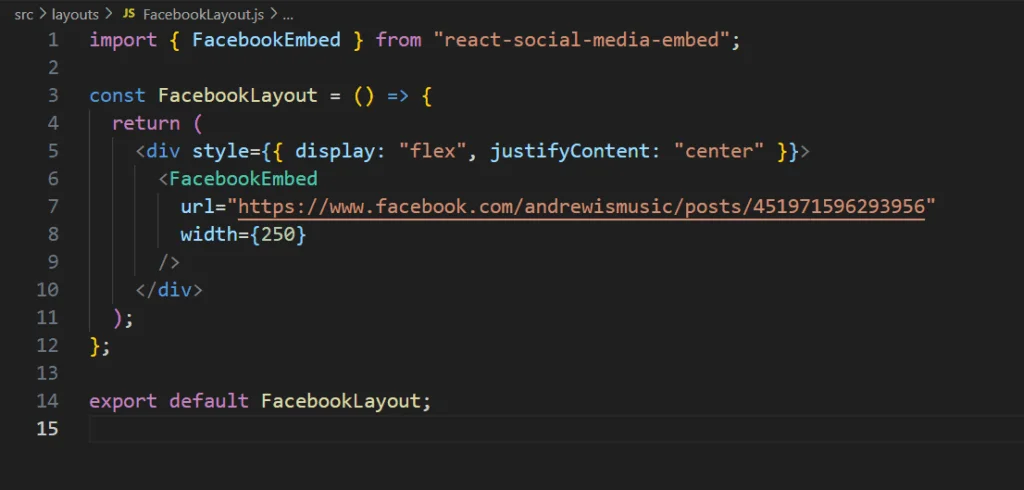
Facebook – social media widget for React
You can import the FacebookEmbed and pass the URL of the post and styling of the widget.
You can import the InstagramEmbed and pass the URL of the post and styling of the widget

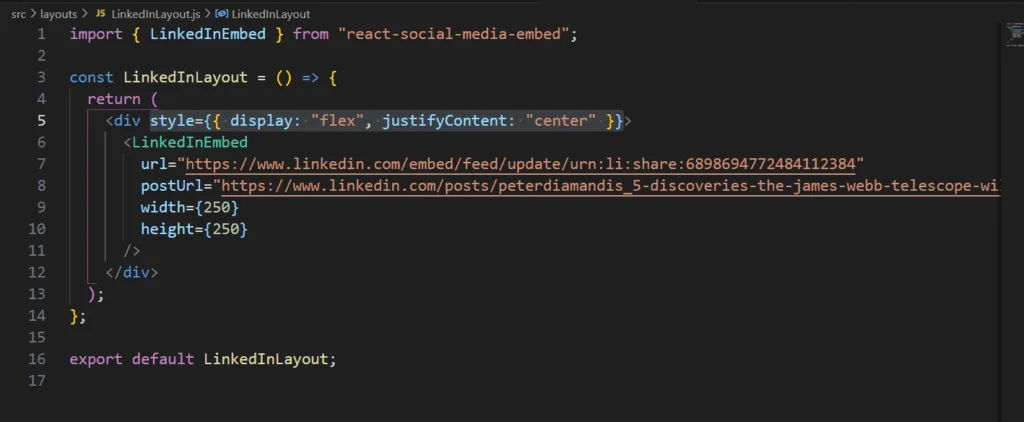
You can import the LinkedIn Embed and pass the URL of the post and styling of the widget.
X (Twitter)
You can import the XEmbed for Twitter and pass the URL of the post and styling of the widget.

Youtube
You can import the YoutubeEmbed for Youtube and pass the URL of the post and styling of the widget.

Handling Loading States and Fallbacks
Social media embeds are powered by externally hosted scripts and often involve a live network request to whichever platform you’re embedding from. This means there’s always an infinitesimal chance that the embed will simply fail to load for some reason: be it a network hiccup, the post being deleted, or the embed API for that particular platform being down for maintenance.
Without any handling for these cases, a user may be greeted by an empty space in your layout where the widget was supposed to appear, or a sudden shift in layout as the widget’s script loads in and pushes other things around. A simple loading placeholder (or even a static skeleton of a given height) would generally alleviate these issues by reserving space for the widget and notifying the user that something is indeed happening.
You should also account for cases where the widget fails to load for whatever reason. It’s generally preferable for UX not to have giant ugly boxes in your page layout where the widget was supposed to appear, especially on a marketing-focused landing page.
Performance Considerations for Multiple Embeds
A page with multiple social media embeds loaded at once—say, a media or press page embedding posts from four or five different accounts—can be substantially slower than average due to the extra time taken to load each platform’s external scripts.
One simple solution is lazy-loading any embeds that appear lower on the page so they only begin to load when the user reaches them, rather than all at once; this could help massively on longer pages where the average user is unlikely to scroll through dozens of posts on a single visit.
Privacy and Cookie Consent Considerations
Most social media embeds are scripts that are loaded from the embedding service, meaning that they can set cookies or track visitors even before a user interacts with the widget at all. That presents a problem, especially for sites that operate under GDPR which require consent before any third party can use tracking scripts.
The solution most sites can implement to address this is to defer loading the third party’s script when the page is opened and display a placeholder message (“Click to load this post”) that will trigger loading the social media embed or ask the user to accept cookies for a third party script on your domain to be loaded.
That way the social media widget is still loaded on the page but only after the user has explicitly agreed to terms defined by your cookie consent manager, while still allowing those who have accepted cookies to view the content.
It’s also worth noting whether the cookie consent solution you’re using already handles third party social media embeds as a separate category, since some scripts require a separate opt-in procedure defined in your CMS or a separate tracking script altogether.
Styling Embeds to Match Your Site’s Design
The limitation of most social media embeds – and thus most of those provided by react-social-media-embed – is that the content of the embed (i.e. the text of the post being embedded, any media attached to it, the branding of the platform) is rendered by the platform itself and cannot be restyled in the same way that a regular React component could.
What can be styled, generally, are things related to the container of the embedded content: its width, the spacing around it, any borders or shadows applied to the container element.
On a marketing site that has a particular visual identity, it’s worth investing a little time in making sure that these embedded social posts don’t feel like an eyesore, disrupting the general look and feel of the page they’re on. Making sure there’s adequate spacing between embeds, that they have similar border radius/card styles to the rest of the page’s UI if they’re being rendered within cards, and that the embeds themselves aren’t varying greatly in size between platforms will go a long way in making embedded social posts feel cohesive.
And it’s probably a good idea to pick a certain width or aspect ratio for embeds of a particular platform ahead of time – a Twitter embed taking up more horizontal space on a page than an Instagram embed would be jarring to see, even if both were styled in a generally pleasing way.
Conclusion
Embedding social media widgets into a React application can be an excellent way to add constantly updated content without having to code it manually. By using such packages as react-social-media-embed one can significantly reduce the amount of necessary code for each particular component. It allows one to reuse the same blocks for Facebook, Instagram, LinkedIn, X (Twitter), and YouTube content.
The actual code of such components may seem trivial, but the experience of working with them tells that the details significantly impact the overall appearance and functionality. For example, the loading of embedded content may need to be optimized, and the necessary code for each widget should be added in such a way that the entire block would not break when the content inside it changes. Allowing the components to handle such details transparently to the user significantly reduces the development and testing time after launch.