- 1 Integrating HubSpot CRM with a React app enhances customer management by centralizing data, automating interactions, and streamlining communication.
- 2 Real-time features like live chat and meeting scheduling improve user experience, providing instant support and efficient scheduling.
- 3 With this setup, teams benefit from actionable insights into customer behavior, leading to more effective sales and marketing efforts.
Efficient customer relationship management is essential in today’s fast-paced business world. CRM systems have become vital tools for businesses, helping streamline sales and marketing efforts. Integrate HubSpot with React to enhance these systems and create a seamless experience.
HubSpot CRM stands out as a popular choice due to its user-friendly design and valuable features. It’s especially effective for businesses seeking a smooth, organized approach to managing customer data.
If your web application is built with React, collaborating with an Android app development agency can take your customer management to the next level. This blog will guide you through integrating HubSpot CRM into your React app, creating a seamless experience for users with the support of a skilled development team.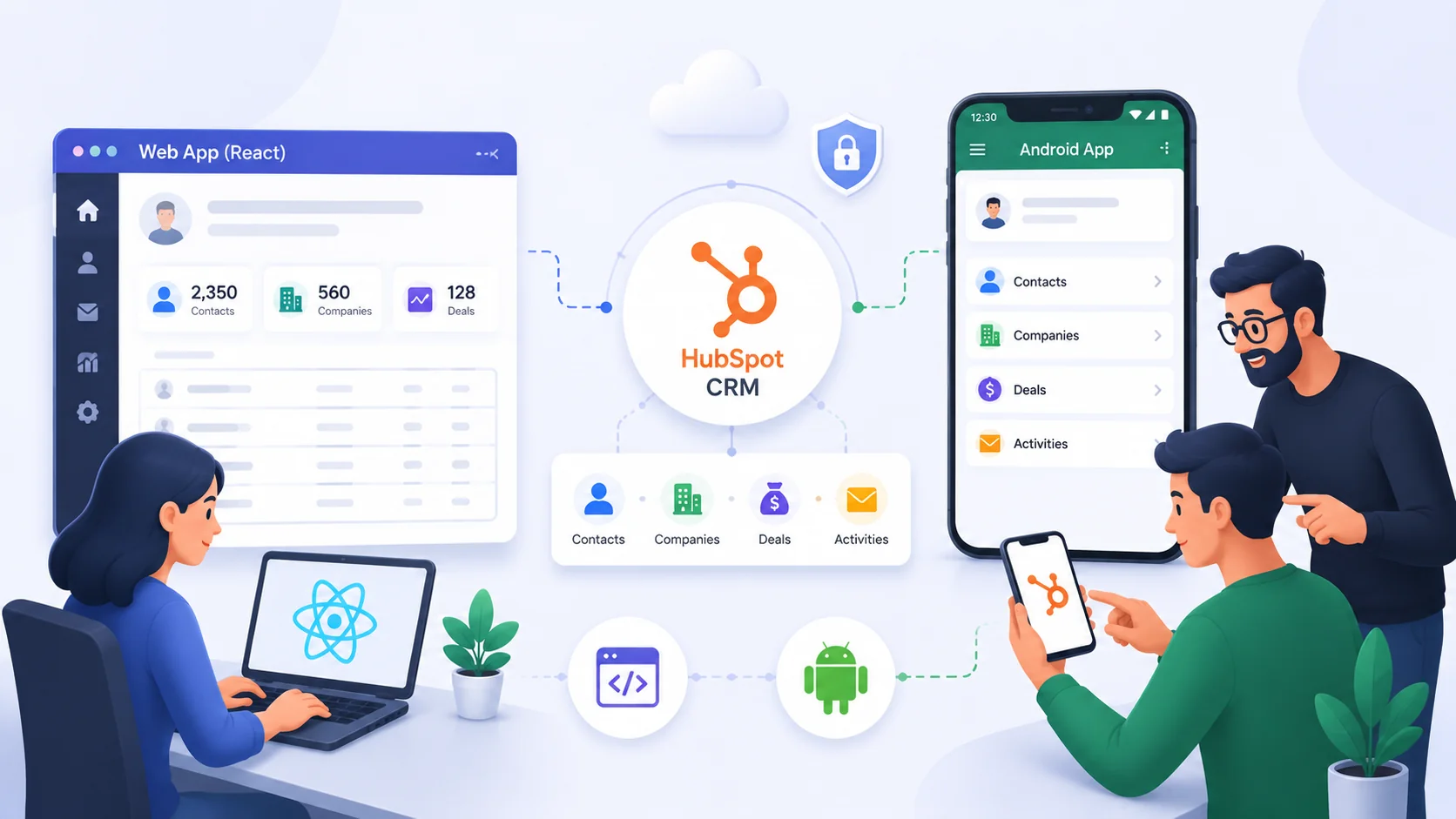
How to Integrate Hubspot CRM with React
Integrating HubSpot CRM into your React application can give you a number of benefits, such as:
- Improved customer relationship management (CRM)
- Increased sales and marketing efficiency
- Better insights into customer behavior
- More personalized customer experiences
Why Integrate HubSpot CRM with Your React Application?
Before we dive into the technical details, let’s briefly discuss the benefits of integrating HubSpot CRM into your React application:
Centralized Data
With HubSpot CRM integration, you can centralize all customer data, including contact information, communication history, and sales activities, in one place. This ensures that your team has access to up-to-date and comprehensive customer information, a crucial aspect of custom software development.
Streamlined Communication
Integrating HubSpot CRM allows you to automate and streamline communication with leads and customers. You can set up email campaigns, track responses, and nurture leads more effectively, all while leveraging api development companies for seamless integration.
Improved Sales Insights
HubSpot CRM provides powerful analytics and reporting tools. By integrating it with your React app through the expertise of application development companies, you can gain valuable insights into your sales and marketing efforts, helping you make data-driven decisions.
Enhanced Productivity
Automation features in HubSpot CRM reduce manual data entry and repetitive tasks, freeing up your team’s time to focus on more strategic activities. This can be especially beneficial when working with dedicated offshore developers.
Personalized User Experience:
By accessing customer data from HubSpot CRM, your React application can offer a personalized user experience. You can tailor content and recommendations based on user profiles and preferences, thanks to custom software services and the expertise of your development team.
Now, let’s get into the steps to integrate HubSpot CRM with your React application:
HubSpot API Tiers: Free vs. Paid Limits Compared
Before beginning the software integration, it is important to understand the technical specifics of how API access is handled in the HubSpot platform as this consideration has a large impact on the functionality available to the React application.
The accounts that do not have a paid subscription have significantly lower API limits as compared to higher-tiered accounts. A prototype built on a free account may stop functioning properly when deployed on a production server due to increased request volumes if the company did not upgrade their account level. Additionally, some of the APIs are only available in specific tiers which means that certain functions (advanced workflows, custom objects, reporting tools) will be inaccessible if the account is not on the required plan.
This circumstance should be carefully taken into consideration before choosing which API to use for the integration. It is necessary to evaluate the capabilities of the current or prospective account to leave enough headroom for the development and testing of the software product.
Choosing Between REST API Calls and the HubSpot SDK
While this guide primarily uses Axios to make direct calls to the REST API, there’s also an official Node.js SDK available for use as an alternative. The official SDK abstracts some common authentication header formatting and request/response processing logic, which can be useful for larger-scale projects with many interacting with different API endpoints.
By contrast, the Axios-based approach shown in this guide provides greater visibility into the exact request being sent and response being received at the protocol level. In general either approach is reasonable, with the choice depending on your expected scale and surface area of API interactions.
Step 1: Create a HubSpot Developer Account
To start, you’ll need a HubSpot developer account. If you don’t have one, sign up for a free account at HubSpot Developers.
Step 2: Set Up Your React Application
Assuming you already have a React application, make sure it’s set up and running. You can use popular tools like Create React App to bootstrap your project.
Step 3: Generate API Key
To interact with HubSpot CRM from your React app, you’ll need an API key. In your HubSpot developer account, go to the settings >Integrations> Private Apps section and then click a private app, selecting the scopes as per your requirements. Keep this access token secure, as it will be used to authenticate your requests.

Step 4: Install Axios (or Your Preferred HTTP Library)
You’ll need a library to make HTTP requests to HubSpot’s API. Axios is a popular choice, but you can use any library you prefer. Install Axios using npm or yarn:
npm install axios
# or
yarn add axios
Step 5: Make API Requests
Now comes the coding part. You can use Axios or your chosen HTTP library to make API requests to HubSpot CRM.
Here are some common API endpoints you might use:
- Contacts: Retrieve, create, or update contact information.
- Deals: Manage sales deals and their associated data.
- Email Campaigns: Automate email campaigns and track their performance.
- Analytics: Fetch sales and marketing analytics for reporting.
Remember to include your API key in the request headers for authentication.
// Example using Axios to get contacts
const axios = require('axios');
const apiKey = 'YOUR_API_KEY';
const apiUrl = 'https://api.hubapi.com/crm/v3/objects/contacts';
axios.get(apiUrl, {
headers: {
'Authorization': Bearer ${apiKey},
},
})
.then((response) => {
console.log('Contacts:', response.data);
})
.catch((error) => {
console.error('Error:', error);
});
Step 6: Handle Responses
Once you’ve made API requests, you’ll need to handle the responses and update your React application’s state accordingly. You can use React’s state management (e.g., useState and useEffect hooks) to ensure that your application displays the most recent data from HubSpot CRM.
Step 7: Implement Webhooks (Optional)
To keep your React application updated in real-time, consider implementing webhooks. HubSpot allows you to set up webhooks that notify your app when specific events (e.g., contact creation or deal closure) occur in the CRM. This ensures that your app always has the latest data without constantly polling the API.
Securing Webhook Endpoints
Webhooks present a particular security concern, which is worth addressing specifically, since they expose a publicly accessible webhook endpoint in the application.
Without verification, any third party that learns of the existence of a webhook can send a request to it, since HubSpot is not the only one that can call it. The requests made by HubSpot are signed, which means that checking the signature on the server when a request comes in is an obvious step to take in validating it.
It is also useful to design webhook handlers to be idempotent – in other words, capable of processing the same event twice without negative consequences – since HubSpot’s webhooks can sometimes be delivered more than once.
Testing the Integration Before Going Live
An integration that will touch customer data in HubSpot should get a proper test run before going live, beyond just verifying that API calls work correctly.
Testing with a sandbox account (separate from the production CRM) allows for experimenting with contact creation and deal updates, as well as webhook responses, without risking actual customer data. Most HubSpot plans that allow the use of this feature are worth considering for this purpose.
Testing failure scenarios is just as important as testing the happy path. Simulating the failure of the HubSpot API to respond correctly (timeout, rate limit, etc.) ensures that the error handling described in this article’s common mistakes section does what we expect it to do, not what we assume it does.
Bonus:
Expand your application’s capabilities further by integrating HubSpot’s meeting scheduler and live chat features:
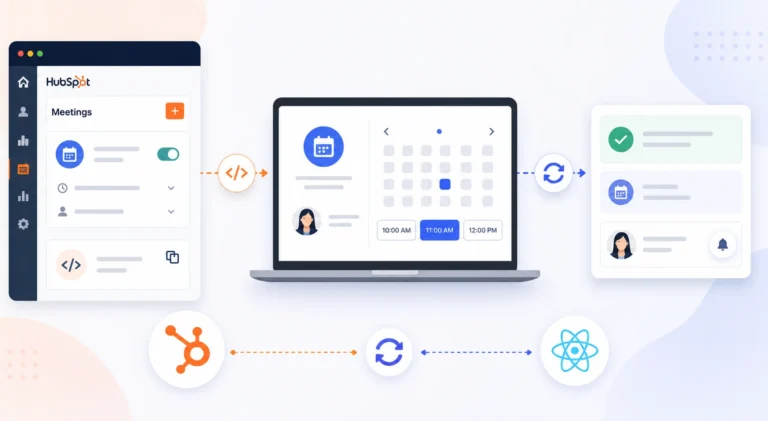
Meeting Scheduler
Set Up HubSpot Meeting Scheduler: In your HubSpot account, navigate to sales > Meetings and create meeting links. Customize the settings, and then generate the embed code.
Embed Meeting Scheduler: Add the generated embed code to the pages of your React application where you want users to schedule meetings.
Handle Meeting Scheduler Callbacks: Implement callbacks to handle events such as meeting bookings. Update your React app’s state or take specific actions based on these interactions.
Live Chat
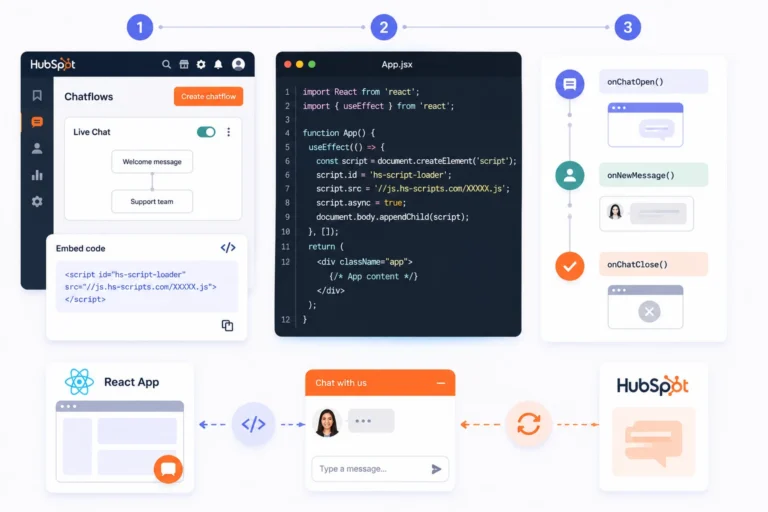
Configure HubSpot Live Chat: In your HubSpot account, configure your live chat settings. To configure live chat go to conversations > chatflows. Then, click create chatflow and configure the live chat. Then, generate the live chat embed code.
Embed Live Chat: Add the generated live chat embed code to the relevant pages in your React application.
Handle Live Chat Callbacks: Implement callbacks to handle events triggered by live chat interactions. You can open a chat window or update the UI in response to user actions.
By following these steps and integrating HubSpot CRM along with the bonus features into your React application, you can harness the power of data-driven decision-making and deliver exceptional customer experiences. Collaborating with custom software development companies and software development agencies specializing in web development services can further enhance the quality of your application.
Benefits of Integrating HubSpot CRM with Your React Application
Improved Customer Relationship Management (CRM)
Centralizing customer data within your React application allows for organized, up-to-date access to client information. This streamlined approach supports quicker decision-making and more effective communication, leading to stronger customer relationships.
Increased Sales and Marketing Efficiency
Automating tasks like email campaigns and follow-ups saves time and resources, allowing your team to focus on strategic activities. Managing these processes within the CRM creates a cohesive approach across sales and marketing, reducing redundancy and enhancing productivity.
Better Insights into Customer Behavior
HubSpot’s analytics tools provide valuable insights into customer interactions and preferences. Integrating these insights with your React app enables data-driven decisions that refine sales strategies, improve marketing efforts, and help forecast trends with greater accuracy.
More Personalized Customer Experiences
Access to comprehensive customer data enables a tailored approach to service. With HubSpot CRM integration, your React app can customize content, recommendations, and communication based on individual user preferences, creating a more engaging experience for each customer.
Why Choose Innostax for Your React Development Needs
Innostax specializes in React development services, providing businesses with customized, high-performance applications. Our team brings a wealth of expertise in building responsive and scalable React applications that integrate seamlessly with tools like HubSpot CRM. We stay current with the latest React updates and use modern development practices to ensure your app is optimized for functionality and user experience.
Whether you’re looking to enhance customer management with CRM integration or build a dynamic user interface, Innostax’s React developers are here to support your vision. Join hundreds of companies that trust Innostax to deliver quality software on time, every time. Reach out to discover how we can help make your React project a success.
Common Mistakes While Integrating HubSpot CRM With React Essay
Several mistakes are common when integrating HubSpot with React. The first is sharing the private application access token publicly.
A React application’s frontend should not contain API keys. These keys can be exposed because they are included in network request headers. This can create a security risk and allow unauthorized users to access company data.
API keys should instead be stored on a backend server. The frontend should only access the backend when it needs to use the HubSpot API.
The second common mistake is ignoring API rate limits. Sending too many requests can cause API calls to fail soon after the product is launched.
Another mistake is using poor error handling. Developers may assume that problems such as missing contacts, missing deals, or timeouts will not happen. When these errors occur, users may see a blank screen with no information about what went wrong.
For these reasons, these mistakes should be avoided when building React applications that use the HubSpot API.
Planning for Long-Term Maintenance of Your HubSpot Integration
Think about long-term maintenance from the start. A HubSpot integration is rarely a one-time project. HubSpot regularly updates its API and may retire or change endpoints.
An integration that is not monitored can break without an obvious cause. A specific feature may stop working before the problem is noticed.
This is especially important for React applications that use webhooks. Changes to payload formats or event rules can break real-time data syncing without clear warning.
You should also plan for larger amounts of data. Features such as pagination and batching can help when working with thousands of records. Reducing memory use is also important when your React application handles large amounts of data.
Planning for these cases can prevent problems as your application grows. An integration that worked well for years may need changes when it starts handling more data.
Teams should treat the integration as a long-term project. Review the HubSpot API changelog and use proper alerts and monitoring. This can help find issues before they affect customers or sales engineers.
Conclusion
Innostax specializes in React development services, providing businesses with customized, high-performance applications. Our team brings a wealth of expertise in building responsive and scalable React applications that integrate seamlessly with tools like HubSpot CRM. We stay current with the latest React updates and use modern development practices to ensure your app is optimized for functionality and user experience.
Whether you’re looking to enhance customer management with CRM integration or build a dynamic user interface, Innostax’s React developers are here to support your vision. Join hundreds of companies that trust Innostax to deliver quality software on time, every time. Reach out to discover how we can help make your React project a success.
For additional insightful articles and information, please reach out to us.