- 1 GCP provides many services for a business including computing, storage, machine learning, and analytics hosted on Google’s network to provide high availability and low latency.
- 2 Some of the major elements of GCP are marked as scalable computing services, secure storage solutions and machine learning for new age business solutions.
- 3 To set up a Cloud SQL Database on GCP, one needs to log into the console, configure the instance details, enable billing for Cloud SQL, and connect to the Cloud SQL instances by means of using Google Cloud SDK or with third-party tools, enhancing the database management.
- 4 Google Cloud Platform is a scalable and secure cloud infrastructure which hosts modern applications. GCP provides computing, storage, databases, analytics, and machine learning services, as well as products for serverless computing and security. Cloud SQL can be particularly beneficial for teams which need a managed relational database as the underlying infrastructure does not need to be maintained by them.
- 5 By using Cloud SQL it becomes easier for developers to manage their databases and connect their applications to them. After launching an instance of Cloud SQL, they can configure its settings, add database users and grant them permissions, and connect their applications to it using the Google Cloud SQL Connector or Prisma. This would allow their teams to focus on developing and improving the application while GCP takes care of most of the database management and infrastructure-related tasks.
In today’s digital age, businesses and organizations are continually striving to scale, innovate, and streamline their operations. Google Cloud Platform (GCP), a dominant force in cloud computing, offers a comprehensive suite of services tailored to meet the diverse requirements of modern enterprises. In this blog post, we’ll delve into what GCP is, its key features, and how it can benefit your business, whether you’re involved in custom financial software development, software development for financial services, custom enterprise software development, or seeking an iOS mobile app development company.
What is Google Cloud Platform (GCP)?
Google Cloud Platform, often referred to as GCP, is a suite of cloud computing services that provide a scalable and flexible infrastructure for software application development. It’s one of the major players in the cloud industry, competing with other giants like Amazon Web Services (AWS) and Microsoft Azure. GCP offers a wide range of services, including computing, storage, databases, machine learning, and analytics, all hosted on Google’s highly reliable and secure global network.
Key Features of GCP:
Global Network: Google Cloud Platform leverages Google’s extensive global network infrastructure, ensuring high availability and low-latency access to services across the globe.
Compute Services: Google Cloud Platform provides a variety of virtual machine options, including Google Compute Engine, which allows you to run workloads at scale.
Storage Services: With Google Cloud Storage and Cloud SQL, GCP offers secure, durable, and highly available storage solutions for your data.
Big Data and Analytics: Google’s BigQuery and Dataflow services enable you to process and analyze large datasets with ease.
Machine Learning: GCP’s AI and machine learning services, like AI Platform and AutoML, empower you to build and deploy ML models without specialized expertise.
Security and Compliance: Google Cloud Platform prioritizes security, with features like Identity and Access Management (IAM) and encryption to protect your data.
Serverless Computing: GCP’s serverless offerings, such as Cloud Functions and App Engine, simplify application deployment and management.
Benefits of Using GCP:
Scalability: GCP allows you to scale your resources up or down as needed, so you pay only for what you use, making it cost-effective for businesses of all sizes.
Reliability: Google’s infrastructure is known for its high uptime, ensuring that your applications and data are available when you need them.
Innovation: GCP provides access to cutting-edge technologies, such as AI and machine learning, enabling you to stay ahead of the competition.
Global Reach: With data centers in multiple regions, GCP offers global coverage, allowing you to reach your customers wherever they are.
Ease of Use: GCP’s user-friendly interface and extensive documentation make it accessible to both seasoned developers and newcomers to cloud computing.In this vast ocean of services, we are going to create a Cloud SQL Database and connect to it. We are going to see the connection with the created DB, both by the package provided by GCP and also simply by Prisma. Whether you choose to work with dedicated offshore developers or an in-house team, understanding the process of setting up and connecting to a Cloud SQL Database is essential for successful application development.
Cloud SQL vs. Self-Managed Databases: What Enterprises Should Weigh
For teams considering building their own custom enterprise software or financial services software, the question is more often not about which cloud to choose but whether to go with a managed or self-managed solution. Hosting your own Postgres or MySql server on a VM provides much needed flexibility and freedom in terms of configuration and control but also requires that your team take on the responsibility of backups, failover management, security patching, and capacity planning.
With cloud SQL the responsibilities of the database administrator are largely handed off to Google who handle the automated backups, point-in-time recovery, patching, and replication, while the customer has more control over network access and instance sizes and can manage users and permissions. In a financial services context, where uptime and auditing are crucial, the cost in engineering time saved by going with a fully managed solution can outweigh the loss of control and the ongoing cost of the instance compared to buying and maintaining your own VM instances.
When to Choose Cloud SQL vs. Other GCP Database Options
Cloud SQL isn’t the only managed database service on Google Cloud Platform, and picking the right one upfront can save significant re-architecture work later. Understanding where each service fits helps teams doing custom enterprise software development avoid over- or under-engineering their data layer.
Cloud SQL is built for traditional relational workloads — applications that rely on structured schemas, foreign key relationships, and transactional consistency, such as billing systems, inventory management, or customer account records. If your application already speaks SQL and fits comfortably on a single well-sized instance, Cloud SQL is typically the simplest and most cost-predictable choice.Cloud Spanner, by contrast, is designed for workloads that need both strong relational consistency and horizontal scale across regions — think global-scale financial ledgers or multi-region inventory systems where a single instance would eventually become a bottleneck. It costs more than Cloud SQL and introduces a different query planning model, so it’s usually worth adopting only once an application has outgrown a single-instance relational database.
Firestore and Bigtable serve a different category of problem altogether. Firestore is a NoSQL document database suited to applications with flexible, evolving schemas, such as mobile app backends or content-driven platforms, where real-time syncing across clients matters more than strict relational integrity. Bigtable is built for extremely high-throughput, low-latency workloads like time-series data, IoT telemetry, or analytics pipelines processing millions of writes per second — well beyond what a relational database is designed to handle efficiently. For most custom software projects — particularly those built around standard business logic like user accounts, transactions, or catalog data — Cloud SQL remains the practical starting point. Teams typically only need to evaluate Spanner, Firestore, or Bigtable once specific scale or data-model requirements emerge that a single relational instance can no longer satisfy.
To create Cloud SQL DB follow this step by step guide.
1. Log in to Google Cloud Console:
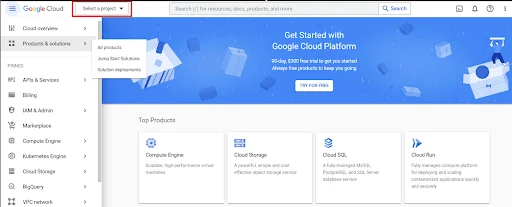
Sign in with your Google account credentials.
If you don’t have a Google account, you’ll need to create one.
2. Select or Create a Project:
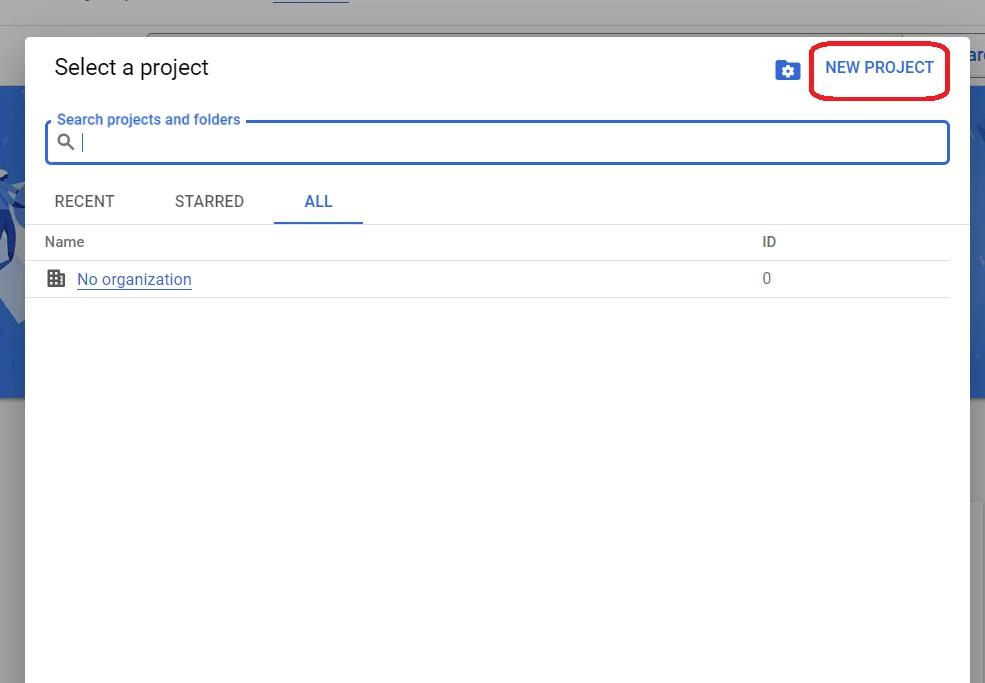
If you’re working on an existing project, select it from the dropdown in the top navigation bar.
3. Enable Billing:
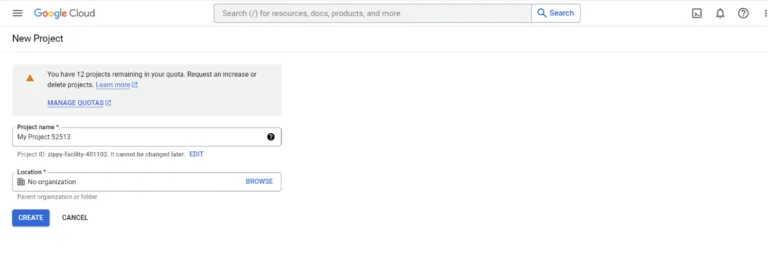
4. Open the Cloud SQL Page:

5. Click “Create Instance”:
On the Cloud SQL page, click the “Create instance” button.

Now choose the instance you want to create for –
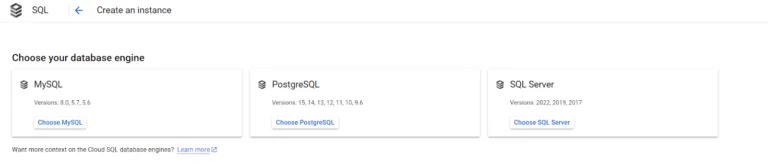
6. Configure Instance Details:
In the “Instance ID” field, enter a unique name for your Cloud SQL instance.
Choose the database engine you want to use (e.g., MySQL, PostgreSQL, SQL Server).
Select your preferred location (region) for the instance.
Choose the database version.
Set the machine type and storage capacity.
Configure your database instance with a password for the master user.
Optionally, enable automatic backups and maintenance.
The below is a screenshot for Configuration page –

7. Wait for Instance Creation:
Google Cloud will take a few moments to create your Cloud SQL instance. You can monitor the progress on the “SQL instances” page. It can take upto few minutes.
8. Configure Access Control:
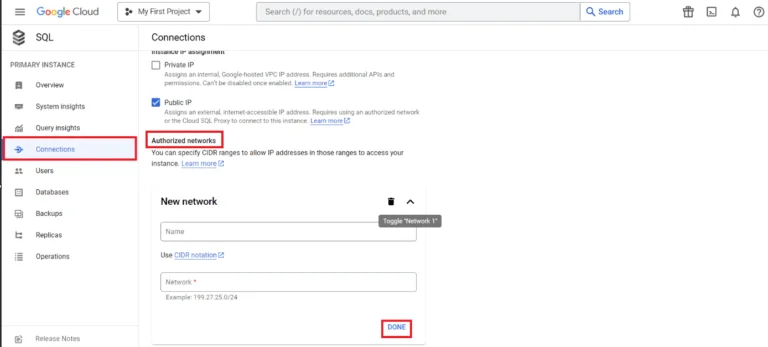
Once the instance is created, you’ll want to configure access control. You can set up authorized networks, create users, and manage access to your database from the “Users” and “Authorized networks” tabs under your instance’s details.
To create Authorized networks :
Go to connection, and In the authorized networks add the IP address of your device. If you want to allow all traffic just enter “0.0.0.0/0”. Give the IP address a name and click DONE.
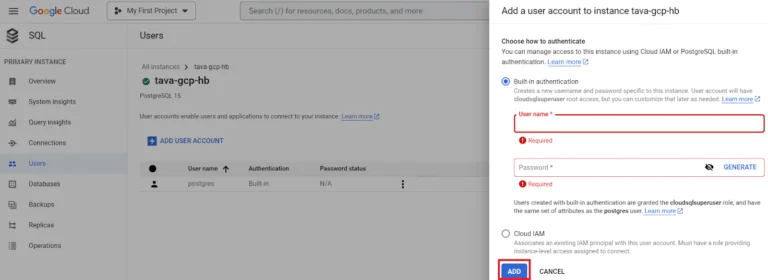
If You want to create user –
Go to Users, then click on Add User Account –

Below is a sample code to form the connection “pool” using which we can fire sql query.
const pg = require('pg');
const { Connector } = require('@google-cloud/cloud-sql-connector');
require('dotenv').config();
const { Pool } = pg;

async function GcpDbCreator() {
  const connector = new Connector();
  const clientOpts = await connector.getOptions({
    instanceConnectionName: 'YOUR_DB_INSTANCE_CONNECTION',
    ipType: 'PUBLIC',
  });

  const pool = new Pool({
    ...clientOpts,
    user: 'USER_NAME',
    password:'PASSWORD',
    database: 'DATABASE_NAME',
    max: 5,
  });
  const query = `QUERY TO FIRE`;
  const { rows } = await pool.query(query);
  console.table(rows);

  await pool.end();
  connector.close();
}

GcpDbCreator().catch((error) => {
  console.error('Error:', error);
});
SAMPLE OUTPUT –
As you can see we can fire a query and the expected response is fetched.
Connecting to Cloud SQL Using Prisma
While the GCP connector package specified above may be appropriate for direct SQL access, many teams developing in Node.js or TypeScript will prefer to use Prisma. This provides a type-safe query builder in addition to a migration tooling. Here’s how to set it up to use the same Cloud SQL instance.
Install the Prisma package, and set your connection string in your .env file. If you’re connecting via a public IP (as you set up authorized networks to do previously), it will take the form of:
DATABASE_URL="postgresql://USER_NAME:PASSWORD@YOUR_INSTANCE_PUBLIC_IP:5432/DATABASE_NAME"For production workloads Google recommend using the Cloud SQL Auth Proxy instead of a public IP, which forwards traffic through a secure local socket instead of the wide internet.
Next, define your data source in schema.prisma:
datasource db {
  provider = "postgresql"
  url      = env("DATABASE_URL")
}
Run npx prisma migrate dev to sync your schema, then query the database using the generated Prisma Client:
const { PrismaClient } = require('@prisma/client');
const prisma = new PrismaClient();

async function getRecords() {
  const records = await prisma.yourTableName.findMany();
  console.table(records);
  await prisma.$disconnect();
}

getRecords().catch(console.error);
The main benefit of Prisma is that you can implement schema-driven development, which ensures that your models are always in sync with the database and that you get autocompletion and type checking for all your queries, which is critical in bigger custom software development teams working on multiple services.
Troubleshooting Common Cloud SQL Connection Issues
Connection timeout errors usually indicate that the client IP address is not added to the authorized networks list or the instance is still being provisioned. Check theAuthorized networks tab and instance status (it should be Runnable).
Authentication failures are most likely due to a wrong password specified for the database user in a connection string or missing database name in the connection URL.
SSL/TLS connection errors occur if an instance is set to require SSL and the client is not configured to pass certificates, so either uncheck theRequire SSL option for development instances (never do this for production instances) or configure the client to pass the server’s SSL certificates.
Intermittent disconnects under load usually happen due to connection pool exhaustion. Set a reasonable max value for the pool and close idle connections.
Now that your Cloud SQL instance is up and running, you can create databases, tables, and manage your data using SQL commands or database management tools.
Conclusion
Google Cloud Platform (GCP) stands as a robust and versatile cloud computing solution that caters to a wide array of business needs. By leveraging GCP’s Cloud SQL Database, you can create secure, scalable, and highly available database instances while benefiting from its seamless integration with modern tools and frameworks like Prisma. Whether you’re working with offshore developers, an in-house team, or a hybrid model, mastering the process of setting up and connecting to a Cloud SQL Database is essential for efficient application development. With GCP’s innovative features and global reach, your business is well-equipped to thrive in today’s dynamic digital landscape.