


JDBC provides the connection between Java applications and relational databases, allowing developers to establish connections, execute SQL queries, and work with returned data. A typical JDBC setup involves loading the required driver, configuring the database connection, executing queries, handling results, and closing connections properly. Using connection pooling and proper error handling can also help improve application performance and reliability.
- 1 The core of the Java relational database integration is JDBC, which gives a capacity to run SQL commands and fetch the data through components including the connection URL, username, password, and JDBC driver to enable an effective transfer of the entire data.
- 2 To work efficiently with JDBC, one must fully understand how to create statements using both Statement and PreparedStatement for different types of queries and how to manage the result set in the most effective way possible as to manipulate data in order to obtain a clean and efficient execution of operations on the database.
- 3 The main use cases of JDBC are the optimization of connection usage; establishment of connection pooling; and the inclusion of efficient error handling throughout Java applications enhancing scalability of Java applications.
- 4 Properly closing JDBC connections helps prevent resource leaks and keeps database resources available for other operations.
- 5 Consistent connection management, query execution, result handling, and error handling help maintain reliable JDBC-based applications.
JDBC Connections in Java: A Complete Guide
Java Database Connectivity (JDBC) is the standard way Java applications talk to relational databases. It lets your code run SQL queries, fetch results, and manage data — all in a reliable and consistent way.
In this guide, you’ll learn:
- What a JDBC connection is and how it works
- How to set one up, step by step
- How to run SQL queries safely
- Best practices like connection pooling and error handling
What Is a JDBC Connection?
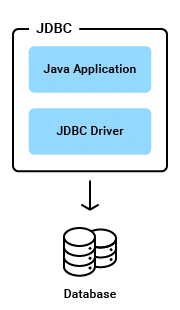
A JDBC connection is the link between your Java application and a database. It lets your app:
- Send SQL queries to the database
- Get back results
- Update, insert, or delete data
Think of it as a bridge. Your application’s logic sits on one side. Your data sits on the other. JDBC connects the two.
The 4 Building Blocks of a JDBC Connection
Every JDBC connection needs four things:
- Connection URL – Tells Java which database to connect to (its address).
- Username – Identifies who is connecting.
- Password – Verifies that the user is authorized.
- JDBC Driver – Translates Java code into a language the database understands.
If any one of these is missing or wrong, the connection will fail.
Setting Up a JDBC Connection: Step-by-Step
Follow these five steps to connect Java to a database.
Step 1: Import the JDBC Packages
Java’s JDBC classes live in the java.sql package. Import what you need:
import java.sql.Connection;
import java.sql.DriverManager;
import java.sql.SQLException;
Step 2: Load the JDBC Driver
The driver acts as a translator between Java and your database. Load it using Class.forName():
try {
    Class.forName("com.mysql.cj.jdbc.Driver");
} catch (ClassNotFoundException e) {
    e.printStackTrace();
    // Handle the exception appropriately
}
Note: Replace "com.mysql.cj.jdbc.Driver" with the driver for your database. For example, use "oracle.jdbc.driver.OracleDriver" for Oracle.
Step 3: Establish the Connection
Set your database URL, username, and password. Then call DriverManager.getConnection():
String url = "jdbc:mysql://localhost:3306/your_database";
String username = "your_username";
String password = "your_password";

try (Connection connection = DriverManager.getConnection(url, username, password)) {
    // Your code for database operations goes here
} catch (SQLException e) {
    e.printStackTrace();
    // Handle the exception appropriately
}
Replace the URL with your actual database address.
Step 4: Execute SQL Queries
Once connected, create a statement and run your query:
try (Connection connection = DriverManager.getConnection(url, username, password)) {
    Statement statement = connection.createStatement();
    String query = "SELECT * FROM your_table";
    ResultSet resultSet = statement.executeQuery(query);

    while (resultSet.next()) {
        // Your code to handle each row of results goes here
    }
} catch (SQLException e) {
    e.printStackTrace();
    // Handle the exception appropriately
}
For queries with dynamic values, use PreparedStatement instead (more on this below).
Step 5: Close the Connection
Always close your connection when you’re done. This frees up resources:
try (Connection connection = DriverManager.getConnection(url, username, password)) {
    // Your code for database operations goes here
} catch (SQLException e) {
    e.printStackTrace();
} finally {
    try {
        if (connection != null && !connection.isClosed()) {
            connection.close();
        }
    } catch (SQLException e) {
        e.printStackTrace();
    }
}
Skipping this step can cause resource leaks, which slow down or crash your app over time.
Executing SQL Queries: Statement vs. PreparedStatement
JDBC gives you two ways to run SQL: Statement and PreparedStatement. Here’s the full example:
import java.sql.Connection;
import java.sql.DriverManager;
import java.sql.PreparedStatement;
import java.sql.ResultSet;
import java.sql.Statement;
import java.sql.SQLException;

public class JdbcStatementExample {
    public static void main(String[] args) {
        String url = "jdbc:mysql://localhost:3306/mydatabase";
        String username = "root";
        String password = "password";

        try (Connection connection = DriverManager.getConnection(url, username, password)) {

            // Using Statement for simple SQL queries
            Statement statement = connection.createStatement();
            String simpleQuery = "SELECT * FROM mytable";
            ResultSet resultSetSimple = statement.executeQuery(simpleQuery);

            while (resultSetSimple.next()) {
                System.out.println("Column 1: " + resultSetSimple.getString(1));
                System.out.println("Column 2: " + resultSetSimple.getString(2));
            }

            // Using PreparedStatement for parameterized queries
            String paramQuery = "SELECT * FROM mytable WHERE column1 = ?";
            PreparedStatement preparedStatement = connection.prepareStatement(paramQuery);
            preparedStatement.setString(1, "someValue");
            ResultSet resultSetParam = preparedStatement.executeQuery();

            while (resultSetParam.next()) {
                System.out.println("Column 1: " + resultSetParam.getString(1));
                System.out.println("Column 2: " + resultSetParam.getString(2));
            }

        } catch (SQLException e) {
            e.printStackTrace();
        }
    }
}
When to Use Each One
| Use Case | Best Choice | Why |
| Simple, fixed queries | Statement | Shorter code, easy to read |
| Queries with changing values | PreparedStatement | Safer, reusable, avoids repeated code |
| Accepting user input | PreparedStatement | Prevents SQL injection attacks |
| Small, one-off projects | Statement | Less overhead |
| Larger, evolving projects | PreparedStatement | Easier to maintain and update |
Key takeaway: You don’t have to pick just one. Use Statement for simple, unchanging queries. Use PreparedStatement whenever user input is involved or the query needs to be reused with different values.
Handling Query Results
After running a query, JDBC returns a ResultSet. To use it:
- Loop through it with
resultSet.next() - Pull out column values using methods like
getString()orgetInt() - Wrap your code in a
try-catchblock to handle errors cleanly
Good result-handling keeps your app stable, even when a query returns unexpected data.
Best Practices for JDBC Connections
Opening and closing a new database connection every time is slow and wasteful. Connection pooling solves this by reusing a set of open connections.
Benefits of connection pooling:
- Faster performance – no need to open/close connections repeatedly
- Better resource use – avoids overloading the database
- Easier scaling – supports more users without slowing down
Here’s an example using Apache DBCP (a popular pooling library):
import org.apache.commons.dbcp2.BasicDataSource;

public class ConnectionPoolExample {
    public static void main(String[] args) {
        BasicDataSource dataSource = new BasicDataSource();

        dataSource.setUrl("jdbc:mysql://localhost:3306/your_database");
        dataSource.setUsername("your_username");
        dataSource.setPassword("your_password");

        try (Connection connection = dataSource.getConnection()) {
            // Your code for database operations goes here
        } catch (SQLException e) {
            e.printStackTrace();
        }
    }
}
You can also fine-tune the pool size:
dataSource.setMaxTotal(20); // Max active connections
dataSource.setMaxIdle(10);  // Max idle connections
dataSource.setMinIdle(5);   // Min idle connections
Adjust these numbers based on how much traffic your app handles.
2. Handle Errors Properly
Databases can fail in many ways — a bad password, a dropped connection, an invalid query. Good error handling means:
- Always wrapping database code in
try-catchblocks - Logging errors with clear, useful messages
- Closing connections in a
finallyblock, even if something goes wrong
This keeps small problems from turning into bigger ones.
3. Check Driver Compatibility
Before deploying your app, confirm your JDBC driver version matches your database version. Mismatched versions can cause bugs that are hard to trace.
Most database vendors publish a compatibility chart. Checking it before setup takes a few minutes and can save hours of debugging later.
Common JDBC Connection Errors and How to Fix Them
Even a carefully built JDBC setup can run into trouble. The good news is that most connection errors fall into a small number of predictable categories. Once you know what causes them, fixing them becomes fast and routine.
Connection Refused
This error usually means the database server is not reachable at the address you gave it. The server might be down, the port might be wrong, or a firewall might be blocking the request. Start by checking that the database service is actually running. Then confirm the host and port in your connection URL match the database’s real configuration.
No Suitable Driver Found
This happens when Java cannot find or load the JDBC driver for your database. It often means the driver JAR file is missing from your project’s classpath, or the driver class name in your code has a typo. Double-check that the driver dependency is included in your build file, and that the class name passed to Class.forName() matches the driver you are using.
Communications Link Failure
This error points to a broken or dropped network connection between your application and the database. It can happen if the connection stayed idle too long and the database closed it, or if there is an unstable network path between the two systems. Configuring your connection pool to test connections before handing them out can prevent this from affecting real requests.
Too Many Connections
Databases limit how many connections they can handle at once. If your application opens connections without closing them, you will eventually hit this limit. This is one of the clearest signs that connection pooling is missing or misconfigured. Review your pool settings and confirm that every connection your code opens is properly closed or returned to the pool.
Access Denied for User
This error means the username or password in your connection string is incorrect, or that the user does not have permission to access the requested database. Verify your credentials first. If they are correct, check the user’s permissions directly in the database to confirm they can connect from your application’s location.
Connection Timeout
A timeout means your application waited too long for the database to respond and gave up. This can happen under heavy load, during network delays, or when a query itself is too slow to finish. Increasing the timeout value is a short-term fix. Looking at query performance and server load will solve the real problem behind it.
Most JDBC errors trace back to one of these six causes. Reading the exact error message carefully, rather than guessing, is almost always the fastest way to find the real issue.
Conclusion
Building reliable JDBC connections comes down to a few core habits:
- Set up connections correctly, step by step
- Choose the right tool —
StatementorPreparedStatement— for the job - Use connection pooling to boost performance
- Handle errors and close connections properly
- Keep your driver version compatible with your database
Master these basics, and you’ll build Java applications that connect to databases smoothly, perform well under load, and stay easy to maintain as your project grows.


