
- 1 Pinecone excels as a managed vector database for machine learning, offering high performance and scalability with its cloud-native architecture. It supports tasks like similarity searching and anomaly detection efficiently, even with large datasets, due to its distributed approach and approximate nearest neighbor search capabilities.
- 2 Ease of integration is a significant advantage of Pinecone, providing a high-level API and SDKs for multiple programming languages. This simplifies the implementation of vector storage, indexing, and querying in machine learning applications, enhancing developer productivity.
- 3 While Pinecone enhances machine learning workflows with advanced features and managed services, potential drawbacks include recurring costs and vendor lock-in. Organizations should weigh these factors against the benefits of optimized performance and simplified database management when considering adoption.
In a field known as machine learning, the storage and accesses of information are critical to creating the best models in the business. Pinecone, a vector database built for ML-specific queries, is exactly where this turns into a strength of the db. Much like Grove, Pinecone is a cloud-native database that allows you to index and search for high-dimensional vector data simply, so that you might build applications with state-of-art machine learning techniques with the help of a software development company in us or a custom software development company.
What is Pinecone?
Interestingly, Pinecone can be classified as a managed vector database; nonetheless, it mainly consists of a simple solution to store, index, and search complex vectors at that. Especially for a certain series of activities, it is best suited to interact with this purpose for the Machine Learning operations like similarity searching, or clusterization, or operations which are closeness related. Pinecone is a vector database that is ready to be used in your applications with vectors search and retrieval function that provides content suggestion, real-time outlier detection and even in the creation of the and financial software development with the help of Android application development services or android development services or the company which provides the services like android app agency..
Pros
- Performance: Pinecone is built to scale with vector data while having the best performance for it. Because of the distributed architecture and the utilization of the approximate nearest neighbors search, it performs very well and quickly even when working with billions of vectors of the target dataset.
- Scalability: Therefore, as more of these machine learning applications are developed, Pinecone is built to scale with the data and the workloads. Its c c c cloud-native approach empowers the platform to be horizontally scalable, so that your applications will not lag as your demands increase.
- Ease of Use: Pinecone is very easy to use and it provides high level API that shields the user from working with vectors directly. Pinecone is multilingual and has SDKs for various programming languages, making integrating it into your current projects streamlined.
Advanced Features: Pinecone adds a few extra features focused specifically on machine learning use cases, for example, approximate near neighbor search, filter, and the ability to filter by both vector similarity and by keyword.
- Managed Service: Pinecone is used as a fully managed service which means that all the work is done for you, including handling the details of high availability, durability, and security of the data you store with Pinecone. This enables one to direct their concentrate on developing the applications they necessitate without struggling to handle cumbersome database structures.
Cons
- Cost: As a managed service, Pinecone comes with recurring costs based on your usage and data storage requirements. While the costs are generally competitive, they may be higher than self-hosted solutions for smaller projects or applications with limited budgets.
- Vendor Lock-in: Like any third-party service, using Pinecone introduces a level of vendor lock-in. Migrating your data and applications to another platform or service may require significant effort and potentially disrupt your workflows.
- Limited Customization: While Pinecone provides a powerful and flexible set of features, it may not offer the same level of customization and control as a self-hosted database solution.
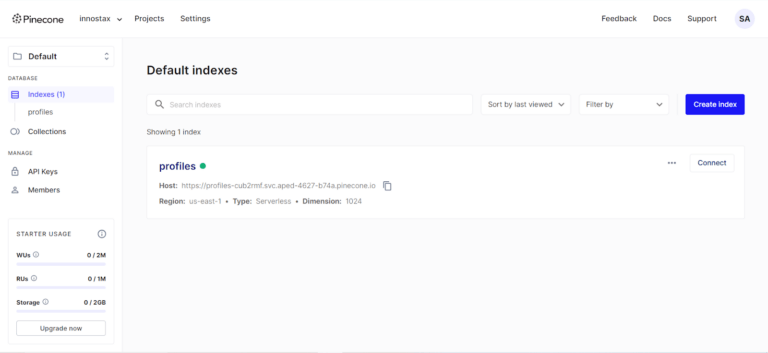
Python Implementation with Pinecone
Implementing Pinecone involves a few key steps: opening an account, installing Pinecone client library, creating and managing a vector index, some of the possible operations are inserting vectors, querying vectors, and updating vectors. Here’s a step-by-step guide to get you started:Here’s a step-by-step guide to get you started:
1.Set up a Pinecone account
- Sign Up: First, visit Pinecone and if you have an account, please log in if not, then please create an account.
- API Key: Subscribing to this service will get you an API key that you will use to include your API requests for authentication.
2.Install the Pinecone SDK
To interface with Pinecone, you must at first set up the Pinecone client library. You can do this using pip:You can do this using pip:
pip install pinecone-client3. Initialize Pinecone Clientz
After the client library is installed, you can create the Pinecone client in the Python script that you are running or Jupyter notebook open.
import pinecone
pinecone.init(api_key='your-api-key')
4. Create and Manage a Vector Index in Pinecone
You need to create an index to store your vectors. An index is a collection of vectors that you can search and manage
# Create an index named 'example-index'
pinecone.create_index(name='example-index', dimension=128)

# List all indexes
indexes = pinecone.list_indexes()
print(indexes)

# Connect to the created index
index = pinecone.Index('example-index')
5. Inserting Vectors in Pinecone
Insert vectors into the index. Each vector should have a unique ID and the vector itself.
# Example vector data
vector_data = [
    ('id1', [0.1, 0.2, 0.3, ...]),  # Replace with actual vector values
    ('id2', [0.4, 0.5, 0.6, ...]),
    # Add more vectors as needed
]

# Upsert (update or insert) vectors into the index
index.upsert(vectors=vector_data)
6. Query Vectors
To query the index and find the most similar vectors, use the query method.
# Query vector
query_vector = [0.1, 0.2, 0.3, ...]

# Perform the query
results = index.query(queries=[query_vector], top_k=5)  # top_k is the number of results to return

# Print the results
for result in results['results'][0]['matches']:
    print(f"ID: {result['id']}, Score: {result['score']}")
7. Update and Delete Vectors
You can also update or delete vectors as needed.
Update Vectors
# Example vector data to update
update_data = [
    ('id1', [0.9, 0.8, 0.7, ...]),
    # Add more vectors as needed
]

# Upsert the updated vectors
index.upsert(vectors=update_data)
Delete Vectors
# IDs of vectors to delete
delete_ids = ['id1', 'id2']

# Delete vectors from the index
index.delete(ids=delete_ids)
8. Manage Indexes
You might need to delete an index when it’s no longer needed.
# Delete the index
pinecone.delete_index('example-index')
Conclusion
Pinecone can be described as a highly effective vector database that targets the needs of machine learning. Due to its endless adaptability, flexibility and even more functions, Pinecone eases the workflow concerning the storage and searching of high-dimensional vector data. Thus, Pinecone enriches your machine learning applications no matter if you deal with content recommendation, anomaly detection or semantic search. However, the use of this framework does not come cheap, and organizations that adopt it are locked into a particular service provider type for their machine learning needs, which offsets the advantages in nearly all cases.
To learn more about Pinecone and its capabilities, check out their official website.
For additional insightful articles and information on custom software development services, please reach out to us.
Common Mistakes When Working with Pinecone
Getting an index up and running with Pinecone is simple as the walkthrough above shows. Using it well in a production application involves a things to think about that don’t always come up until a project has real data and real traffic behind it.
Choosing the dimension size for your vectors is one of the more basic mistakes since its set once when an index is created and can’t simply be changed later. The dimension has to match what your embedding model outputs. Mismatching this means either padding vectors artificially or recreating the index entirely once the problem is found, which is a frustrating way to lose time on something that could have been checked earlier.
Not planning for metadata filtering enough is another common problem. Pinecone supports filtering by both vector similarity and keyword metadata. If an applications data model wasn’t built with useful metadata fields from the start adding filtering later means re-upserting a large number of vectors just to attach the fields that should have been there from the beginning. Thinking through what a query needs to filter on. Category, date range, user ID whatevers important. Before the first vectors go in saves a lot of rework later.
Treating vector upserts as a one-time operation than an ongoing process trips up a lot of teams too. Embeddings tend to become outdated as content changes. A product description gets updated a document gets revised. And if theres no process for re-embedding and re-upserting affected vectors the index quietly gets out of sync with the actual data its supposed to represent. Building a refresh pipeline from the start a simple one avoids results that technically return but no longer show what’s true.
Ignoring the cost implications of index size and query volume is worth mentioning given the pricing model mentioned earlier. It’s easy to prototype with a dataset see acceptable costs and not realize how usage grows until a much larger dataset or higher query volume is in production. Estimating cost at the target scale, not the prototype scale avoids an unpleasant surprise once a feature actually launches to real users.
Finally not testing query performance under load is a mistake that only shows up once real traffic hits. A query that returns quickly against a test index can behave differently once the index holds millions of vectors and multiple queries are running at the same time. Load testing against a dataset to production scale rather, than just the development-sized index used while building the feature catches performance issues while they’re still easy to fix.
Pinecone vs. Self-Hosted Vector Databases
Pinecone is not the choice for vector storage. Pinecone offers a trade‑off when compared to self‑hosted alternatives such as Weaviate, Milvus or pgvector. Understanding this trade‑off before deciding to use a managed service for a project is wise.
The main trade‑off is the amount of work a team must do versus the amount of control it can have. Pinecone, because Pinecone is a managed service removes the work of scaling keeping the system up and maintaining the infrastructure. This removes a lot of hassle for a team that does not want to spend engineering time on database infrastructure. Self‑hosted options require someone to manage that infrastructure directly. In return self‑hosted options give control over how a team sets things up do not charge for each query or each piece of storage beyond a hosting bill and do not depend on a third‑party provider to stay online or change prices.
pgvector deserves a mention for teams that already run PostgreSQL. Pgvector adds vector search directly to a database that many projects already use. For applications that need a modest amount of vector search together with a lot of existing relational data using pgvector can be simpler than adding a whole new vector database to the stack even though pgvector may not perform as well as Pinecone when the data set is very large.
Weaviate and Milvus are worth looking at for teams that want control than a managed service provides but still need a system built especially for vector search instead of adding a system to an existing database. Both Weaviate and Milvus can be. Used through a managed service, which gives teams flexibility in how much operational work they want to handle.
The real choice usually depends on team size, existing infrastructure and how costly a managed service is compared to the engineering time needed for self‑hosting. Smaller teams and projects that move quickly usually pick Pinecone because Pinecone cuts down on hassle. Teams that have infrastructure experience, tighter budgets or special compliance rules about where data lives often find a self‑hosted option a better fit, for the long run.
Monitoring and Maintaining a Pinecone Index Over Time
Once an index is live and serving real queries, it’s worth keeping an eye on a few things beyond just whether queries return results. Index size and growth rate matter for cost planning, since both storage and query costs tend to scale with the volume of vectors stored, and a steadily growing index that nobody’s tracking can quietly turn into a larger bill than expected.
Query latency is worth watching over time as well, not just during initial testing. An index that performs well at a few hundred thousand vectors can behave differently once it grows into the millions, and catching that shift early gives more room to adjust — whether that means reconsidering index configuration or reassessing which queries actually need to hit the full dataset versus a filtered subset.
It’s also worth periodically auditing for stale or orphaned vectors, particularly in applications where the underlying source data gets deleted or replaced over time. Vectors tied to content that no longer exists don’t just waste storage — they can also surface irrelevant results in a similarity search if nothing’s cleaning them up. Tying vector deletion to whatever process removes the source data, rather than treating it as a separate afterthought, keeps the index accurate as well as efficient.
Setting up basic alerting on index size, query latency, and error rates early on tends to pay off more than it seems like it should. Catching a gradual drift in performance or an unexpected spike in storage growth through an alert, rather than a user complaint or a surprise invoice, keeps a small issue small instead of letting it turn into something harder to unwind later.