Integrating AngularJS with RESTful APIs enables single-page applications to fetch, manipulate, and synchronize data dynamically. While traditional $http calls manage stateless CRUD operations, real-time data synchronization relies on pairing AngularJS with persistent connections like WebSockets or Server-Sent Events (SSE). Abstracting API logic into custom services, implementing robust JWT authentication, and managing dirty-checking overhead during high-frequency digests ensures fast, secure, and responsive user experiences.
- 1 Seamless API Integration: AngularJS enables smooth communication with RESTful APIs for real-time data updates.
- 2 Efficient Data Handling: Utilize $http service and WebSockets for dynamic and responsive applications.
- 3 Best Practices: Implement error handling, API encapsulation in services, and security measures like HTTPS and JWT.
- 4 Performance Optimization: Reduce network calls by caching API responses and leveraging WebSockets for instant updates.
- 5 Expert Assistance: Partnering with an AngularJS development company ensures robust API integration, scalability, and enhanced user experience.
Are you struggling to integrate AngularJS with RESTful APIs? This guide will help you easily get through it.
AngularJS is a popular front-end framework. People use it to build single-page applications (SPAs). These apps easily connect with RESTful APIs. AngularJS helps developers build robust web apps fast.
AngularJS offers a strong real-time data experience. Using it with RESTful services helps you manage data updates. This deeply improves the final user experience.
Let us closely look at how to connect AngularJS with RESTful APIs. We will cover key techniques and best practices.
What is AngularJS?
AngularJS is a powerful JavaScript framework. It lets you build dynamic web apps. It does this by extending basic HTML syntax.
AngularJS provides a structured approach to web development. It uses clever two-way data binding. It has clean dependency injection and a modular architecture. This makes it perfect for real-time apps.
What are RESTful APIs?
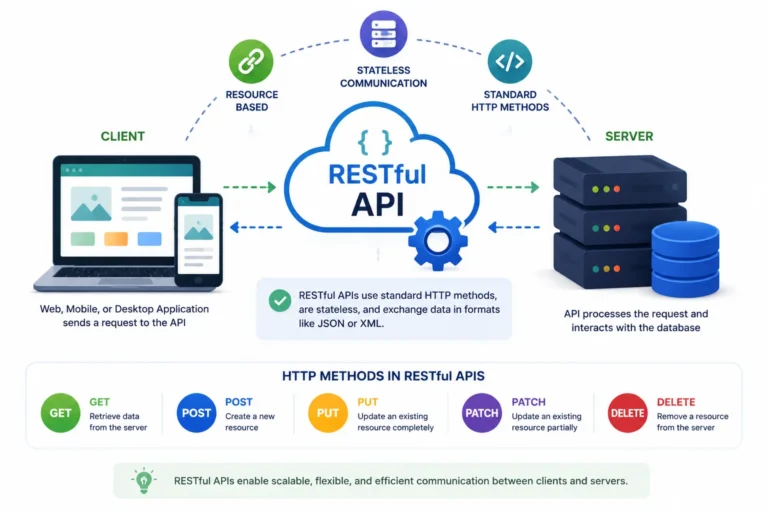
Representational State Transfer (REST) is a modern software style. It easily allows communication between web services. It uses basic HTTP methods like GET, POST, PUT, and DELETE.
The main goal of RESTful APIs is simple. They allow web apps to request, send, and easily change data on a remote server.
Their active role is incredibly important in web development. APIs ensure that fast data exchange happens easily. They connect front-end and back-end systems seamlessly.
Furthermore, RESTful architecture is completely stateless. This means the server does not store any memory of past client requests. Every single API call must contain all the information necessary to process that specific request, including authentication tokens and payload parameters. This stateless nature allows backend servers to scale horizontally with ease, as any server instance can handle any incoming client request independently. It also dramatically reduces memory overhead on the server side, making it highly efficient for enterprise applications.
Steps to Integrate AngularJS with RESTful APIs
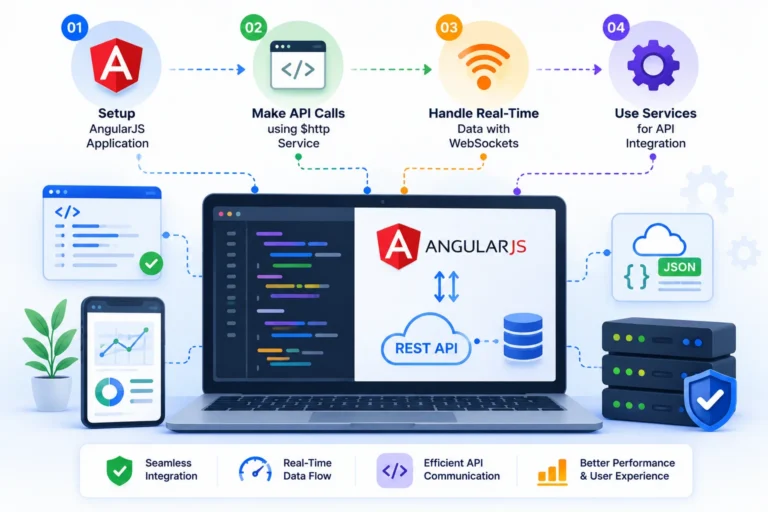
To integrate RESTful APIs with AngularJS, developers follow these steps:
1. Setting Up an AngularJS
First, ensure your AngularJS application development environment is set up. You can easily include AngularJS in your project. Just add a simple script tag to your HTML file.
2. Using the $http Service for API Calls
AngularJS provides the powerful $http service. It smoothly talks with RESTful APIs. This allows apps to fetch data safely. It then instantly updates the UI.
3. Handling Real-Time Data with WebSockets
WebSockets are great for rapid real-time updates. You should tightly integrate them with AngularJS. WebSockets provide an unbroken connection. They link the core server and the client. This allows for truly instant data updates.
Unlike traditional RESTful HTTP requests, which require the client to constantly poll the server to see if new data is available, WebSockets establish a permanent, bidirectional communication tunnel. Once the initial handshake is completed, the server can instantly push updates to the AngularJS front-end the exact millisecond a database change occurs. This completely eliminates the network latency and heavy bandwidth overhead associated with repeatedly opening and closing HTTP headers, making it ideal for live trading dashboards or chat applications.
4. Using AngularJS Services for API Integration
A better approach is encapsulating $http calls inside AngularJS services. This safely helps ensure high code reusability. It also gives massive long-term maintainability.
Best Practices for AngularJS RESTful API Integration
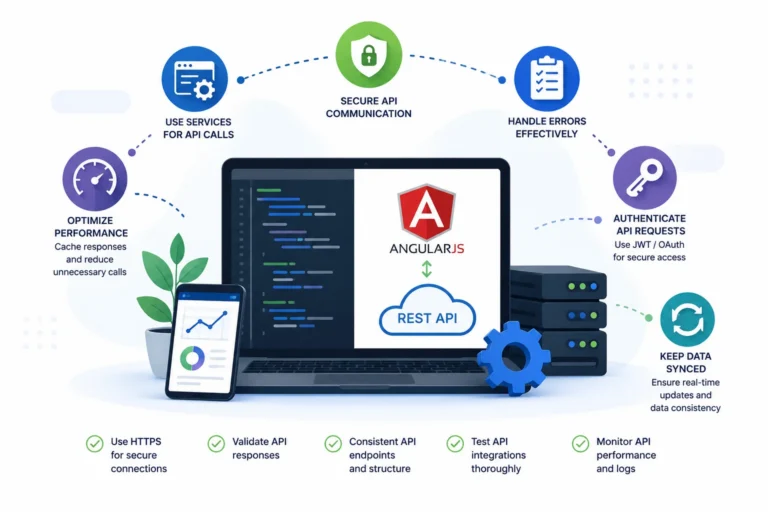
To ensure total efficiency, make sure your developers carefully do the following:
- Error Handling: Safely use
.catch()to manage bad API errors. This displays user-friendly messages. - Using Services for API Calls: Put all API requests inside AngularJS services. This heavily improves code reusability.
- Securing API Communication: Always use safe HTTPS. Pair it with strict authentication like JWT or OAuth.
- Optimizing Performance: Actively cache raw API responses. This massively reduces slow network calls.
- Leveraging WebSockets: WebSockets perfectly ensure truly instant data synchronization.
Why Choose an AngularJS Application Development Company?
Partnering with an expert AngularJS company is highly beneficial. You can easily achieve perfect RESTful API integration. This is great for massive real-time data handling.
These companies offer expert AngularJS web development services. This safely yields much better user experiences. It builds robust API integrations and highly scalable cloud systems.
A professional AngularJS company helps you build real-time data handling. This deeply optimizes your app’s raw performance and tight security.
Working closely with an expert agency absolutely ensures a smooth development process. Neatly using these techniques will vastly enhance your app.
Additionally, an experienced agency understands how to properly implement continuous integration and continuous deployment (CI/CD) pipelines specifically tailored for complex AngularJS single-page applications. They will set up automated unit testing using frameworks like Karma and Jasmine to ensure that new feature updates never break existing REST API data bindings. This rigorous quality assurance prevents costly production outages and guarantees that your application remains highly reliable as user traffic scales up.
Interceptor Architecture: Managing Global API Requests & Error Handling
Centralizing your request, response, and error logic is vital. It perfectly prevents bad duplicate code across all AngularJS controllers:
- Request Interceptors: These smoothly intercept outgoing API requests. This cleanly injects secure authorization headers. It easily normalizes basic JSON payloads.
- Response Interceptors: This enables safely parsing standard response envelopes. It happens before passing control back to controllers. It allows for highly standardized data.
- Centralized Error Handling: Smart interceptors actively catch nasty 401 or 500 error codes. This safely notifies the user about bad credentials. It securely clears sessions and rapidly redirects to safe views.
- Automatic Token Refreshing: When a short-lived JWT authorization token expires, a smart request interceptor can silently pause all outgoing API calls, securely request a fresh token from the backend using a hidden refresh token, and then automatically replay the paused requests. This provides a completely seamless experience without forcing the user to log back in.
Managing the AngularJS Digest Cycle with High-Frequency Real-Time Streams
Receiving incredibly rapid WebSocket data updates can severely degrade raw app performance. This happens if every tiny incoming message unnecessarily triggers a massive dirty-check cycle:
- Throttling & Debouncing Updates: Safely group multiple tiny real-time data packets into arrays. Do this before running a heavy
$scope.$apply(). Always run this at scheduled intervals. Do not blindly fire a huge digest cycle on every packet arrival. - One-Time Binding Syntax (
::): Use simple one-time binding for highly data-heavy tables. This brilliantly removes useless watches from the deep memory footprint. - Using
track byinng-repeat: Always strictly specify highly explicit tracking keys. This forces AngularJS to carefully re-render only modified DOM elements. It successfully prevents tearing down entire HTML lists.
Securing AngularJS RESTful API Communications
AngularJS code smoothly executes entirely client-side inside the web browser. Therefore, enforcing strict security controls safely on all API channels is critical:
- CSRF/XSRF Protection: AngularJS safely reads the standard
XSRF-TOKENcookie sent by servers. It includes it directly in the correct HTTP header. - Sanitizing HTML Payloads: Always pass dynamic data safely through the core
$sanitizeservice. This parses and tightly strips dangerous inline scripts. It actively neutralizes bad Cross-Site Scripting (XSS) attacks. - CORS Configuration: Ensure your API servers cleanly return explicit
Access-Control-Allow-Originresponse headers. This safely supports highly secure cross-domain requests effortlessly.
State Management & Local Response Caching Strategies
Greatly reducing useless network round-trips instantly improves raw application speed. It massively lowers heavy API server load:
- Optimistic UI Updates: Safely update frontend scope variables instantly upon user action. Quietly issue the background API call in parallel. If the API fails, roll back the UI state. Display a tiny notification for instant feedback.
- Built-in
$httpCache: Cleanly enable basic response caching. Smoothly set the simple cache flag strictly inside request configurations. This eliminates bad redundant network latency entirely. - Custom
$cacheFactoryInstances: Rapidly construct dedicated LRU cache instances. These securely store simple semi-static API datasets. This neatly prevents a very stale front-end state.
Properly balancing these caching techniques ensures your AngularJS application feels lightning fast. By storing non-critical datasets locally in the browser’s memory, you significantly lower server database queries, which directly reduces your monthly cloud infrastructure costs.